 Produuz.it Docs
Appearance
Integrations & Webhooks
Webhooks let an external system react to what happens in produuz.it. When an event you subscribed to occurs, produuz.it sends an HTTP POST to your URL with a JSON body you choose.
How webhooks work
- You create a webhook in Production Settings → Automations, in the Webhooks card, picking the events it reacts to and the URL to call.
- You pick which blocks of data go in the body (Payload content).
- When one of those events happens, produuz.it builds the body and posts it to your URL.
One webhook can hold several events. If the same endpoint should hear about three of them, pick all three in the same webhook instead of creating three rows with the same URL, secret and headers. Every request carries "event", so your endpoint always knows which one it is.
The number of webhooks you can have is limited by your licence, and the counter is shown in the card header (3/10 Webhooks). It counts rows, not events, so grouping events into one webhook uses less of your licence.
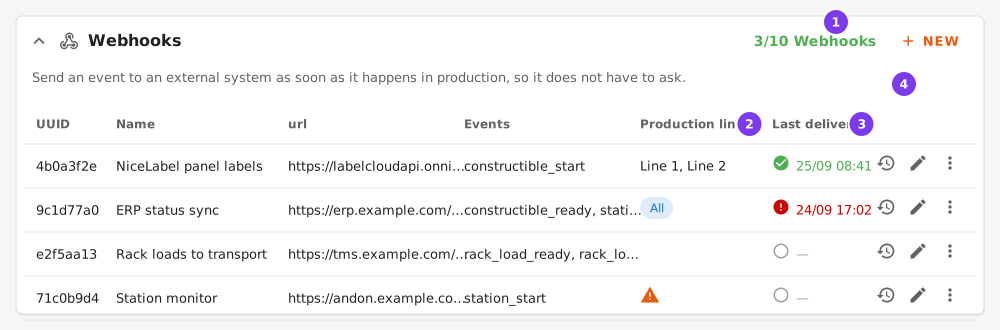
- The licence counter: green while you have room, red once you reach the limit, when New is disabled.
- The production lines the webhook fires on. All means Fire on every production line is on. A warning icon means no line is selected, so the webhook never fires.
- Last delivery: when the webhook last fired and how that call went. See Delivery log.
- The row actions: Deliveries (the clock) and edit. Delete is in the ⋮ menu.
What your endpoint receives
- Method
POST, headerContent-Type: application/json. - The body always contains
"event"with the event name, plus whatever payload blocks you enabled. - produuz.it waits up to 5 seconds to connect and 10 seconds for your answer.
- Any
2xxcounts as delivered —200,201if you create a row,202if you queue the work,204if you answer with nothing. A3xx,4xxor5xxis recorded as a failure. - There is no retry. If your endpoint is down, times out or errors, that notification is lost and nothing is re-sent. Every attempt is recorded, so you can see it happened — see Delivery log.
Calls are made by a background worker, not by the request that raised the event, so a slow endpoint of yours never slows down the tablet on the shop floor. Two consequences for your side:
- Expect the call a few seconds after the event, not at the same instant.
- Order is not guaranteed. Two events raised close together can arrive in either order. Use the
timestampinserialized_eventif the sequence matters to you.
Events
| Event | Triggered when |
|---|---|
constructible_start | An operator starts a panel or module in the production viewer (the panel checklist is opened and production begins). |
constructible_ready | A panel or module completes its last station, or is marked ready in bulk from the constructibles list. |
station_start | An operator starts one station for a panel or module. Also raised for each earlier station that is filled in when a panel is started at a later station. |
station_ready | An operator marks one station as finished for a panel or module. Also raised for each earlier station filled in the same way. |
part_batch_start | A part batch is started in the logistics viewer. |
part_batch_ready | A part batch is finished in the logistics viewer. |
report_deprecation | A new IFC is detected for a design and its existing reports are marked obsolete. |
rack_load_ready | A whole rack load is marked in rack in one action. |
rack_load_delivered | A whole rack load is marked delivered in one action. |
unknown and mounted rack statuses raise nothing: the first is an undo, the second happens on site. A rack load with no project raises nothing either.
The station events are the loudest of the list: one per station and per panel, so a line with six stations sends six times what constructible_ready sends. Starting a panel at a later station also fills in the earlier ones, and each of those raises its own pair. Subscribe to them when you track station occupancy; use constructible_start and constructible_ready when you only track panels.
Configuring a webhook
| Field | Description |
|---|---|
| Name | Free text, up to 80 characters. Only used to recognise the row in the table. |
| events | Which events trigger this webhook. Pick one or several. |
| Fire on every production line | Fires whatever the production line, including lines created later. Disables the list below. |
| Production lines | The production lines this webhook fires on. Select at least one: an empty list means the webhook never fires. |
| Payload content | Which blocks of data to include in the body. See Payload content. |
| auth header type | None, Secret or Bearer. Adds an Authorization header. |
| Secret / Token / SubscriptionKey | The token sent after the auth header type. Only shown when a type is selected. |
| Signing secret | Set by produuz.it when the webhook is saved, read only. Every call is signed with it. See Checking the signature. |
| URL | The endpoint that receives the POST. Must be http:// or https://. |
| custom headers | Extra HTTP headers, as name/value pairs. Press ADD for each one. |
| custom payload | Extra name/value pairs merged into the body. Press ADD for each one. |
The NiceLabel tutorial shows the whole form filled in.
Production lines
A webhook only fires on the production lines you select. Selecting none is not a shortcut for "all lines" — the webhook stays silent, and the form warns you about it.
If you want a webhook to fire everywhere, turn on Fire on every production line. That covers the lines you have today and any line you create later, so you do not have to come back and edit the webhook each time. With the switch off, a new production line is not added to your webhooks automatically: add it yourself to each webhook that should cover it.
Three events never belong to a production line: report_deprecation, rack_load_ready and rack_load_delivered. They reach every webhook subscribed to them, whatever lines it lists, and a webhook holding only those does not need a line at all — the form does not warn about it. An event on a batch with no line assigned is treated the same way.
Payload content
Payload content is a multiple choice. Each option adds one block to the JSON body. If you save a new webhook without picking anything, it sends serialized_event only.
| Option | Adds |
|---|---|
serialized_event | The production event itself, merged at the top level of the body. |
serialized_station | production_station: the station the event happened at. |
serialized_constructible | assembly and/or module: the panel or module the event is about. |
serialized_part_batch | part_batch: the batch, its session proof and the sizes it covers. |
serialized_project | project__details: the project the event belongs to, with your own project number. |
employees__client_ids | employees__client_ids: your own ids for the people the event belongs to. |
serialized_employees | employees__details: the same people as full rows, with name and alias. |
nicelabel_print | A NiceLabel print job, merged at the top level. See the NiceLabel tutorial. |
A block that cannot be built is simply left out — a station payload on an event with no station, for example. The request is still sent.
serialized_event
The production event, merged at the top level. The account the event was posted from is deliberately not included.
json
{
  "event": "station_ready",
  "uuid": "4b0a3f2e-6c1d-4a1f-9c2b-9f9b1f0f2a11",
  "timestamp": "2026-09-14T08:41:12.884Z",
  "project": "9d1e7b6a-2f44-4f0a-9a1c-1b2c3d4e5f60",
  "assembly": "e8f7e7f7-3b27-41e0-bb78-99eae64ba7cd",
  "module": null,
  "part_batch": null,
  "assembly_design": 45213,
  "module_design": null,
  "report": null,
  "employees": [312, 318],
  "employee_aliases": ["JAN", "PIET"],
  "meta": {
    "frontend_timestamp": "2026-09-14T08:41:12.640Z",
    "station_name": "Nailing",
    "station": "7a2c8e11-9d3b-4c22-8f1e-0b5a6d7c8e90"
  }
}
{
"event": "station_ready",
"uuid": "4b0a3f2e-6c1d-4a1f-9c2b-9f9b1f0f2a11",
"timestamp": "2026-09-14T08:41:12.884Z",
"project": "9d1e7b6a-2f44-4f0a-9a1c-1b2c3d4e5f60",
"assembly": "e8f7e7f7-3b27-41e0-bb78-99eae64ba7cd",
"module": null,
"part_batch": null,
"assembly_design": 45213,
"module_design": null,
"report": null,
"employees": [312, 318],
"employee_aliases": ["JAN", "PIET"],
"meta": {
"frontend_timestamp": "2026-09-14T08:41:12.640Z",
"station_name": "Nailing",
"station": "7a2c8e11-9d3b-4c22-8f1e-0b5a6d7c8e90"
}
}employee_aliases is a snapshot taken when the event was recorded, so renaming or removing someone later does not rewrite history. employees holds the matching account ids.
serialized_station
Resolved from the station uuid in the event's meta, so it is only present on events that carry one: station_start and station_ready.
json
{
  "production_station": {
    "name": "Nailing",
    "uuid": "7a2c8e11-9d3b-4c22-8f1e-0b5a6d7c8e90",
    "production_line_name": "Line 1",
    "production_line_uuid": "1c2d3e4f-5a6b-7c8d-9e0f-1a2b3c4d5e6f",
    "client_station_id": "ST-02"
  }
}
{
"production_station": {
"name": "Nailing",
"uuid": "7a2c8e11-9d3b-4c22-8f1e-0b5a6d7c8e90",
"production_line_name": "Line 1",
"production_line_uuid": "1c2d3e4f-5a6b-7c8d-9e0f-1a2b3c4d5e6f",
"client_station_id": "ST-02"
}
}serialized_constructible
Adds assembly, module, or both, depending on what the event points at. Both blocks have the same shape.
json
{
  "assembly": {
    "uuid": "e8f7e7f7-3b27-41e0-bb78-99eae64ba7cd",
    "design_uuid": "db0cb2a6-8fbf-46ac-81f5-ece6faca584e",
    "design_name": "ML-0B-5",
    "status": "working",
    "scheduled_prod_date": "2026-09-15",
    "client_order_id": "1030622",
    "batch_uuid": "e8986e12-4454-4ae5-a40d-4929d6a5b789",
    "batch_name": "Batch 1",
    "phase": "Phase_1"
  }
}
{
"assembly": {
"uuid": "e8f7e7f7-3b27-41e0-bb78-99eae64ba7cd",
"design_uuid": "db0cb2a6-8fbf-46ac-81f5-ece6faca584e",
"design_name": "ML-0B-5",
"status": "working",
"scheduled_prod_date": "2026-09-15",
"client_order_id": "1030622",
"batch_uuid": "e8986e12-4454-4ae5-a40d-4929d6a5b789",
"batch_name": "Batch 1",
"phase": "Phase_1"
}
}serialized_part_batch
Only present on part_batch_start and part_batch_ready. It carries the batch, the proof of the session (times, pauses, the parts marked ready, the material declared as returned) and the sizes the batch covers, so you never have to walk the parts yourself.
json
{
  "part_batch": {
    "uuid": "b1f0c2d3-4e5f-6a7b-8c9d-0e1f2a3b4c5d",
    "name": "PB-2026-014",
    "status": "working",
    "priority": 0,
    "scheduled_prod_date": "2026-09-15",
    "production_line": "Saw line",
    "production_line_uuid": "1c2d3e4f-5a6b-7c8d-9e0f-1a2b3c4d5e6f",
    "project_name": "Vianen",
    "project_uuid": "9d1e7b6a-2f44-4f0a-9a1c-1b2c3d4e5f60",
    "parts_count": 412,
    "ready_count": 0,
    "sizes": [
      {
        "branch": "timber",
        "alike": "wood",
        "size": "38x140 C24",
        "size_uuid": "2b3c4d5e-6f70-4182-9394-a5b6c7d8e9f0",
        "erp_code": "W-38140-C24",
        "material": "C24",
        "finish": "planed",
        "parts_count": 240,
        "width": 38,
        "height": 140,
        "total_length_mm": 486200.0,
        "dims": [{ "dim": "38x140x2400", "count": 120 }]
      }
    ],
    "proof": {
      "uuid": "f0e1d2c3-b4a5-4968-8778-695a4b3c2d1e",
      "start_date": "2026-09-14T07:02:00Z",
      "ready_date": null,
      "paused": false,
      "elapsed_seconds": 5720,
      "worked_seconds": 4980,
      "user_name": "tablet_saw",
      "checklist": [],
      "materials": []
    }
  }
}
{
"part_batch": {
"uuid": "b1f0c2d3-4e5f-6a7b-8c9d-0e1f2a3b4c5d",
"name": "PB-2026-014",
"status": "working",
"priority": 0,
"scheduled_prod_date": "2026-09-15",
"production_line": "Saw line",
"production_line_uuid": "1c2d3e4f-5a6b-7c8d-9e0f-1a2b3c4d5e6f",
"project_name": "Vianen",
"project_uuid": "9d1e7b6a-2f44-4f0a-9a1c-1b2c3d4e5f60",
"parts_count": 412,
"ready_count": 0,
"sizes": [
{
"branch": "timber",
"alike": "wood",
"size": "38x140 C24",
"size_uuid": "2b3c4d5e-6f70-4182-9394-a5b6c7d8e9f0",
"erp_code": "W-38140-C24",
"material": "C24",
"finish": "planed",
"parts_count": 240,
"width": 38,
"height": 140,
"total_length_mm": 486200.0,
"dims": [{ "dim": "38x140x2400", "count": 120 }]
}
],
"proof": {
"uuid": "f0e1d2c3-b4a5-4968-8778-695a4b3c2d1e",
"start_date": "2026-09-14T07:02:00Z",
"ready_date": null,
"paused": false,
"elapsed_seconds": 5720,
"worked_seconds": 4980,
"user_name": "tablet_saw",
"checklist": [],
"materials": []
}
}
}alike is the geometry family of the branch, taken from the project's IFC parsing setup: wood (measured by length), plate (measured by area) or generic (not measured). Profiles report width/height/total_length_mm, plates report thickness/total_area_mm2.
serialized_project
The project the event belongs to. serialized_event already tells you which project by uuid; this block tells you which one it is in your own books — project_number and client_name are the fields to key on.
The key is project__details, not project, because serialized_event already uses project for the uuid.
json
{
  "project__details": {
    "uuid": "9d1e7b6a-2f44-4f0a-9a1c-1b2c3d4e5f60",
    "name": "Vianen",
    "project_number": "5073H11L",
    "client_name": "Heijmans",
    "super_project": "",
    "start_date": "2026-09-01",
    "delivery_date": "2026-11-20",
    "archived": false
  }
}
{
"project__details": {
"uuid": "9d1e7b6a-2f44-4f0a-9a1c-1b2c3d4e5f60",
"name": "Vianen",
"project_number": "5073H11L",
"client_name": "Heijmans",
"super_project": "",
"start_date": "2026-09-01",
"delivery_date": "2026-11-20",
"archived": false
}
}The block is left out when the event has no project — a batch made without one, for example.
employees__client_ids
The people the event belongs to, using your id for each of them — the client_id on their user account. When someone has no client_id, their produuz.it alias is sent instead, so the list always has one entry per person and stays aligned with employee_aliases.
json
{ "employees__client_ids": ["EMP-0042", "PIET"] }{ "employees__client_ids": ["EMP-0042", "PIET"] }If you need to know for certain whether a value is your id or a fallback alias, use serialized_employees and read client_id explicitly.
serialized_employees
The same people as full rows. The key is employees__details, not employees, because serialized_event already uses employees for the list of account ids.
json
{
  "employees__details": [
    { "id": 312, "alias": "JAN", "name": "Jan de Vries", "client_id": "EMP-0042" },
    { "id": 318, "alias": "PIET", "name": "Piet Bakker", "client_id": "" }
  ]
}
{
"employees__details": [
{ "id": 312, "alias": "JAN", "name": "Jan de Vries", "client_id": "EMP-0042" },
{ "id": 318, "alias": "PIET", "name": "Piet Bakker", "client_id": "" }
]
}nicelabel_print
Builds a NiceLabel cloud print job from the panel the event is about and merges it at the top level of the body. Selecting it adds a Payload Extra Fields section to the form, with three fields: printer name, file path and api version (v1 or v2, v2 by default). Full walkthrough and example payloads in the NiceLabel tutorial.
Events with a fixed payload
report_deprecation, rack_load_ready and rack_load_delivered are not production events, so Payload content does not apply to them. They always send their own block. Custom payload fields, headers and authentication work as usual.
report_deprecation
json
{
  "event": "report_deprecation",
  "design_name": "ML-0B-5",
  "design_uuid": "db0cb2a6-8fbf-46ac-81f5-ece6faca584e",
  "design_level": "assembly",
  "design_revision": 3,
  "project_uuid": "9d1e7b6a-2f44-4f0a-9a1c-1b2c3d4e5f60",
  "project_name": "Vianen",
  "affected_reports": [
    { "uuid": "c3d4e5f6-a7b8-4901-8234-56789abcdef0", "name": "Wood BoM", "document_type": "wood_bom" }
  ]
}
{
"event": "report_deprecation",
"design_name": "ML-0B-5",
"design_uuid": "db0cb2a6-8fbf-46ac-81f5-ece6faca584e",
"design_level": "assembly",
"design_revision": 3,
"project_uuid": "9d1e7b6a-2f44-4f0a-9a1c-1b2c3d4e5f60",
"project_name": "Vianen",
"affected_reports": [
{ "uuid": "c3d4e5f6-a7b8-4901-8234-56789abcdef0", "name": "Wood BoM", "document_type": "wood_bom" }
]
}rack_load_ready and rack_load_delivered
The load, the rack setup it uses and every panel on it with its place on the rack, under rack_trace.
json
{
  "event": "rack_load_delivered",
  "rack_trace": {
    "uuid": "5f6a7b8c-9d0e-4f12-8345-6789abcdef01",
    "description": "Truck 2, morning",
    "location": "Yard A",
    "status": "loaded",
    "project_name": "Vianen",
    "project_uuid": "9d1e7b6a-2f44-4f0a-9a1c-1b2c3d4e5f60",
    "project_number": "5073",
    "rack_setup": {
      "uuid": "aabbccdd-1122-4334-8556-778899aabbcc",
      "name": "A-frame 6m",
      "type": "middle",
      "length": 6000,
      "width": 1200,
      "height": 3000
    },
    "panels": [
      {
        "uuid": "e8f7e7f7-3b27-41e0-bb78-99eae64ba7cd",
        "design_name": "ML-0B-5",
        "status": "ready",
        "delivery_status": "delivered",
        "client_order_id": "1030622",
        "batch_name": "Batch 1",
        "rack_side": "a",
        "rack_row": 2,
        "rack_row_pos": 1,
        "strapped_to_frame": false,
        "width": 3000,
        "height": 2800,
        "thickness": 300
      }
    ],
    "panels_count": 1
  }
}
{
"event": "rack_load_delivered",
"rack_trace": {
"uuid": "5f6a7b8c-9d0e-4f12-8345-6789abcdef01",
"description": "Truck 2, morning",
"location": "Yard A",
"status": "loaded",
"project_name": "Vianen",
"project_uuid": "9d1e7b6a-2f44-4f0a-9a1c-1b2c3d4e5f60",
"project_number": "5073",
"rack_setup": {
"uuid": "aabbccdd-1122-4334-8556-778899aabbcc",
"name": "A-frame 6m",
"type": "middle",
"length": 6000,
"width": 1200,
"height": 3000
},
"panels": [
{
"uuid": "e8f7e7f7-3b27-41e0-bb78-99eae64ba7cd",
"design_name": "ML-0B-5",
"status": "ready",
"delivery_status": "delivered",
"client_order_id": "1030622",
"batch_name": "Batch 1",
"rack_side": "a",
"rack_row": 2,
"rack_row_pos": 1,
"strapped_to_frame": false,
"width": 3000,
"height": 2800,
"thickness": 300
}
],
"panels_count": 1
}
}rack_side is a or b — a is the only side of a single-sided rack. status on the load is a free-text note typed by the person who made it, not a computed state; the state you want is delivery_status on each panel.
A rack load spans whatever production lines its panels came from, so it is not line-specific: it reaches every webhook subscribed to the event.
Delivery log
Every call is recorded: when it was made, which event it was about, the status code your endpoint returned, how long it took and, when it failed, the error.
The Last delivery column in the webhooks table shows when the webhook last fired, coloured by how that call went:
| Meaning | |
|---|---|
| Green | The last call was accepted (any 2xx). |
| Red | The last call was refused, errored, or got no answer at all. The tooltip says which. |
| Grey | Nothing has been sent yet, shown as —. A webhook whose event has not happened is not a problem. |
The Deliveries button (clock icon) on the row opens the log itself: the last 20 calls with their date, event, status code, duration and error. That is where to look when an integration stops working — a column of red rows with ConnectTimeout says your endpoint is unreachable, and a column of 401 says the secret no longer matches.
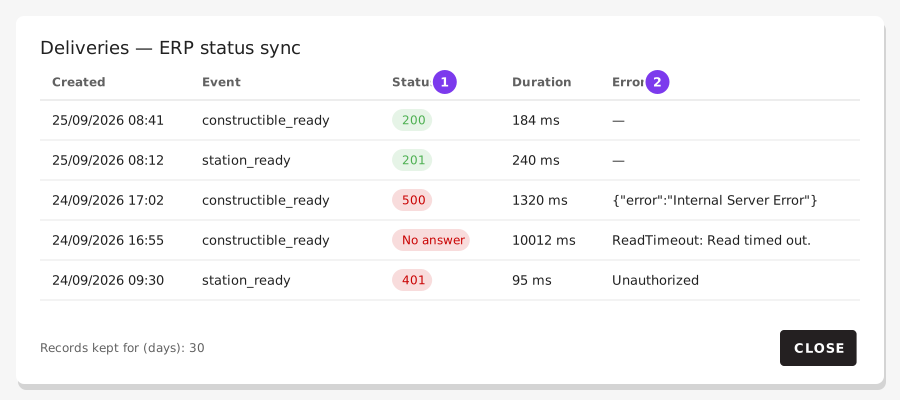
- The status code your endpoint answered: green for any
2xx, red for everything else. No answer means the call timed out or could not connect. - The error, when there was one. For a refused call it is the start of what your endpoint answered.
Some details worth knowing:
- Records are kept for 30 days and then deleted. The log answers "what happened this week", not "what happened last quarter".
- The request body is kept only for failed calls, so you can see exactly what was being sent when it failed. A successful call keeps no copy.
- Headers are never stored. They carry your secret, and a log is read by more people than a settings form.
Custom payload fields
Beyond the payload blocks, you can add your own name/value pairs, merged into the body of every request this webhook sends. Useful for constants your endpoint expects: a plant identifier, a routing key, an environment tag.
Each field has a name (the JSON key) and a value (a text string). If a custom field uses the same name as a standard field, the standard field wins and your value is dropped. Pick names that cannot collide.
Authentication and headers
- auth header type + Secret / Token / SubscriptionKey send
Authorization: <type> <secret>, for exampleAuthorization: Bearer eyJhbGci.... ChooseNoneto send noAuthorizationheader. - custom headers add any other header your endpoint requires, such as
Ocp-Apim-Subscription-Keyfor NiceLabel.
Every call is also signed, see below. Use HTTPS in any case.
Checking the signature
Every call carries an X-Produuzit-Signature header:
X-Produuzit-Signature: t=1761134400,v1=5f1c...e9a2X-Produuzit-Signature: t=1761134400,v1=5f1c...e9a2tis when the call was made, in seconds since 1970 (UTC).v1is the HMAC-SHA256, in hexadecimal, oft, a dot and the raw body, made with the webhook's signing secret.
The signing secret is shown in the webhook form, with a button to copy it. It is never sent, so a call with a valid signature comes from produuz.it, and its body was not changed on the way. Checking it is optional: the Authorization header and your custom headers are still sent as before.
To check a call, on your side:
- Take the body exactly as received, before parsing it.
- Compute the HMAC-SHA256 of
<t>.<body>with the signing secret and compare it withv1. - Refuse the call if
tis more than 5 minutes away from your clock, so an old call sent again is not accepted.
Python:
python
import hashlib, hmac, time

def is_from_produuzit(secret: str, header: str, body: bytes, tolerance=300) -> bool:
    parts = dict(item.split("=", 1) for item in header.split(","))
    expected = hmac.new(secret.encode(), f"{parts['t']}.".encode() + body, hashlib.sha256).hexdigest()
    return hmac.compare_digest(expected, parts["v1"]) and abs(time.time() - int(parts["t"])) <= tolerance
import hashlib, hmac, time
def is_from_produuzit(secret: str, header: str, body: bytes, tolerance=300) -> bool:
parts = dict(item.split("=", 1) for item in header.split(","))
expected = hmac.new(secret.encode(), f"{parts['t']}.".encode() + body, hashlib.sha256).hexdigest()
return hmac.compare_digest(expected, parts["v1"]) and abs(time.time() - int(parts["t"])) <= toleranceJavaScript (Node.js):
js
const crypto = require("crypto");

function isFromProduuzit(secret, header, rawBody, tolerance = 300) {
    const parts = Object.fromEntries(header.split(",").map(item => item.split("=", 2)));
    const expected = crypto.createHmac("sha256", secret)
        .update(`${parts.t}.`).update(rawBody).digest("hex");
    const same = expected.length === parts.v1.length
        && crypto.timingSafeEqual(Buffer.from(expected), Buffer.from(parts.v1));
    return same && Math.abs(Date.now() / 1000 - Number(parts.t)) <= tolerance;
}
const crypto = require("crypto");
function isFromProduuzit(secret, header, rawBody, tolerance = 300) {
const parts = Object.fromEntries(header.split(",").map(item => item.split("=", 2)));
const expected = crypto.createHmac("sha256", secret)
.update(`${parts.t}.`).update(rawBody).digest("hex");
const same = expected.length === parts.v1.length
&& crypto.timingSafeEqual(Buffer.from(expected), Buffer.from(parts.v1));
return same && Math.abs(Date.now() / 1000 - Number(parts.t)) <= tolerance;
}New signing secret in the form replaces the secret. The old one stops working at once, so give your system the new one straight away.
Use cases
- ERP integration — sync production status to your business system.
- Label printing — print a label when a panel starts (see the NiceLabel tutorial).
- Notifications — send alerts to Slack, Teams or another messaging platform.
- Logistics — tell your transport system a rack load is ready to leave.
- Quality tracking — log production events in an external quality system.