 Produuz.it Docs
Appearance
Issues Report
The Issues Report generates a PDF listing the production issues found on your assemblies.
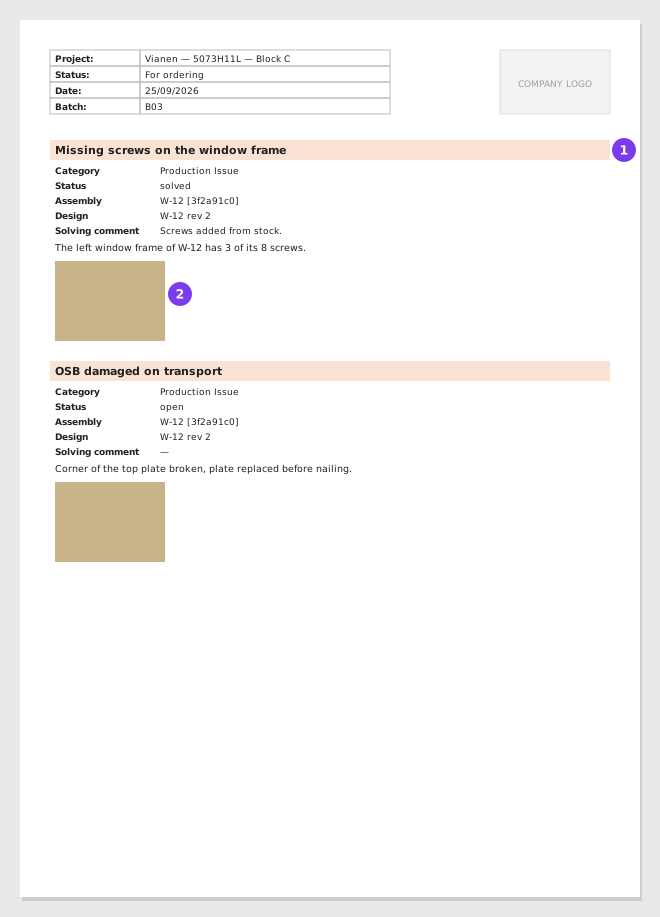
- One block per production issue.
- Its pictures.
Output
- Format: PDF
- Content: One section per assembly, with its production issues: title, category, status, assembly, design, solving comment, the text of the issue and its pictures. Quality control issues are not included; they are in the Quality Control Report.
Scope
This report is available both at project level and company level. In both cases you select the assemblies to include.
- Project level — Select the assemblies from the project tree.
- Company level — If your company works by date, pick a production line and a date range to narrow the list, then select the assemblies.
Options
| Option | Description |
|---|---|
| Contact person | Printed on the document. Leave it empty to use the company default. |
| Delivery address | Printed on the document. Leave it empty to use the company default. |
| Production line | Narrows the assemblies you can select (company-level reports). |
| Date range | Narrows the assemblies you can select (company-level reports). |
When to Use
Use this report to review all production issues in one document — useful for root cause analysis, team meetings, or reporting to project stakeholders.