 Produuz.it Docs
Appearance
Worktime Excel
The Worktime Excel generates a spreadsheet with the production time of each panel, taken from its checklist records. It is listed in Management files.
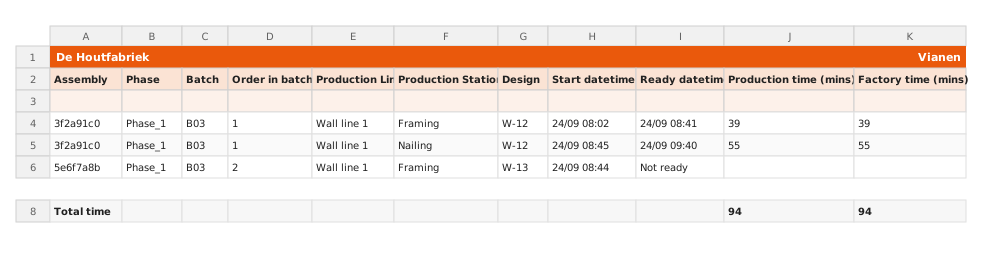
Output
- Format: Excel (.xlsx)
- Content: One sheet. Cell A1 holds the company name and C1 the project name (all for a company-wide report). Row 3 holds the column names, then one row per assembly (or per assembly and station):
| Column | Description |
|---|---|
| Assembly | Short panel ID (first 8 characters) |
| Phase, Batch, Order in batch | Where the panel sits in the project |
| Production Line | Line of the panel's batch |
| Production Station | Only in the per-station format |
| Design | Design name |
| Start datetime / Ready datetime | When the panel (or station) was started and finished, in the company's time zone. Not started / Not ready when there is no record. |
| Production time (mins) | Sum of the station times, from each station's start to its ready, counted in the company's working hours |
| Factory time (mins) | Working minutes from the panel's start to its ready |
Times are only filled in for panels that are ready; the others show 0. A Total time row at the bottom adds up both times.
Scope
This report is available both at project level and company level.
- Project level — Includes every assembly of the project. The dates in the form are not used.
- Company level — Includes your company's assemblies whose scheduled production date falls between From and To. The dates start on the current week, Monday to Friday. Leave one empty for an open range.
Options
| Option | Description |
|---|---|
| Worktime Excel Format | Choose how rows are organized (see below). Required. |
| From / To | Scheduled production date range (company-level reports). |
Format Options
- By constructible rows — One row per assembly, with its total times.
- By constructible-station rows — One row per assembly and station of its production line, showing the start, ready and time of each station separately. An assembly whose batch has no production line gets a single row.
TIP
The By constructible-station rows format gives more detail about where time is spent in the production process, which is useful for identifying bottlenecks.
When to Use
Use this report for labor tracking, cost analysis, and production efficiency reviews.