 Produuz.it Docs
Appearance
CHANGELOG
2026.11.02
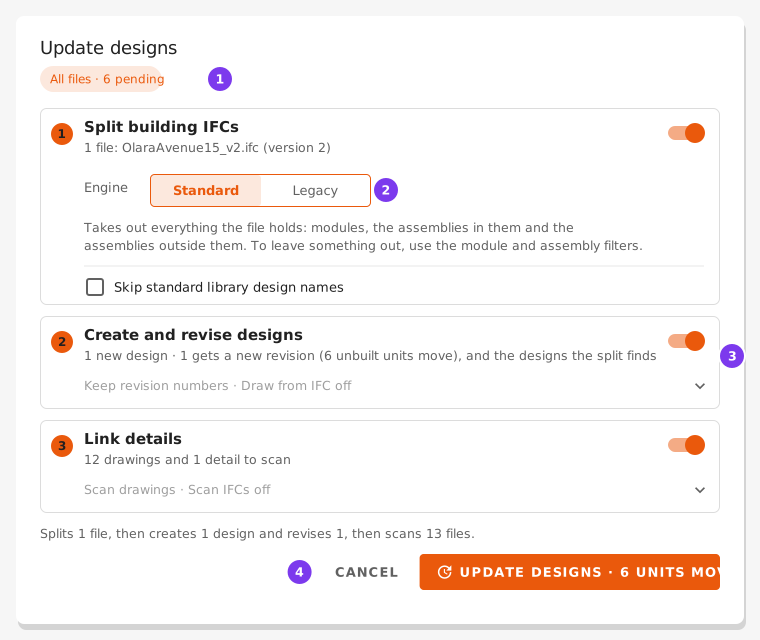
📄 Files — details, specs and documents are linked to the designs faster, and background tasks wait less at busy moments. Plus some other fixes. See: Update designs
📐 IFC Parsing Setup — a new Module filter, with Split only these modules and Never split these modules, leaves modules out of the split, as the Assembly filter does for assemblies. A module left out gives no module IFC and no module design, and its assemblies are still split. See: Module filter
2026.10.29
⚙️ Production settings — a station or a checklist task can now be enabled If all Branches in Design, when the design has every one of its branches in any zone, or If no Branch in Design, when it has none of them. The Enable when options, the QC Inclusion Criteria and the station card are now translated. See: Checklist tasks
🖥️ Viewer — when the panel you open is on another production line than yours, or the panel you are on is moved to another line, hidden from the viewer, or its project is archived, the viewer now says so above the drawing, and the checklist of a panel on another line cannot be started. If it is on another line, it offers to switch your line to it: one tap when the station is clear, otherwise Change Station opens with that line's stations. The Part lists table is reworked: it starts on the zones of your station and shows sizes and lengths in mm. Tick several rows and Show N parts in 3D highlights them all, or tap a row to highlight just that one. Companies that track kitted parts see how many parts of each row are ready. See: A panel that is not on your line, Part List
🔌 API — the Swagger page and the OpenAPI schema now describe every endpoint: the filters each list accepts with their type and meaning, the body each action expects and the answer it gives. Press Authorize on the Swagger page to try requests with an API account token. A list at the top switches between the produuz.it API and the API of each new module (planning, sales, purchasing, people, suppliers and design), each with its own schema at
/api/v2/openapi/<module>/; the module APIs start at version 0.x and are still empty. Nothing in what the API accepts or answers has changed. See: Interactive Documentation📄 Files — the menu entry is now Files, and Operations is replaced by one button, Update designs, that splits the building IFCs, creates and revises the designs, and links the details in one go. It works on the pending files, and the button shows how many there are, or on the files you tick with Update designs from N files in the selection bar, or Update designs from this file in the row menu. Before anything runs, its window says what will happen: which files are split, which designs are created or get a new revision, and how many units not built yet move to the new revision. The splitter has two engines: Standard, which can also split into modules and split External IFCs, and is used for projects never split before, and Classic, which projects already split keep. A Module IFC you upload is split too, like a project IFC, so one module exported again updates the design of the module and of its assemblies. When files name the same design, the design takes the one exported last, and a new version exported before the previous one is warned about. A banner shows the progress and the result, with the split warnings, and Clean stuck jobs is replaced by Mark as stopped, offered only when an update stops responding. In the project menu, Files shows how many files are waiting. Generate elements in phase/batch is gone: units are created in Production Counts. Creating and revising designs is also much faster in large projects: only the files that changed are attached again, so an update that finds nothing new no longer rewrites every design. See: Update designs
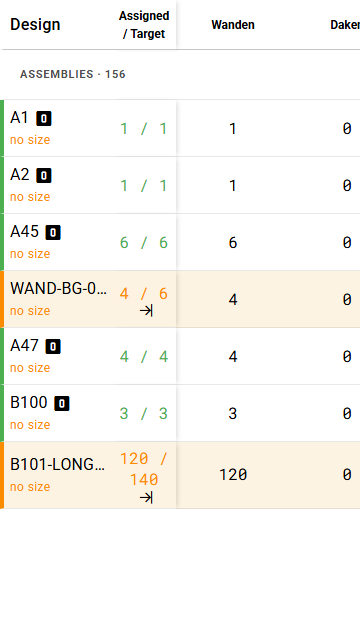
🔢 Quantities — Generate is now called Update production. The targets now count each unit once over every project IFC you split, recognising it by its unit ID, or by its GlobalId when it has none, with the file exported last deciding its design, phase and batch. You can split the whole model and later one floor again: that floor's units are updated and the rest keep counting, since nothing is removed on its own. In Files, a Split units column shows how many units each split file holds and what it did. A Counts for production switch leaves a file such as a reference model out. Update production now links each new unit to its IFC element and says how many get one, and how many existing units are no longer in the IFC. It also says which buildings and storeys the new units go to: by default the ones already linked, or new ones with the IFC names. Advanced: buildings and storeys lets you create, assign or skip each one. Clear the project totals and Recover totals are gone, since the targets are now worked out from the units. On a phone, the design name and the assigned / target columns are much narrower, so one or two columns of numbers fit beside them. See: Saved is not the same as in production, How each file counts, IFC elements, buildings and storeys
Before
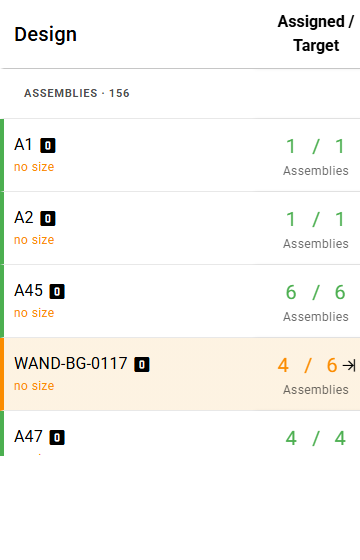
After
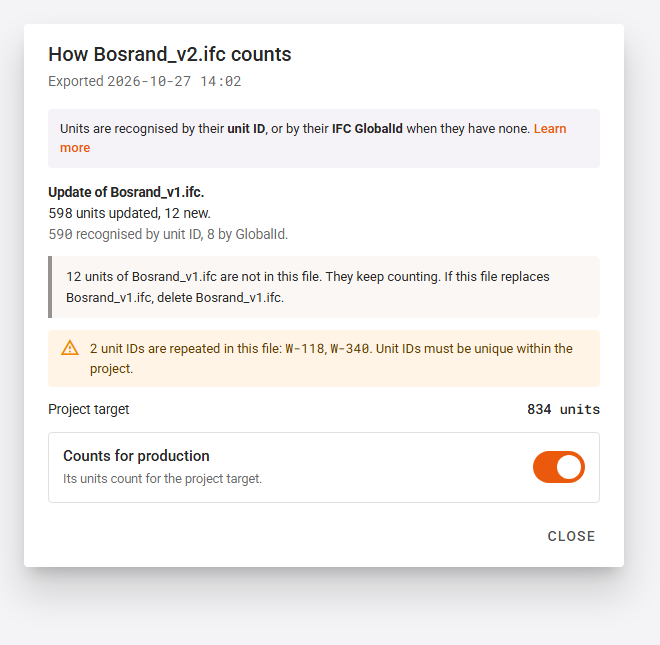
📐 IFC Parsing Setup — a new Assembly unit ID key reads the unique id of each panel, such as your customer's element number. Each assembly unit keeps it when it is generated. Unit IDs must be unique within the project, and a part reference must never name two different shapes. See: Assembly unit ID
🚗 Constructibles — a unit's detail shows an IFC card with its unit ID, its GlobalId, the file it comes from, and a warning when it is no longer in the IFC. The lists show a Unit ID column when a unit has one, and the project list can be searched by it. Link to the IFC gives the ticked units made before an IFC element of their design.
{ifc_unit_id}and{ifc_guid}can be used in the viewer header and the custom constructibles column, and the API filters units byifc_guidandifc_unit_id. See: Units made before, Panel properties🎨 Look — the screens are calmer and more consistent. Boxes on a page no longer cast a shadow; they have a thin border, while windows and menus keep theirs. Each kind of button looks the same everywhere: the main action of a page and the confirm button of a window are filled orange (red when it deletes), and Close / Cancel are always the last button of a window. The actions on selected rows share one look, in a bar that stays in place until you select rows. Switches and checkboxes are orange when on and take less room; a switch acts at once, while options that wait for Save are checkboxes. Scrollbars are thin and grey instead of orange, and the left menu fits more entries on the screen. See: Styles
Before
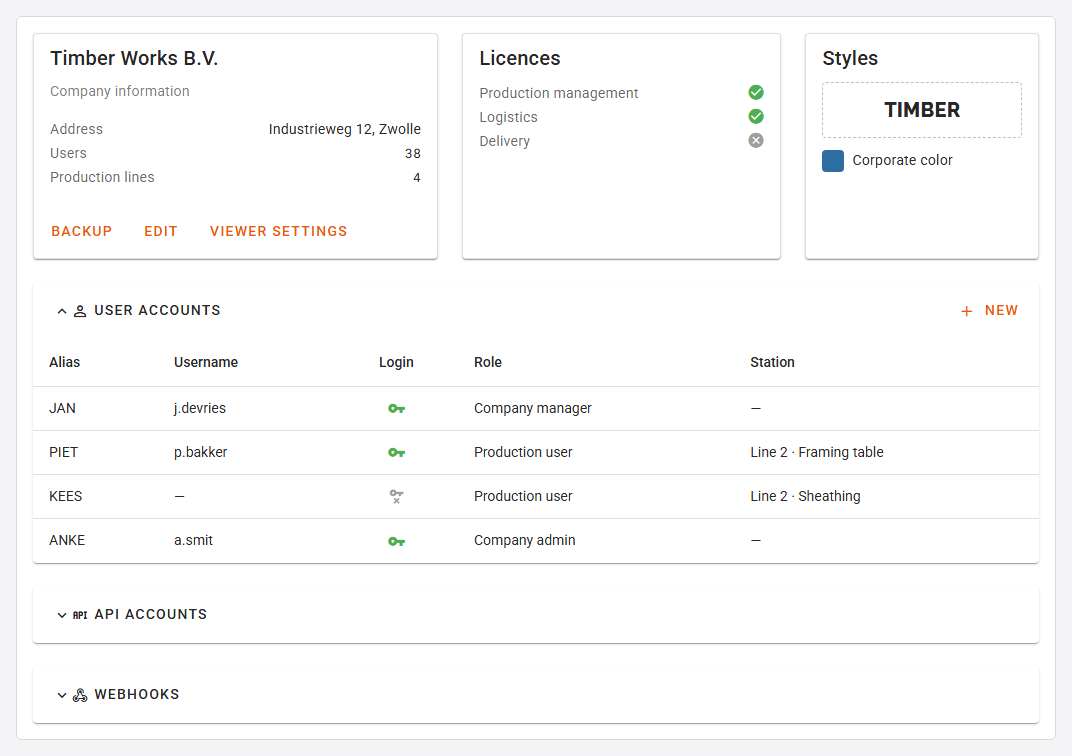
After
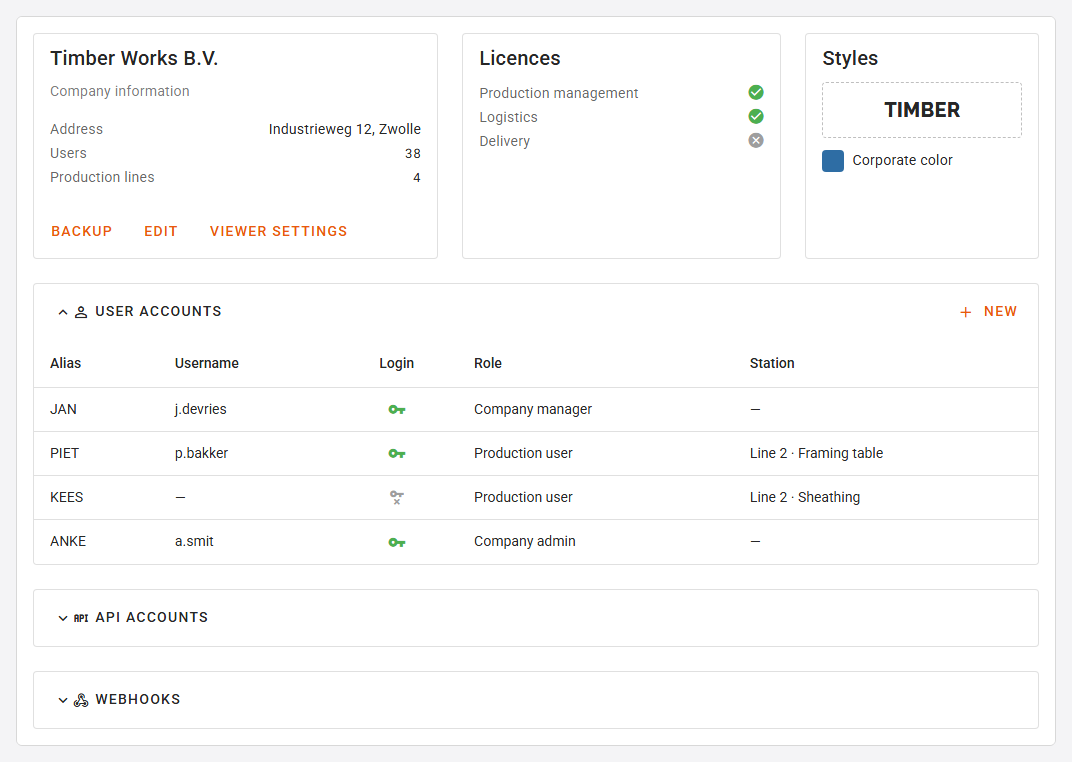
Before
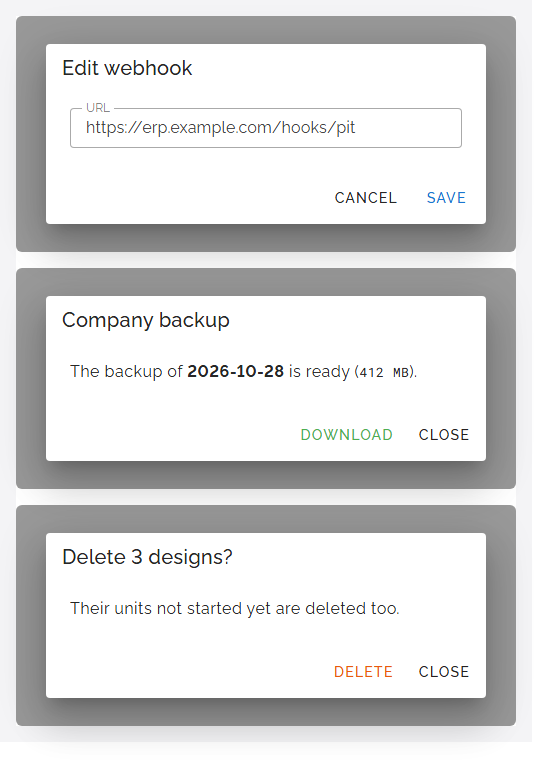
After
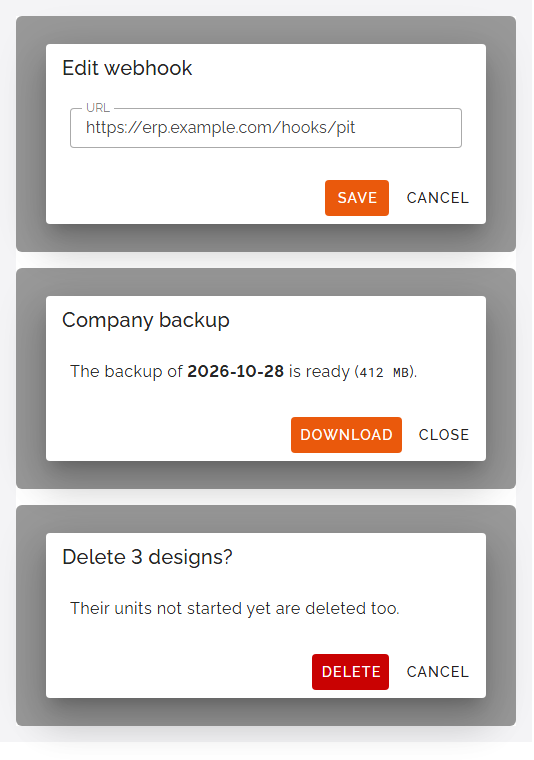
Before (left) and after (right)
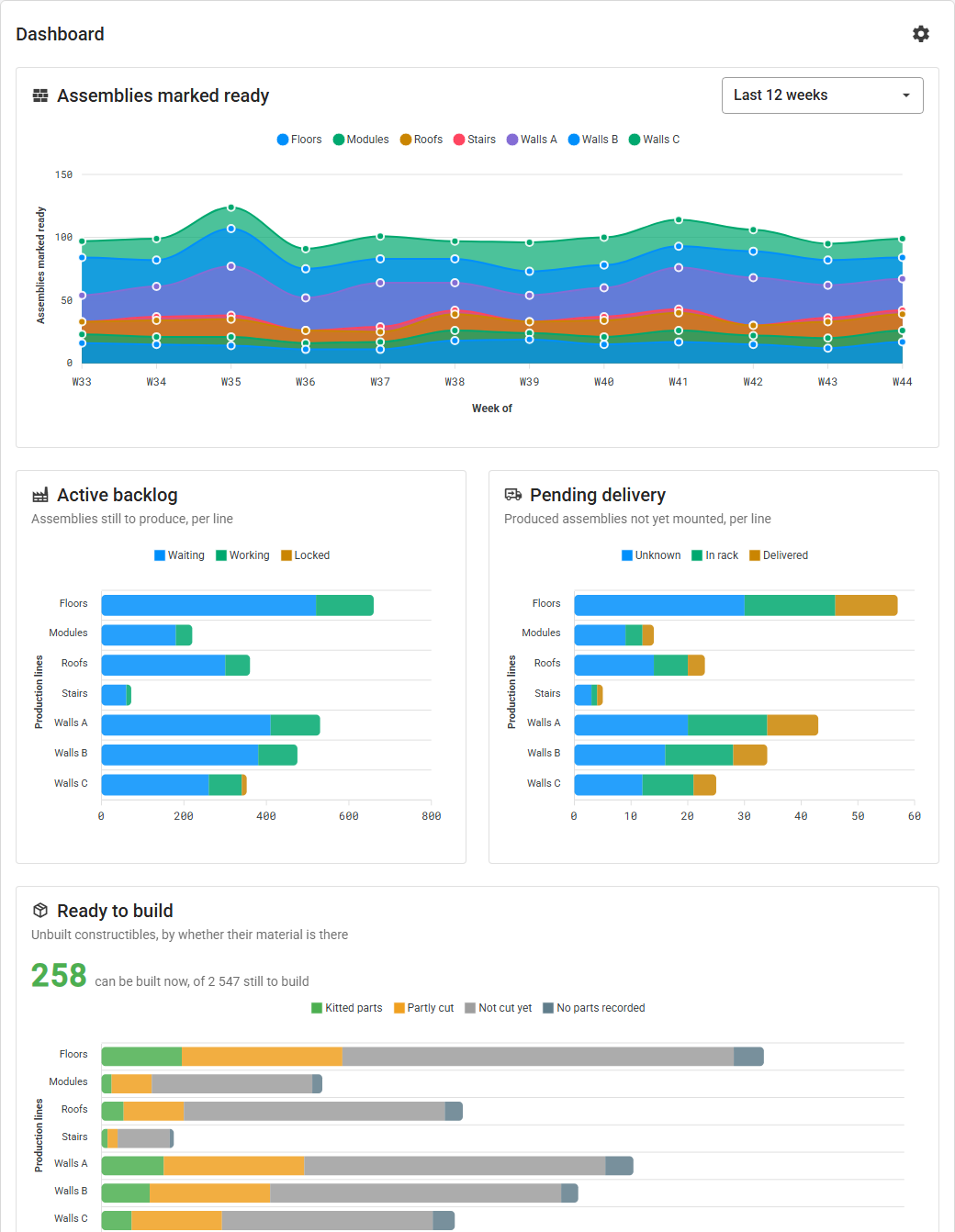
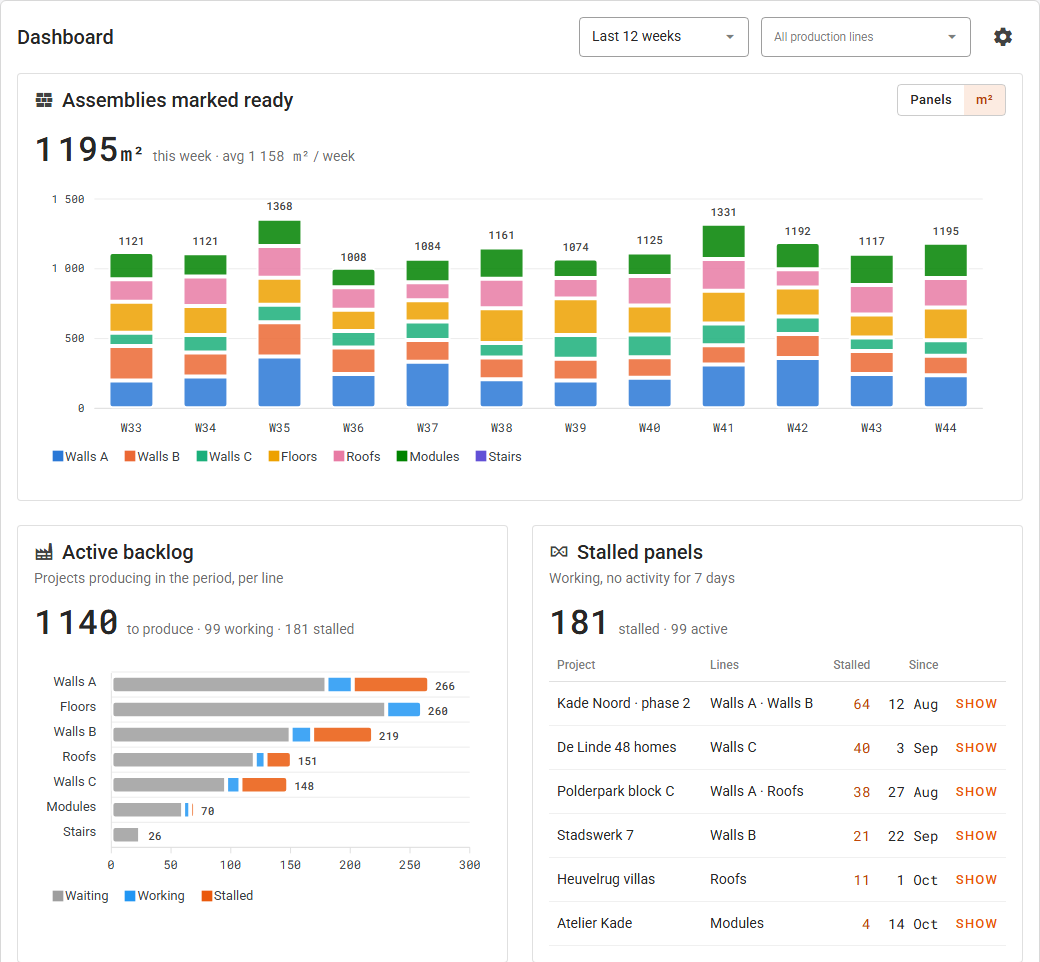
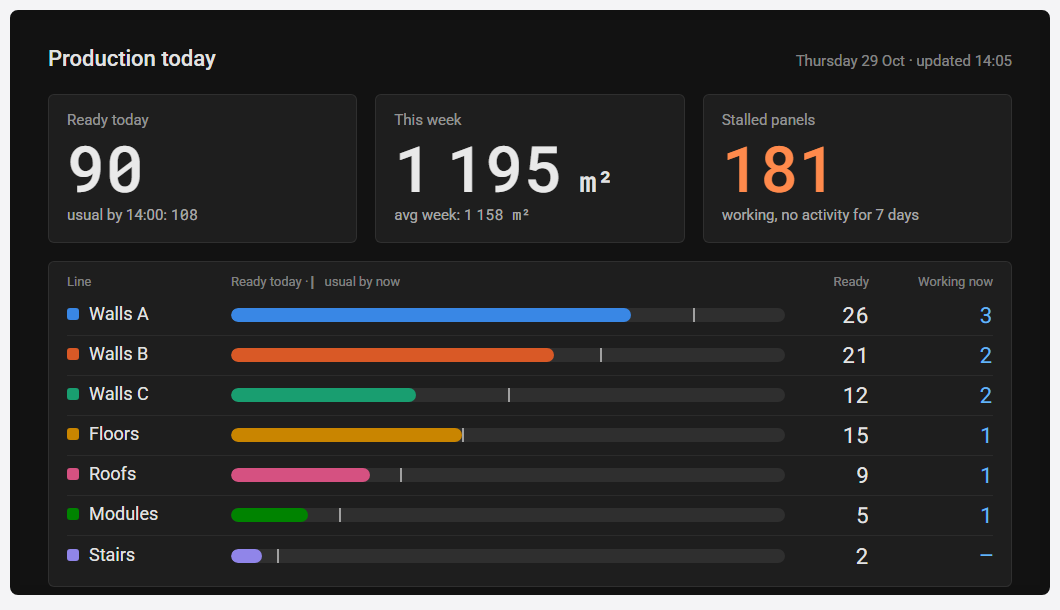
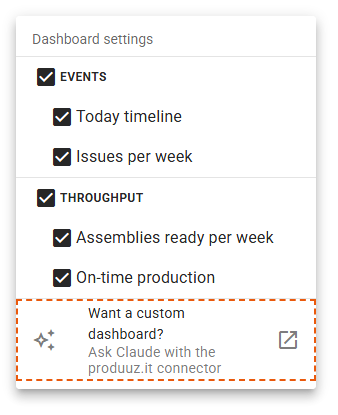
📊 Dashboard — reworked around what is used. One Period and one Production lines filter now apply to the whole page, and every card opens with its main figure, so nothing needs hovering. Panels marked ready are shown as weekly columns, in panels or in m². The backlog only counts the projects in production and splits Working from Stalled: panels set working with no activity for a week. New cards list the Stalled panels and the Projects in production with their progress. Panels per station replaces Station throughput, and Issues per 100 panels replaces Issues opened vs resolved. Projects, Projects by client and Design types are gone. Pending delivery only appears once you record deliveries. A production line keeps one colour everywhere, and statuses have the same colours as in the rest of the app. Open factory screen in the settings menu shows today's figures full screen for a TV, refreshed every minute. The settings menu also ends with a link to the Claude connector guide, for dashboards built to your own needs. See: Dashboard, Claude connector (MCP)
Before
After
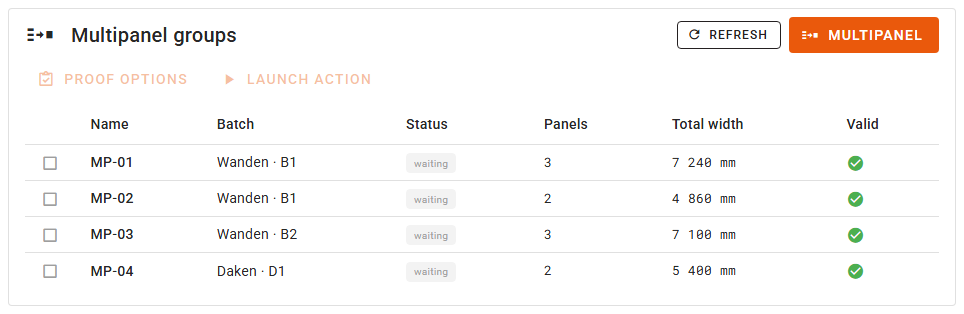
🗂️ Multipanel groups — the page lists every group of the project, with a Batch column, instead of opening on a batch selector. The Multipanel button is always there, and the window that creates a group asks for the batch first.
Before
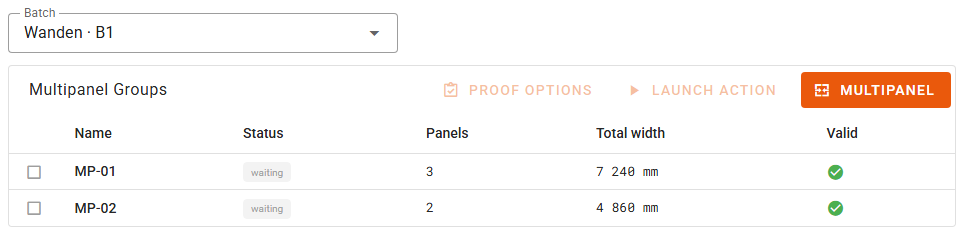
After
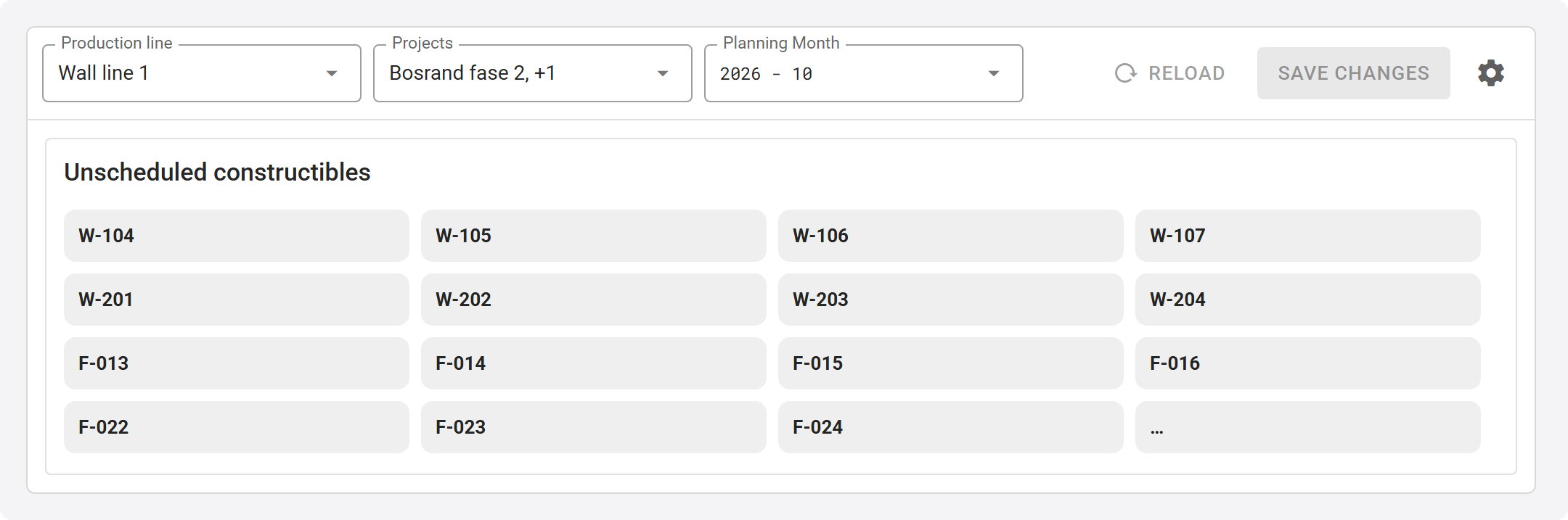
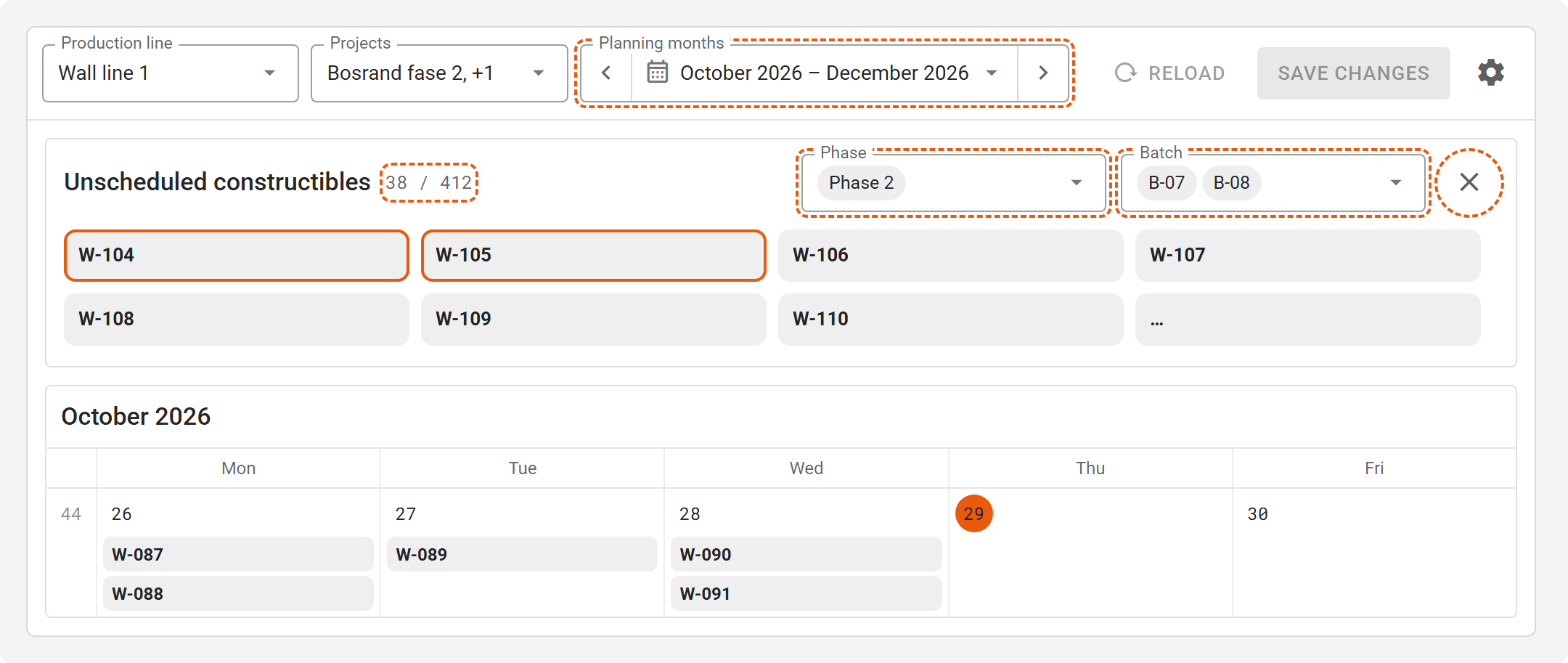
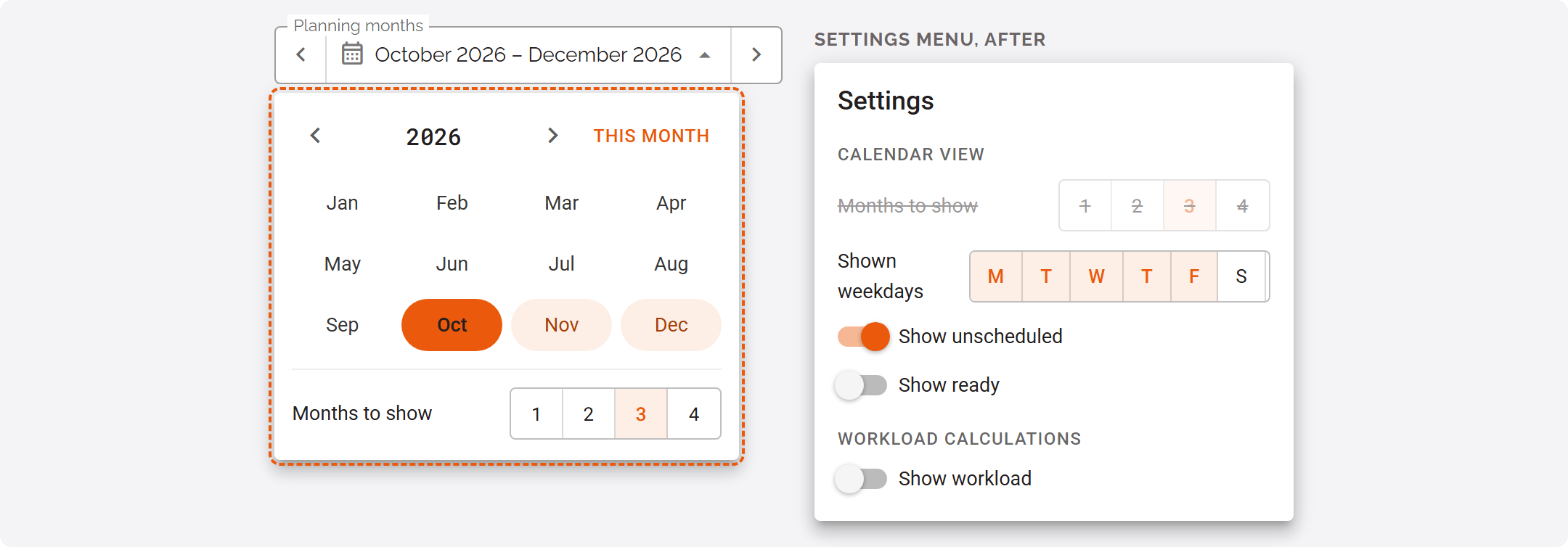
📅 Production planning — the unscheduled constructibles can be filtered by Phase and Batch, in their own box. They are listed by project, phase, batch and their order in the batch. Planning Month is now a month picker: the arrows move one month, the field names the months shown, and it opens on a grid of the year's months with Months to show, which leaves the settings menu.
Before
After
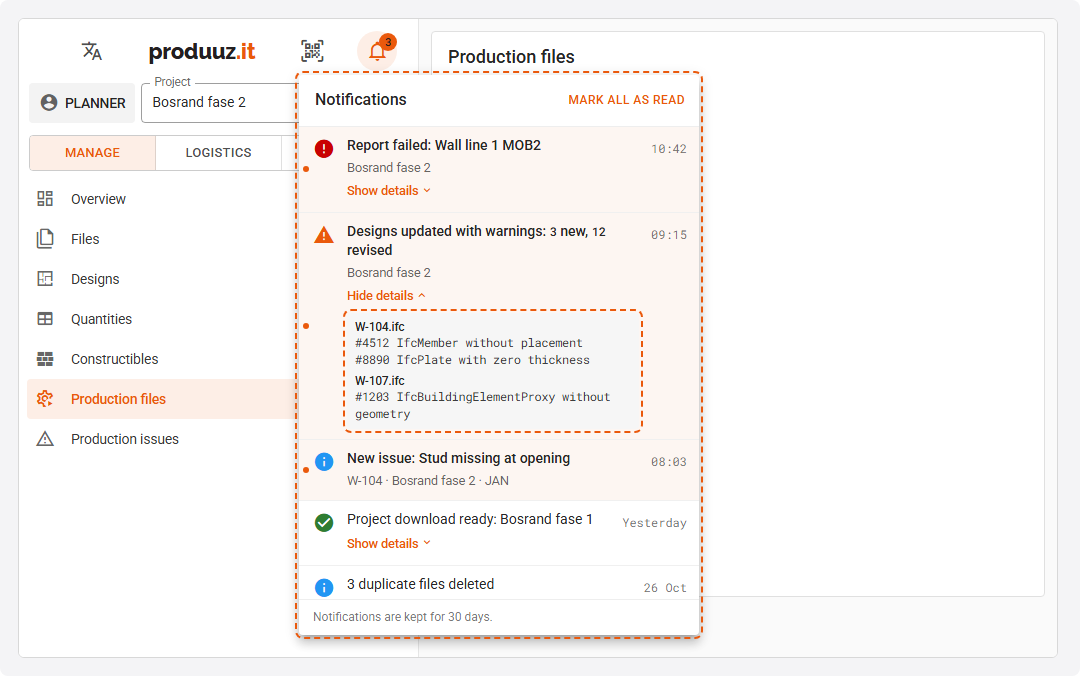
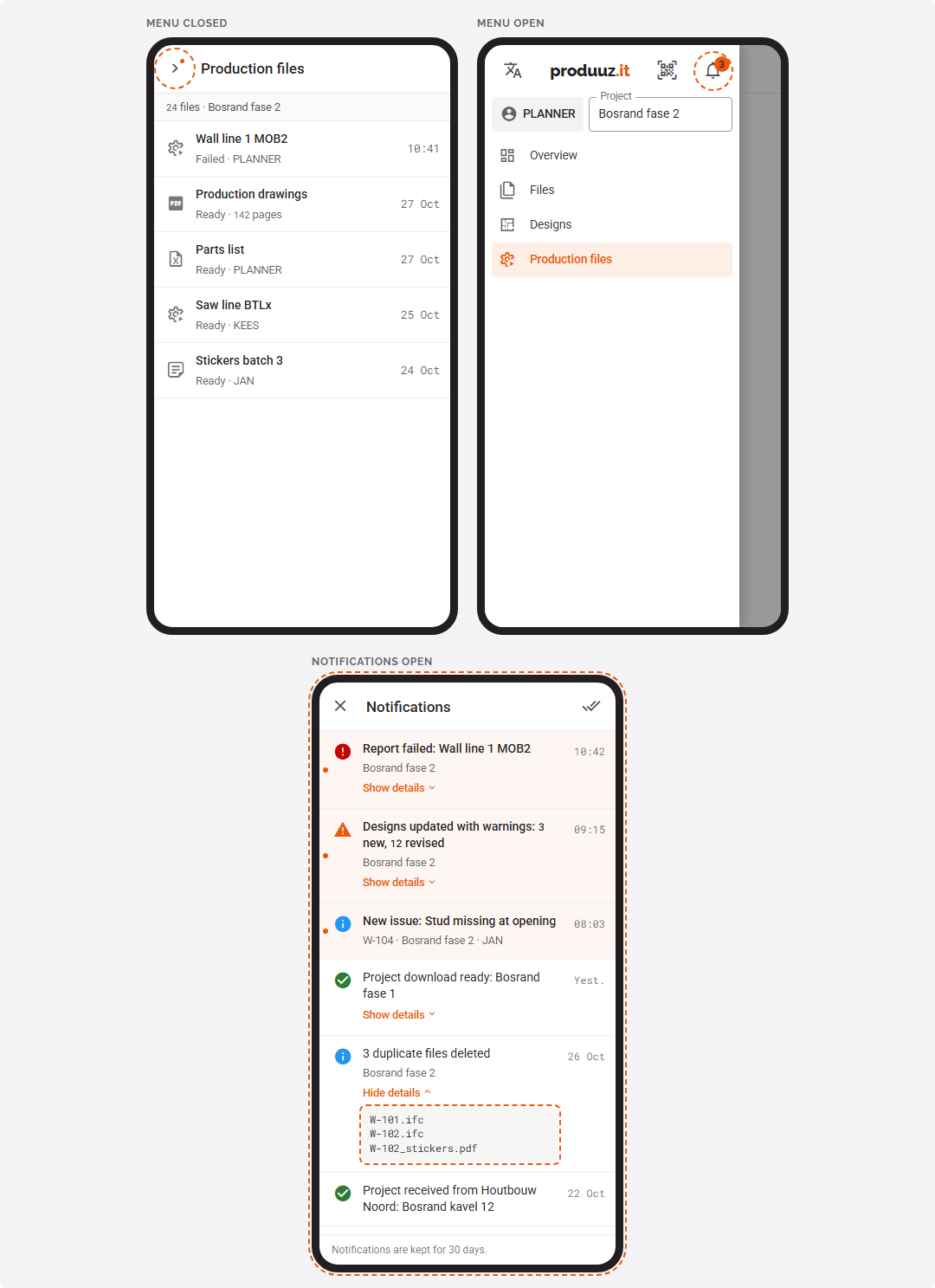
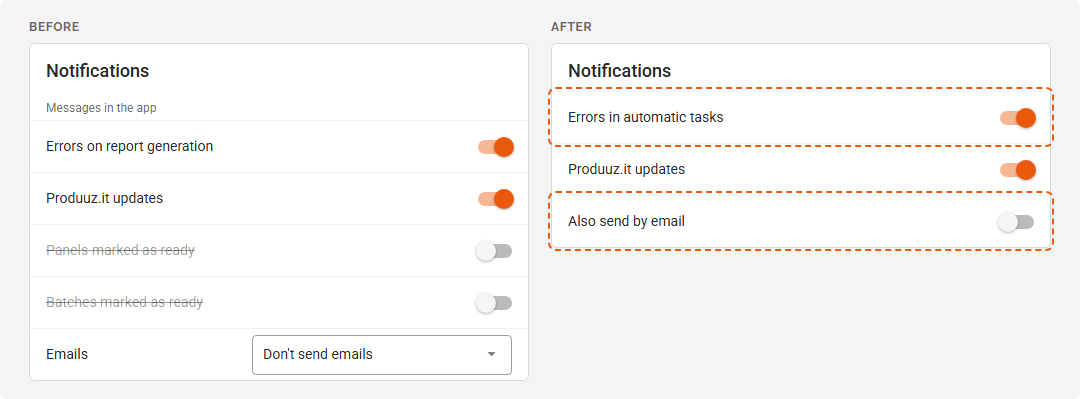
🔔 Notifications — the chat is gone, and a bell takes its place at the top of the left menu, counting what you have not read. Nobody wrote in the chat: it held the system's messages, and four out of five were the same IFC error sent to every account once per error. Now each task you launch tells you, once per run, with the details inside: a report, the automatic drawings, Update designs with its IFC warnings grouped by file, a project download, a transfer or copy, a backup. Deleted duplicate files come as one list per upload, and Notify colleagues in a new issue sends a notification in each colleague's own language. Click one to open what it is about; for a production user, an issue opens the panel in the viewer, with the hot issue shown. On a phone, the menu toggle shows a dot while something is unread. Notifications are kept 30 days. In Account → Notifications, Errors on report generation is now Errors in automatic tasks (failures of tasks nobody launched by hand), the emails are one switch, Also send by email, and the two switches that never sent anything are gone. See: Account
Before (left) and after (right)
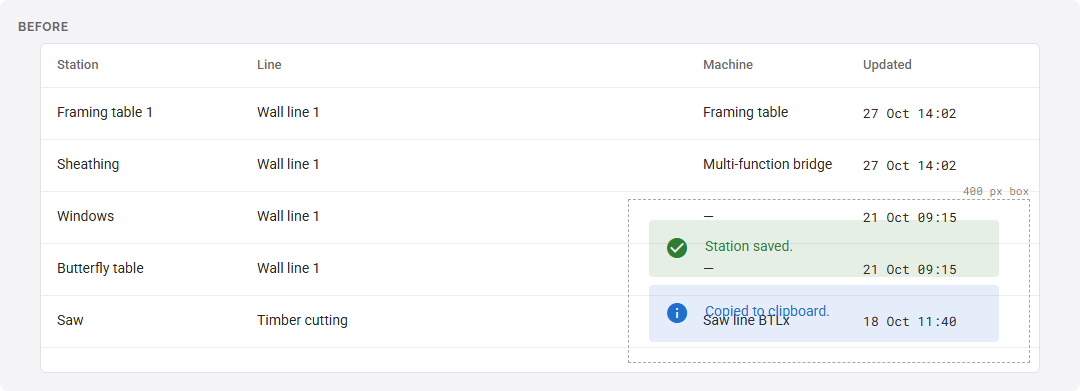
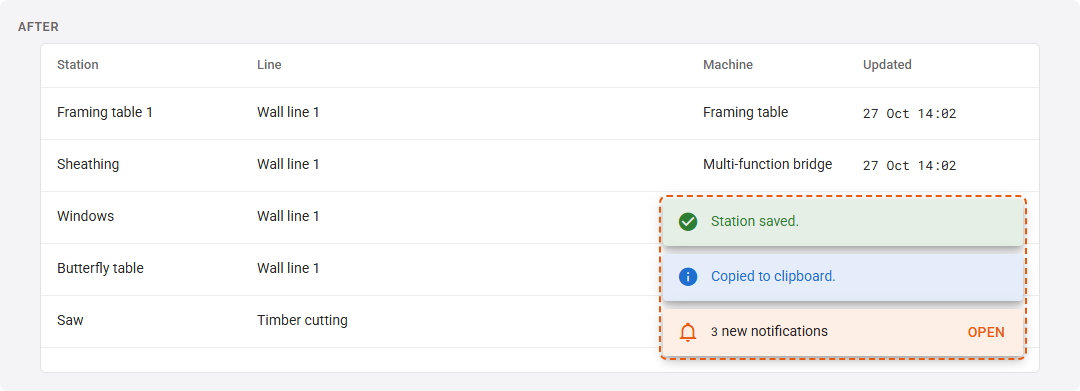
The messages at the bottom right that answer what you just did now sit in one column at the right edge, are no longer see-through, and show above windows.
Before
After
🐞 Fixed — Dashboard: On-time production and Station throughput were always empty. Stations with the same name on two lines were counted as one. Lists: after making the window narrow and wide again, an empty detail panel opened over Issues, Constructibles, Designs and the other lists, and its × did not close it. Files: every split warned that IfcBuildingElementProxy entities would break the job, even when the file had none, and in a file whose panels are proxies it named the panels themselves; it now warns only about the proxies it actually leaves out, and lists them. Keep current revision numbers gave the design a new identity, so links to it stopped working. Every Generate designs gave a new revision to each design with an extra IFC. Detect details reached 100 % while it was still scanning, and Production Counts unlocked too early; scanning IFCs without scanning drawings never found a detail. Launch all carried on after a split failed, and created designs from what the failed split left. A split could mark project IFCs it never split as split, and a parsing setup that finds assemblies by a part property split into nothing. Right after a launch, the same operation could be launched again. A file being split could be deleted. New files appeared only after leaving the page. Viewer: on a panel that had left your line, Part lists kept loading forever and its buttons never appeared. Opening a panel you cannot see, for example by scanning its QR sticker, kept showing the previous panel and its checklist. A production account with no line selected saw only the panels of batches without a line. After changing line, the batches of the new line showed up empty until the project was opened again. Change Station: choosing a line the account is not allowed to choose did nothing and said nothing. Production settings: stations and tasks set to If Zone in Design or If Branch in Zone of Design were never included, whatever the zones of the design, and the station showed as greyed out in the viewer. They are now included when the zone matches, on panels started from now on; for a panel already started, use Merge checklist to add them. With 1/n, two stations with a task of the same text shared one count, so one of them could get the task on every panel and the other never; each station now counts its own panels. An n that was not a whole number made the panels of that line impossible to start, and two panels of one batch started at the same moment could both be taken as the first of the batch. Panels set ready from the constructibles list no longer use up the 1/n checks. MOB2 files: a BTLx panel with a core plate or battens in the frame zone got no file when the production line shifts its operations or layers; the file is now made. Quantities: with several project IFCs the targets could be wrong: a file uploaded again under the same name replaced the counts of the earlier one even when it held other panels, the same model uploaded under a new name was counted twice, and deleted files kept counting. A background analysis that finished while you edited the matrix could put back the numbers you had just changed. Splitting: a project IFC with several storeys put every panel in the first storey. A Revit IFC with one assembly that has no name made the whole split fail; that assembly is now left out, the rest is split, and the managers get a message listing what was left out. Reports: a change made to a report's memory outside produuz.it could stay in place until the next update, so a large MOB2 report ran with much less memory than it was set to and failed; a report that starts with less memory than it is set to now puts it back and starts again with the right amount. Production planning: in a narrow window the settings button fell off the top bar, so Show unscheduled could not be turned back on; the selectors now get narrower and the buttons stay. A constructible could only be dragged from the unscheduled list, never from one day of the calendar to another. In Europe the calendar also loaded the constructibles of the last day of the month before, and one or two days after the last month shown, and the month names followed the browser language instead of yours. Notifications: a message raised inside a window showed under it, dimmed and impossible to click away; clicking a message, or waiting for it to go, removed the oldest one instead of that one. Viewer: the new issue window never showed Issue created or Upload failed. Rack loads: dragging a panel selected the text around it, and the delivery status counts touched their labels (0Delivered). Report form: the switches above the selection tree were cut off at the top. Menu: with a wide, low company logo, the buttons beside it sat lower than the logo; they are now centred on it whatever its shape.
2026.10.25
- 🧭 Left menu — the versions at the bottom of the account menu now end in a short code instead of a number, such as 2026.10.20_203cae9f. Each update of the app and of the server has its own code, so support can tell exactly which one you have. They are now two small labels, the server one with a dot that turns red when the connection is lost, and tapping them no longer copies them.
- 👤 Account — the Account page is reorganised. It now shows your email, alias, company and role, and every setting is changed where it is shown and saved at once: the language, the four notification switches and the emails are no longer behind buttons and windows. Two-factor authentication and the Google and Microsoft links share one Sign-in and security card, with the status (On / Off) next to the button that changes it. On a wide screen the cards sit in two columns, and on a phone each row puts its label above the value. The page is now fully translated. See: Account Settings
- 🔌 Webhooks — every call is now signed. It carries an
X-Produuzit-Signatureheader made with a signing secret that each webhook gets when it is saved, and which is never sent. Your system can use it to check that a call comes from produuz.it and was not changed on the way. The secret is shown in the webhook form with a button to copy it and one to replace it. Checking it is optional: theAuthorizationheader and your custom headers are sent as before. See: Checking the signature - 🚚 Logistics — when you tick several panels in the tree, their parts load once you stop, half a second after the last tick, instead of once per tick. The parts of the ticked panels also load faster.
- 🔌 API — the production events list can now be read with
after, a cursor: each answer gives the uuid to ask with next time, so a system can follow the events as they happen without paging through everything again. A page costs the same however far it is. Paging withlimitandoffsetworks as before. See: Reading production events as they happen - 📐 IFC Parsing Setup — a setup now has versions, and saving one never re-analyses anything. A setup that projects use is no longer changed in place: saving it creates the next version, with a note of what changed, and every project stays on the version it has. You move projects to the new version with Upgrade projects in the setup's ⋮ menu, or from the project form, and that window says what the move costs before you confirm: the designs it analyses, the units in production and the ready units, and about how long it takes. When the two versions differ only in what the machine files read, the move analyses nothing. Archived projects keep their version, and new projects start on the newest version of the default setup. In the editor, a section whose changes only reach the machine files says Files only, one also read when the IFC files are split says Split, and Try on a design shows what a change would do to one design before you save it. Every change to a setup is now recorded with who made it and when, in a History you open from the setup's ⋮ menu. A new version keeps the locks of its setup. The editor is also tidier: the name and the default are set from the setups list (Rename, Set as default), each title and explanation appears once, the help panel stays closed until you open it, branch and class rules can read from a property set like the categories, and every label is translated. The company setting is now called Analyse new IFC files automatically. With it off, upgrading a project analyses nothing either: the window says which designs need an analysis, and you run it from the Designs view. See: Versions
- 🧊 Designs — an analysis never changes a part that is ready or in a started part batch: the design shows N ready parts kept and its panel lists what the analysis would have changed. A design analysed with an older version of its project's setup shows that version, such as v3, with Analyse in its menu, and while designs are being analysed a bar above the list shows how many are done. An analysis of a whole project now reads only the latest revision of each design, plus older revisions that still have units in production. See: Ready parts are kept
- 🐞 Fixed — Logistics: ticking a dozen panels in a row could leave the parts table loading for 15 seconds. Viewer: in companies that work by date, the list of today's and late panels could take several seconds to load and to refresh in large projects, and a design with two panels due the same day was listed twice. Background work: after a large upload or a large analysis, the drawing counts of the designs and the other background updates could take up to 50 minutes to catch up; they now follow sooner. Viewer: a tablet whose clock ran ahead could miss the status changes other screens made to panels until the page was reloaded, and after more than 100 panels changed at once (for example set all ready), the rest did not update on other screens. API: reading the reports and the production events page by page, as integrations do, took 5 to 8 seconds per page; it is now faster, and paging through the production events no longer skips or repeats an event when several share the same time. IFC Parsing Setup: renaming a setup, making it the default or locking it analysed every design of every project that used it, and locking or unlocking did it twice. Save without launching the analysis left the parts list and the measurements on the old rules while the machine files already used the new ones. A locked setup could still be changed outside the editor, and a setup used by projects could be deleted. Designs: an analysis could rewrite or remove parts that were already cut.
2026.10.20
🔌 Webhooks — NiceLabel labels can now print the project: the data source sends the project name, the project number and the super project. See: NiceLabel Integration
📄 Files — after uploading many drawings at once, or generating designs in a large project, the drawing counts of the designs and the other background updates are ready sooner. Each design and each file folder is now updated once, instead of once per file. Duplicate files left by an upload are now removed in the background, and you get one message listing them all, instead of one message per file. In the production and management files lists, Generate again has moved into the ⋮ menu, under New revision: the row keeps only Download. The New production file and New management file buttons are now New file, with a +. Clicking a report's title (tapping it on a phone) opens its detail on the right: what it is, any warnings, the settings it was made with, its units grouped by phase and batch with how far along they are, and all its versions, with the same actions as the row. The report type is now shown by its name (Wood BoM) instead of its code. See: Report detail
🧭 Left menu — the bottom of the account menu now shows the version of the app and the version of the server, one per line, with a dot for the connection. The environment is only shown when it is not production. Tap it to copy the versions, for example to send them to support. Versions are now named by the date and a number that goes up with each update of the day, such as 2026.10.20_r4, and the app on a computer and on Android carry the same name.
🔣 Metadata windows — the metadata of reports, files, projects and units is now shown as text coloured like in a code editor, with everything expanded, and a Copy button next to Download.
🚗 Constructibles list — each constructible shows its design revision and its place in the batch the way the viewer does,
4/12for the fourth of twelve, instead of a priority chip.🧊 Designs — the design panel lists its units by phase and batch, like the report detail: how many are in each batch, how far along they are, and their names when you open a batch.
🐞 Fixed — Opening a project: in a large project, the lists of designs, batches, panels, parts and reports could take up to 15 seconds each, and when several tablets opened the project at the same time, for example at the start of a shift, the app could lose its connection for everyone for a moment. These lists now load much faster and use a fraction of the server's memory. Files: removing the duplicates after uploading many files at once could take longer than the server allows and stop halfway, and slow down the app for other users at that moment. Reports: for company managers, the material and size lists of the report form were always empty; only admins could load them. Viewer: the buttons that list a panel's parts missing from the database kept loading forever when the panel's batch had been moved to another production line.
2026.10.18
- ⚙️ Projects Settings — a project can be downloaded as one ZIP with all its data and files, from the projects list and from the archived projects. The ZIP is made in the background and you get a message with the download, and an email to the address you choose; it is kept 7 days. Deleting a project now offers to download it first, and then the project is only deleted once its ZIP is ready. Archived projects can also be transferred and cloned. Transfer & clone now gives the copy its own copy of every file, so deleting or editing the original never touches the copy, and the partner company fully manages a project it receives. A clone keeps the production line of its batches, the engineering contact, the super project, the multipanel configuration, the linked standard libraries and the dates. A transfer leaves your production lines, contacts and stock sizes with you: the partner's parts get the partner's own sizes. If a copy fails, nothing is created and you get a message saying why. The window is translated, and constructibles can only be copied together with their designs. See: Downloading a project
- 💾 Company backups — the backup window lists the project downloads of the last 7 days, those of deleted projects too. The projects in a backup now hold every version of each file, one folder per design, unit or report, and the same content as a project download. See: Company Backup
- 🔘 Row buttons in lists — every list now shows its row buttons the same way, always visible: one or two buttons for what you do most (download, view, edit, solve, generate again), and a ⋮ menu with the rest, each with its name. Delete is always the last item of that menu, in red, and always asks first. An action that does not apply stays in place, greyed out, sometimes with the reason. On a tablet the buttons and menu items are larger, and on a phone the sheet of an item lists the same actions with their names. Before, some lists showed their buttons only when the mouse was over the row, and whether they did depended on the screens opened earlier; on Windows tablets they could not be reached at all. View in the constructibles and designs lists is now an icon, and a constructible can be deleted from its own ⋮ menu. In Constructibles and Designs, the buttons that act on the ticked rows are always shown, next to the All / Modules / Assemblies selector, and stay greyed out until you tick a row; a Refresh button reloads the list. See: Row buttons
- 🐞 Fixed — Lists: deleting a file (in Files and in a design), a report, a report version, a Mobfile Generator file or a multipanel group happened on the first click, with no confirmation. Constructibles: View on a module in the list of all projects opened it as a panel. Designs: View on an older revision of a module design opened it as a panel, and the link of an older revision led nowhere. On a phone, the versions of a report and the older revisions of a design can now be deleted. A design file with only text can no longer be "downloaded". Some list buttons and windows were still in English. Security: issues, their pictures and report files are now always given to the company of their project, never to the account that made them. An account that moved to another company, as produuz.it staff do, took its issues along, so they could show in that company's lists. A company's reports could also be listed from another company by anyone who had the address of the project. Projects Settings: the buttons of the archived projects list were stacked in a column instead of a row. A clone or a transfer with an empty name failed. A transfer made the copied IFC parsing setup the partner's default for its new projects. Company backups: only company admins can make one, and the user list in the backup no longer holds the (encrypted) passwords. Files with the same name in two designs overwrote each other, and a large project could make the backup fail. A failed backup now sends a message instead of leaving you waiting for the email.
2026.10.16
📐 Panel sides and coordinates — a new guide page explains how produuz.it decides the front and the back of a panel, its zones, its axes and its origin, and which side the 3D viewer, the drawings and each machine file look from. It includes a checklist for a new exporter and what to check when a panel comes out mirrored or upside down. See: Panel Sides and Coordinates
🚚 Logistics — the Part data button now looks like the Extended button of the production viewer: filled when the part panel is open, lighter when it is closed, with the same icon. See: Logistics
📱 App on your phone or tablet — on a phone, the management lists now show one short row per item: its name, two or three facts under it and its status. This covers files, designs, constructibles, the parts list, issues, production and management files, part batches, multipanel groups, rack setups, the Mobfile Generator files and the settings lists. Tap a row to open it. Lists that have no detail panel open a sheet from the bottom with all the item's fields and buttons. To act on several items, tap Select, tick them and use Actions in the bar at the bottom. Before, each item was a tall card with one line per column, so a single item could fill the screen. The filters of the parts list and of the constructibles list fold into a Filters button that shows how many are on. The settings cards keep their New button on screen, with the search or the quota on a line below. The edit windows of the settings lists now open full screen on a phone. Tablets and computers are unchanged. See: Guide
📅 Production planning — the menu entry Production Overview is now called Production Schedule, which says better what the screen is for: planning the constructibles on a calendar. It now follows the work calendar: when a production line has no daily capacity, the workload uses the hours of the work calendar for each weekday, closed days are striped, marked Closed and have no capacity, and the days shown are the working days until you choose others. Dragging a card uses the browser's own drag, so it is smooth even with many cards, and the day it lands on is outlined (in red on a closed day). The settings menu is reorganised: the months and the weekdays are rows of buttons, like in the work calendar, and the options are switches grouped by calendar, workload and card fields. Each week grows with its fullest day instead of a fixed height, so no card is cut off, and the Calendar height setting is gone. See: Production Planning
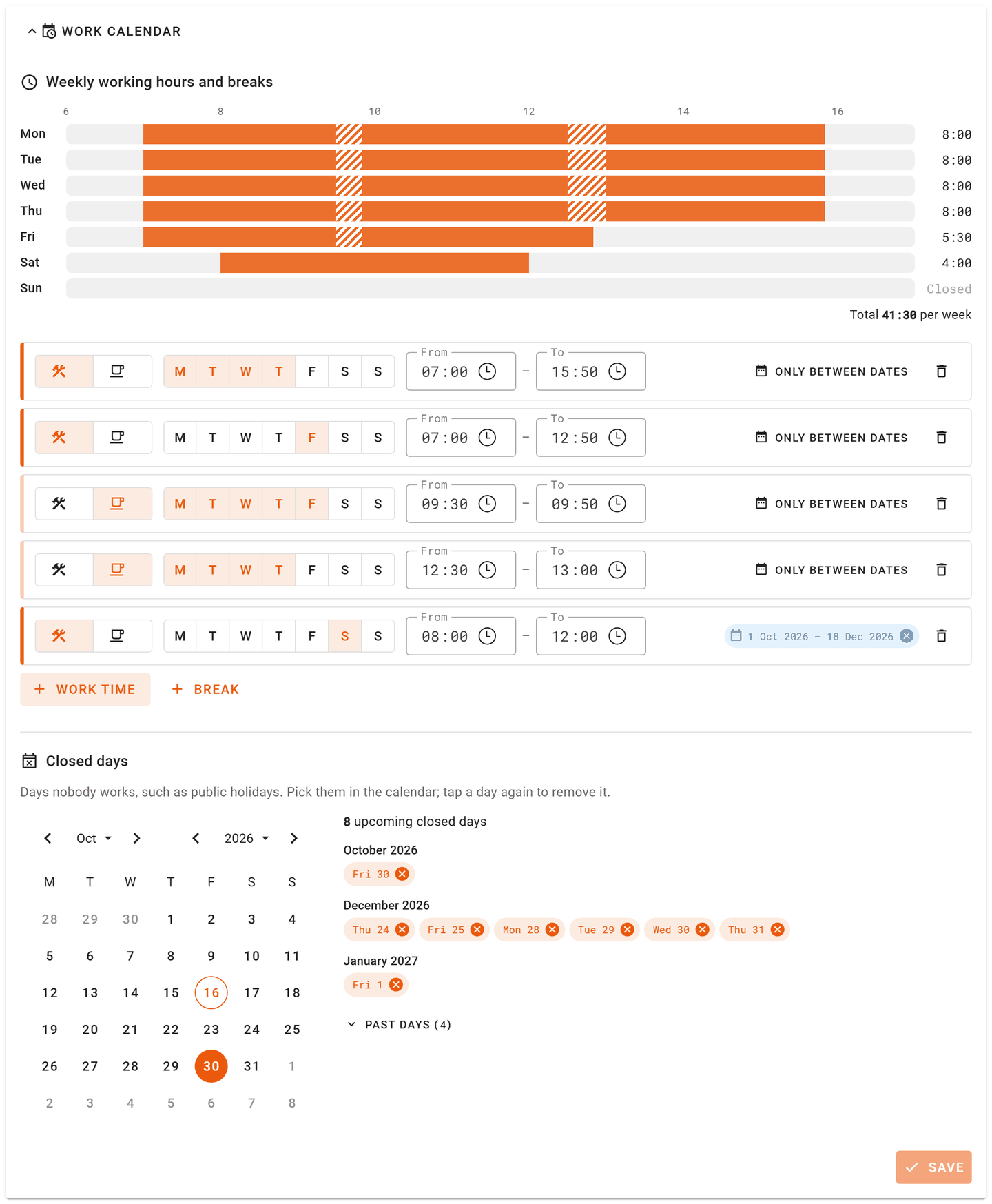
🗓️ Work calendar — redesigned. The week is drawn at the top, one bar per day with the work time and the breaks, and the hours per day and per week. Each work time or break is one line: tap the days, set the times with the clock, and limit it to a period with Only between dates. A break outside the work time of its days is flagged. Closed days are listed by month beside the calendar, with the past ones folded away. Save is active only when something changed. A user's own work time is edited the same way. See: Work Calendar
⚠️ Production issues — a new list with the issues of every project, in the left menu with All projects selected. It opens on the issues created this year, and loads again by itself when you change the dates or tap This year, Last year or Last 90 days. Filter it by category, open or solved, hot issues, super project, project, production line, author or text, without waiting: each filter only offers what the loaded issues have. The table shows each issue's project and line, and the dates and filters stay in the page address, so a filtered list can be bookmarked or shared. In a project's issues list, the User column is now Author and shows the employee alias. See: Issues
🧊 Designs — the design panel has a View button that opens the design in the viewer, and lists the design's other revisions. Tap one to open it.
⚙️ Projects Settings — all the settings of a project are now in its edit form: engineering contact, IFC parsing setup, multipanel configuration, linked standard libraries, PDF rendering scale, start date and delivery date. The separate Project settings page is gone; its entry in the left menu now opens the same form. Each project row has two new buttons: Transfer & clone and Project metadata. See: Project form
🐞 Fixed — Production planning: the workload bar showed Infinity% or NaN% on lines without a daily capacity. Shifting constructibles to an earlier date while counting only the shown weekdays moved them later instead. Pressing a card hid every workload bar and made the calendar jump. Work calendar: the hours in the Excel per worker were counted with the week shifted by one day, so Monday's hours were read from Sunday's. A work time limited to a period only applied from its second day to the day before its last, and a period set in the calendar counted as its first two days only. A user's own holidays could be saved as the day before the one picked; they are read back as the day picked and saved as plain dates. Projects Settings: the edit form of a project did not show its linked standard libraries, so adding one there removed the ones already linked. Launching a transfer or a clone showed no message. Designs: the units table of a module design was always empty. Constructibles: the panel of a module linked to the wrong design and opened it in the viewer as a panel. Issues: the issue detail always marked the revision an issue was solved in as outdated, and for an issue on a module it could show the wrong revision. The constructible link in the issues table led nowhere. Switching to all projects from the issues list opened the company settings. Editing or solving an issue closed the window even when saving failed, and lost what you had typed. MOB2 files: when a zone takes its nail tool from the model and the model gives no usable tool for some nail lines, the panel's file is now built without those lines, and ERRORS.md says which zone, which value the model gave and how to fix it. Before, no file was built for that panel. Panel analysis: after generating designs, the analysis of some panels could fail to start, and those panels stayed on waiting until analysed again by hand.
2026.10.15
📄 Files — the production and management files lists load much faster, and tablets no longer download a project's files list each time they change project.
🧊 Module designs — the analysis of a module now measures its length, width and height, and lists its panels: how many there are, each name with how many times it appears in the module, in blue when the project has a panel design with that name. It also counts the module's parts, the parts that are in no panel, and the unknown parts. Before, the module card showed a width, length, thickness and areas that were always 0. A module exported as one assembly that holds its panels no longer counts itself as one of its panels, also in Quantities. Analyse a module again to see its results.
🖥️ Viewer — a new Hot issues dialog lists the hot issues of the panel and, under Same design, those of the other units of the same design, each with who reported it, its pictures as thumbnails that open full screen, and Show in 3D for the parts it is about. Solved issues are hidden behind Show solved, and the list refreshes every minute while it is open. The New issue dialog says what Mark as hot issue means (it is ticked when you start from New hot issue), lets you pick the colleagues to notify in the dialog itself, each with the employees who use that account, and can attach the parts selected in 3D, which then show in the issue detail, in the hot issues dialog and in the issues report. Closing it keeps what you typed and your pictures. The toolbar has changed too: its labels no longer get cut in any language, the two issue buttons share a row with the number of open hot issues inside the icon, on a phone the buttons are a grid of equal tiles, and Extended is now an on/off switch. On a phone, the drawing and the panel under it are clearly separated. See: Viewer
🔠 Text and numbers — numbers, times, dates, part references and GUIDs are now in a monospaced font: columns of lengths line up, and a 0 is never read as an O. On Windows tablets the text now uses the same font as on Android, instead of a wider one that cut more labels.
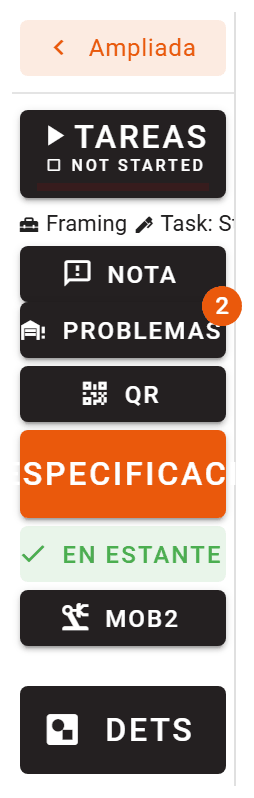
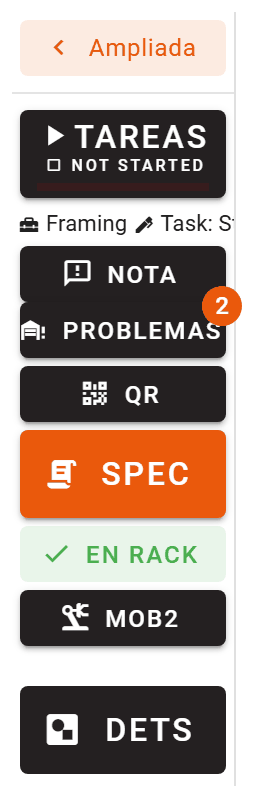
🌐 Language — in Spanish, racks are called rack on every screen. Some screens said estante or bastidor, words nobody uses for a rack on the factory floor, and the frame of a rack is now the marco. The specification button in the viewer now reads Spec: the full word did not fit and was cut. The viewer and logistics are now fully translated: the task status on the checklist button, the next task, the part data, the drawings filter of a multipanel group and several dialogs were still in English. Some words were corrected too: in Spanish Listo, Acabado, Incidencia and Título; in Dutch Melding, Beheer and Gerede onderdelen.
Before
After
🐞 Fixed — Reports: a Wood BoM, Plates BoM or Per-Design BoM of several large panels could still run out of memory and fail, even after the memory was doubled. It happened most with the designs summary page on: its sizes and areas were measured again for every panel. They are now taken from the panel analysis, as the viewer and the rack drawings already do, and each panel's geometry is released as soon as its tables are built. Production lines: sorting the batches of a production line could give a batch the position meant for another one when one of the batches had been deleted in the meantime. Panel analysis: an analysis or a report could now and then stop with an internal error that had nothing to do with the panel. Running it again worked. Viewer: in Spanish and Dutch several buttons were cut off or pushed out of their panel: the specification and issues buttons of the toolbar, Station job completed and Start production in the checklist, and the buttons of the dialog shown when you leave a running panel. With several specifications, each button showed raw data instead of the specification's name, and opening a specification showed an empty screen. The hot issues list hid quality control issues, counted solved ones, and never showed issues whose author's account had been deleted, nor their pictures. Production users could not pick colleagues to notify about an issue: the list kept loading. Logistics: Mark kitted was cut off.
2026.10.13
- 🔢 Production Counts — renaming a phase now renames the phase, all its batches, its numbers and its phase template in one step. If it fails, nothing changes, so no batch is left behind under the old name. A name another phase already has is refused, and so is deleting a phase that still has batches. The order you give the phases is now used everywhere they are listed. Batches can no longer end up without a phase, so the Batches without a phase dialog is gone: the phases those batches had lost have been added back to their projects. See: Quantities
- 🔗 API — every batch now also returns
phase_uuid, an id for its phase that does not change when the phase is renamed, and every project returnsproject_phases, its phases with their id and order. A batch can also be created or moved by sendingphase_uuid. Everything you already read and send stays the same: the phase is still a name. See: Constructibles API List requests now return at most 200 rows per page: a largerlimitis reduced to 200; follow thenextlink of each page instead of computingoffset. - 🤖 Claude connector — the production overview now lists, for each production line, its batches with their units, how many are ready and in progress, and the first and last day they are planned for production. Before, its planned and actual dates were always empty. Projects and batches now list their phases in the project's order, not alphabetically. When a list of units runs over several pages, no unit is repeated or skipped between pages.
- 🔔 Notifications — the notification option Delays detected by scheduler is gone. That message was never sent. See: Account
- 🧩 Parts list — the parts of a project load much faster: a large project could take close to a minute, and now takes under a second.
- 🐞 Fixed — Reports and machine files: the quality control PDF sorted by production order, stickers, the Excel per worker and the Ardis file failed on projects with a batch whose phase was missing from the project. These phases have been added back to their projects, at the end, and the files are made again. Viewer: the first panel offered when opening a project came from the phase first in alphabetical order; it now comes from the project's first phase. API: three old production overview endpoints, which returned no dates and were not used by the app, are removed. A production order could fail when its batch name was used in two phases of the project, and it could create batches in a phase the project did not list; the phase is now added to the project. Files: when an operation on the project files (splitting, generating designs, detecting details) stopped because the connection to the database was lost, the operations button kept showing it as running and the files could not be deleted. It now shows that the operation failed and releases the files. When a step of All operations failed, it was shown as completed; it now shows as failed.
2026.10.11
- 🪟 Subassemblies — every unit of a panel now comes with one unit of each of its subassemblies, in the same batch and next to the panel. They are created, moved to another batch and deleted together with the panel's units, so a subassembly's parts reach the parts list and logistics. Subassemblies no longer appear in Quantities: you plan the panels and their subassemblies follow. Units you had already added by hand for a subassembly are taken over by the panel's units instead of being doubled. Panel units that are already started or finished get no new subassembly units. Every analysis of a panel now analyses its subassemblies again, so they always follow the panel's latest model. By assembly property now works on the subassembly level, and with By IFC class splitting a project file no longer cuts a subassembly out as a panel of its own. See: Subassemblies
- 📚 Documentation — a new page explains subassemblies: how the parsing setup finds them, what the analysis does with them, where their parts are counted, how they look in the viewer and the checklist. The viewer guide no longer calls the panels of a module sub-assemblies. See: Subassemblies
- 🛠️ Machine files — a machine file is now always made, also when part of it cannot be built. What was left out, a part, an operation, a zone or a whole panel, is listed in an ERRORS.md file inside the download, and you get one message for the whole report instead of one per panel. The reports list and the Mobfile Generator show a warning icon on these files. A panel without a model file, or whose orientation cannot be found, now leaves only that panel out of the file instead of stopping it. When no station of the production line has a machine on the frame zone or on one side of the panel, the MOB file now uses a blocker height of 70 mm and says so in ERRORS.md. See: Machine Files
- 🖥️ Viewer — when a drawing or a 3D model cannot be opened, the viewer now says why (no connection, file not available, or damaged file) and shows a Retry button, instead of an empty screen. Drawings, 3D models and the QR reader no longer download parts of themselves from outside services, so they also open on a factory network that blocks those services.
- 🌐 Language — the browser no longer offers to translate the app. The app already shows your language, and translating it on top broke lists and dialogs, mostly in Edge and in Chrome on iPad.
- 📊 Monthly quota report — the Excel file sent at the start of each month now opens on a Summary sheet with the month's figures: designs created, their units, reports by type with their processing time, analyses, and every licence of your company with the seats in use. The designs, reports and analyses sheets have a fixed header with filters, and totals that follow the filter. Times are shown in your company's time zone, while the month is still counted in UTC, so the credits of a month do not change. Report types use the names you see in the app. The mail itself now shows the main figures, so you do not need to open the file to see them.
- 🐞 Fixed — Session: when the session of a tablet expired with a panel running, the tablet stayed on the viewer instead of going to the login page, and every drawing failed to load. It now goes to the login page. When the session renews itself, the action you were doing at that moment is no longer lost. Panel analysis: a panel could stay on waiting or in progress for good, although its analysis had finished. It happened when the project's details and specs were being handed out to its panels at the moment the analysis ended, which is what usually happens right after running all the operations on a new project. The panel now keeps the result of its analysis. The designs table could also show waiting or in progress until the page was reloaded, when an analysis took longer than half a minute: it stopped asking for the new status after the first try. It now keeps asking until the analysis ends. When a panel is analysed again while an earlier analysis is still running, the earlier one no longer writes its result over the newer one. A panel whose analysis could not be started now shows an error instead of waiting forever. Panels that are stuck today need to be analysed once more. A panel whose model file had gone missing from storage stopped its analysis with an internal error; it now shows that it has no model file. Subassemblies: a subassembly counted the panel's own parts as its own, in its parts and its machine files. A subassembly kept reading the model of its panel's first revision. Any design with a subassembly's name was turned into one, even a panel with its own model file; now it stays a panel and the panel's analysis summary says so. With By IFC class, the panel's own parts could be read as a subassembly and leave the panel. Removing a subassembly from a panel left it showing its old panel, and a new revision of a subassembly lost its panel. Its automatic drawings were never marked as outdated when the panel's model changed. Its analysis summary listed the other subassemblies of the panel as its own. When the model writes the panel's name on the panel's own parts, as Tekla's assembly position does, a subassembly could not be placed in its panel. A cloned project linked its subassemblies to the panels of the original project. Viewer: for a subassembly, PARENT drew the subassembly's own parts and the zone buttons the rest of the panel; it is the other way round now. Moving from one subassembly to another of the same panel kept the first one isolated. A subassembly shared by several panels always opened the first panel's model; a unit now opens its own panel's. A panel with extra model files could not show its subassemblies apart. The Unknown Parts buttons listed the whole panel for a subassembly, and a panel's subassembly parts for the panel. The 3D view's loading bar could stay on for a model whose parts list had not arrived yet. Opening a module after a subassembly could show the subassembly's panel instead of the module. Opening the QR reader's address directly showed an error page. Starting a panel whose proof could not be created, for example because its batch has no production line, still went on to mark the previous stations. Pausing a panel right after leaving it showed an error. On a panel with a single specification, the specification button failed and did not appear. Quantities: Reset quantities counted the subassembly units as if they were planned: the totals row showed them on top of the panels, and the Generate dialog listed them as deleted designs. Opening the designs filter broke the matrix. A project change that could not be saved, such as adding a phase, emptied the project on screen. Generate sorted the panels by name only in a batch that was empty: in a batch that already had panels, the new ones went last in the order you typed their quantities, and
W10came beforeW2. The new panels now go after the existing ones, sorted by name with numbers read as numbers, and the existing ones keep their order (see: Order of the new units). Details and specs: specs found in drawings were never attached to the designs that use them. Designs table: the IFC column did not sort, and its tooltips were in English only. Deleting designs right after their units were created could fail. Machine files: a MOB file failed when no station of its line had a machine on zone 0 and the floor was being laid; it is now made, with a note in ERRORS.md. A line with no machine at all now says so, instead of an unclear error. a BVX file left out a whole wood part when one of its laps had three or more faces, and a lap that touched no edge of the part could take the measures of the lap before it. In a MOB report, when the first unit of a design failed, the other units of the same design could get the isolation file of another design. A MOB file stopped on a zone that had machine operations but no plate, and on a panel deleted while the report was being made. Some plates with straight corners stopped a CIX or XCS file. A BTL or Generic Wood CSV report without a machine failed with an unclear error; it now asks you to pick one. ERRORS.md now gives the reason when a BVX housing is left out, such as an angled cutout that is not supported yet. Constructibles: marking panels as ready in bulk skipped the panels whose batch has no production line, while saying it had marked them. They are now marked ready. Constructibles that could not be deleted were still removed from the table. In the constructibles manager, a panel whose design could not be loaded broke its design card, and a card reused for another panel kept showing the previous design. Reports: a report or an analysis cut off by a lost connection to the database could not record that it had ended. opening a report while it was being deleted could show an error. Clearing the search box of the reports table showed an error. A BoM or MOB report of many large panels could run for more than an hour and then fail, because it ran out of memory. Reports now have twice the memory, and the part drawings in the BoMs are made about five times faster, with the same result. Part drawings: a drilling across a part could be missing from one of its views, with no hidden lines, when its round surface had a flat facet lying exactly along that view. It is now drawn in every view that sees it. Drawings are redrawn the next time the panel is analysed. API: a production order was refused as a duplicate when another company used the same order number. Listing the files of a project you cannot see returned an error instead of an empty list. Updates: right after an update, the app could show errors for a minute or two until the database had been updated. The database is now updated first. A tab left open during an update could fail to open a page until it was reloaded; it now reloads by itself, or tells you to reload when a panel is running. Production planning: dragging panels while the list reloaded showed an error. Production lines: a line that names a deleted station could not be opened. Issues: an issue whose design was deleted could not be opened. Chat: a chat with no messages broke the chat list. Checklist pictures: opening a picture that had been deleted showed an error; it now says the picture no longer exists. Mobfile Generator: pressing upload with no file showed an error; it now asks for a file. Projects: cloning or transferring a project failed when the name of its parsing setup was long. Users: resetting a forgotten password failed with an error. saving a new password after closing its window showed an error. A user first saved without a username could not log in after a username and a password were added later; the table kept showing---in the Username and Login columns. Adding the username now turns the login on. Monthly quota report: the report of a company with many panels in the month was never sent, because making it ran out of memory. It is now made in a few seconds, and its panels are listed in the order they were created. Security: licences, modules, partner companies and produuz.it staff access can no longer be changed from a company account, and only administrators and managers can change the company settings. Everything you link a record to, such as a project, a production line or a file, is now always checked to belong to your own company. Webhooks: they could arrive half an hour late or more, for example a sticker that is printed when a panel starts, when many panels were being analysed at the same time. Webhooks are now sent before any other background work.
2026.09.29
- 🤖 Automatic drawings — the zone drawings are drawn from scratch as technical drawings. Each one is an A3 page at a standard scale, with a title block. The dimensions follow the conventions of hand-made shop drawings, always from the bottom-left corner. Studs are measured to their left face. Openings are measured from the outer face of the frame to the inner face of the opening, then their clear size. Both edges of every plate are dimensioned, so the joints show. The partial sizes always add up to the overall. Every piece carries its reference; identical pieces too close for a label each share one. A parts list gives the section, length or plate size and the material. Openings, nail and screw lines with their spacing, holes and sloped edges are drawn and dimensioned. The drawings of negative zones are drawn from the back of the panel, the side they are mounted from once the panel is turned over (BACK_ZONE_-1), and plates in zone 0 get a drawing of their own. Before, they were on no drawing at all. A drawing where something could not be placed cleanly is marked Needs review on the panel's drawings card. A drawing setup can now fix the scale, leave out the parts list or the nail lines, and print your company banner on top of the title block. The Positioning origin and View used for the zone drawings options are gone: each zone is drawn from the side it is mounted from, and a drawing seen from the back measures its lengths from the right, so the positions start at the same corner of the panel on both sides. The whole-panel FRONT, TOP and SECTION drawings are no longer made; generating again removes them. Instead, a setup picks the Drawings to make: zone 0, positive zones, negative zones, and a new drawing per custom branch with parts in the panel. Generate the drawings again with Launch action to get the new version. See: Drawing setups
- 📚 Documentation — the MOB v2 machine file has a new page that explains how a file is made: how the zones of your parts decide which station writes which layer, why the station that builds the frame decides the starting side and the shift for the whole line, what each row of the file means, and what every option of the report form changes, with drawings of the zones, the table stops, the mill directions and twin nailing. It ends with a table of what to check when a file comes out wrong. There are also new pages for Machine Files as a whole, for the Robobrick and for the Isolation machine, and the Mobi One, Frame Station, MOB v1 and Mobfile Generator pages were brought in step with the app. See: MOB v2 Machine File
- 🔢 Production Counts — batches that belong to a phase the project no longer has can now be fixed from the matrix. The status bar shows how many there are, and the dialog lists each batch with what it holds. For each one you can move it to a phase, create its missing phase again, or delete it with its constructibles after seeing exactly what would be lost. Before, the dialog only listed the missing phase names. See: Quantities
- ⚡ Panel analysis and machine files — analysing a panel and generating its machine files and reports is faster. Working out how a panel lies, the slowest step, takes about an eighth of the time it did on our test panels, and a machine file or report made after the analysis now reuses its work instead of starting again.
- 🧩 Parts list — when a project's model files use the same reference for pieces that are not the same, a banner says how many references are shared. Review lists each one with its pieces side by side, and Only diverging references narrows the list to those parts. The panel details list the references that panel shares. See: References shared by different pieces
- 🚚 Logistics — a reference that also names a different piece in the project gets a warning icon, which lists the other pieces and the panels that use them. See: References shared by different pieces
- 🐞 Fixed — Parts: when two panels used the same reference for different pieces, analysing one panel moved the other panel's parts onto its pieces. A floor could then show the sizes and lengths of a wall in the parts list and in Logistics, and the size it needed showed no parts. Each panel now keeps its own pieces. Panel analysis: a part that could not be analysed was removed from the panel. It is now left as it was, and the panel is marked to be analysed again. Machine files and reports: a plate whose zone is left empty in the model could be read as zone 0 one time and as no zone the next, so it sometimes went missing from a machine file or a report. It is always read as zone 0 now. Automatic drawings: the overall length or height could be short by up to 17 cm, because the last edge of the panel was dropped when it sat close to the one before it. It now always runs from edge to edge. A side with a single measure showed the same number twice. The back, right and bottom views flipped each part in place instead of showing the panel from behind. On multipanel groups, the panel widths along the top started to the left of the first panel. Multipanel groups: the gap you set before a panel was placed after it instead, so the first two panels touched and every gap moved one panel along. It affected the machine files, the parts lists and the drawings of every group with gaps. Generate them again to get the panels in the right place.
2026.09.28
- 🐞 Fixed — Viewer: on a tablet, switching between the drawings of a panel kept every drawing opened before it in memory, so after a while — within seconds when tapping quickly through the tabs — the Android app closed on its own. Only the drawing on screen is kept now, and a quick series of taps always ends on the last one tapped. If the app does run out of memory, it now reopens by itself instead of closing. In the Android app, both fixes arrive with the app update from Google Play. Checklist and notes: the second picture of a task opened the front camera, so it came out as a selfie. The first one used the back camera and every one after it fell back to whichever camera the device happens to list first. It now stays on the camera the last picture was taken with, and the switch button still changes it. QR reader: the same thing happened each time the reader was reopened.
2026.09.25
🤖 Claude connector — Claude can now create an IFC parsing setup for you. Give it the property list of a few elements from your BIM application, describe what marks a rail, a stud and a plate, and it writes the setup straight into Company settings → IFC Parsing Setups. It is the first and only thing the connector can create, and it is fenced in: it asks for a separate permission the first time and you can refuse it, it needs a company administrator account, it can never change a setup that already exists or make one the default, and what it creates is assigned to no project — so nothing is re-analysed and no panel moves until you open it, check it and assign it yourself. Your production data stays read only: no panel, part, batch, checklist or proof can be changed through the connector by any means. If you would rather nothing was written at all, deny the permission and ask for the file instead. See: Creating a parsing setup
📐 IFC Parsing Setup — a setup has always been downloadable as a file and uploadable back, and there is now a page that says exactly what is inside that file: every field, every category and property key, what a rule has to look like, and a complete working example. That is how you copy a setup between companies, keep a version outside the platform, or have one written for you and bring it in finished. Uploading saves nothing on its own — the file opens in the normal editor and exists when you press Save. The setup guide has also been brought in step with the editor: Hidden Material and Ignored Part are class behaviours now, not categories, and Not Isolated Area is gone because nothing ever read it. See: The setup file (JSON)
📷 QR reader — the QR button in the left menu now opens the reader as a window over the screen you are on, instead of taking you to a page of its own. Close it and you are back where you were; with a rack open, scanning a panel marks it without leaving the rack. It uses the same camera as the checklist pictures, with a button to switch cameras on devices that have more than one. Scanning a QR for a checklist task and for an RFID tag uses the same reader.
📄 BoM reports — wood parts that differ only in their length now share one table and one drawing in the Wood BoM and the Per-Design BoM. The twelve studs of a sloped wall, all with the same angled top cut, used to give twelve tables whose drawings differed only in the length number; now they give one drawing, where the length reads LENGTH, and a row per stud with its real length. Details are measured from the end they belong to, and a part turned over or end for end counts as the same part. It is on by default and can be turned off in the report form with Group parts that differ only in length. In the Per-Design BoM with extended tables, custom branches set as wood alike now get the timber tables with drawings too, instead of a plain list. The drawing of each part in the viewer and in logistics does not change. See: Wood BoM
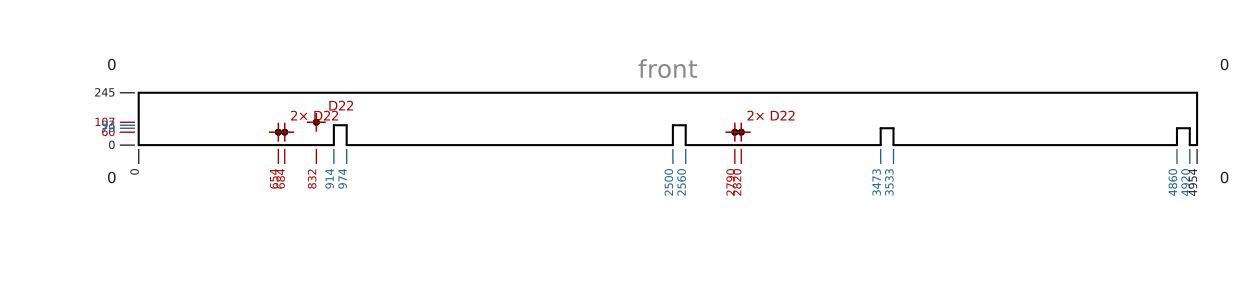
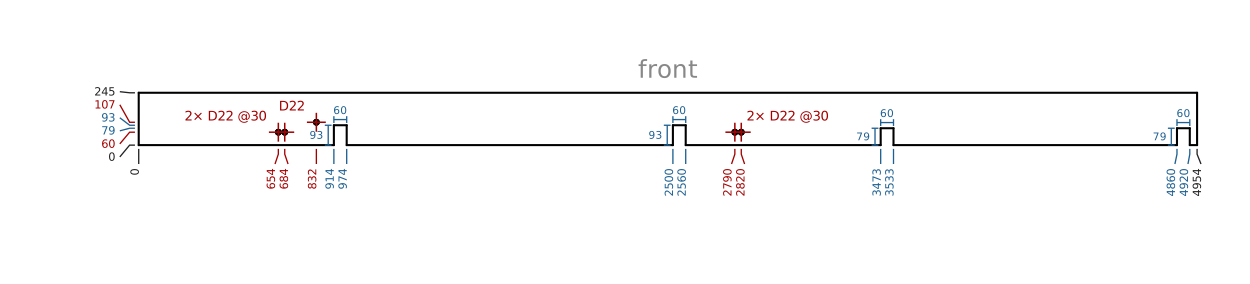
📏 Part drawings — the dimension numbers no longer print on top of each other. On a long part, features a few centimetres apart used to share the same spot on paper, and so did the heights of a part drawn only a few millimetres tall. On a real project that happened on more than half of the drawings. Now numbers that would touch are moved apart, and each tick bends towards its number, so every number can be read and still points to the right place. Nothing was taken off the axes. On top of that:
- Each rectangular cutout also gets its depth and its width dimensioned right on it.
- A set of evenly spaced drillings shows its pitch (2× D22 @30).
- Hole labels no longer overlap each other.
- A square end no longer prints a 0 at each corner.
Before
After
Drawings are redrawn the next time the panel is analysed.
🐞 Fixed — Part drawings: round shapes were drawn and dimensioned as if they were polygons, with a number at every small step of their outline. Now a drilling gets its centre and diameter, and a blind one also its depth in the side view. A slot gets both round ends, each with its centre and diameter. A round notch on an edge gets its radius, its centre (even when it falls on or outside the edge), where it starts and ends, and how deep it goes. A tube or round bar gets only its diameters. The facets of round surfaces are no longer drawn as lines. Stray angles such as 178° or 167° read off the outline of a hole are gone. A shallow cut, such as a pocket whose floor meets the face at a small angle, now shows the line that closes it. Drawings are redrawn the next time the panel is analysed. BoM reports: a wood that appears in several panels could be split over two tables in the Wood BoM and the Per-Design BoM, each with its own drawing, when it had been modelled turned the other way round in some of them. Tables now go by the part's shape, whichever way round it lies, so it is one table with all its units counted together. When the references disagree with the shapes, the row says so in red: this reference has more than one shape (its rows are in separate tables), or same shape as another reference (separate rows of one table). Part references: with automatic references, the same part modelled turned the other way round in another panel got a second reference of its own, and so a second row in every list. The shape now decides, whichever way round it lies (a mirrored part is still a different part). This applies to projects created from 26 September 2026 on; older projects keep the automatic references they already have. References that come from the model use the new rule in every project, so a part modelled turned round no longer splits the BoM there either. See: Management
2026.09.22
- 📱 App on your phone or tablet — produuz.it can now be installed like an app. In Chrome on Android, open the browser menu and choose Install app; on an iPhone or iPad, use Share → Add to Home Screen. It gets its own icon on the home screen and opens fullscreen, with no address bar and no browser buttons, so the whole screen is the panel you are working on. It is the same produuz.it and the same login — nothing to set up, and nothing changes if you keep using it in the browser.
- 🐞 Fixed — Viewer: at companies that work by date, a production account saw the date selector twice in the left menu — once beside the account button and again above the panel list, both moving together. Only the one above the list is left, which is the one that decides what the list holds. The same duplicate was in the logistics menu. On a tablet left open for a day or more, opening a detail, a document, a spec or a project drawing could show an empty page: the link to the file had expired and nothing asked for a new one. Those screens now get a fresh link on their own.
2026.09.21
- 🔤 Properties in texts — the text fields that take
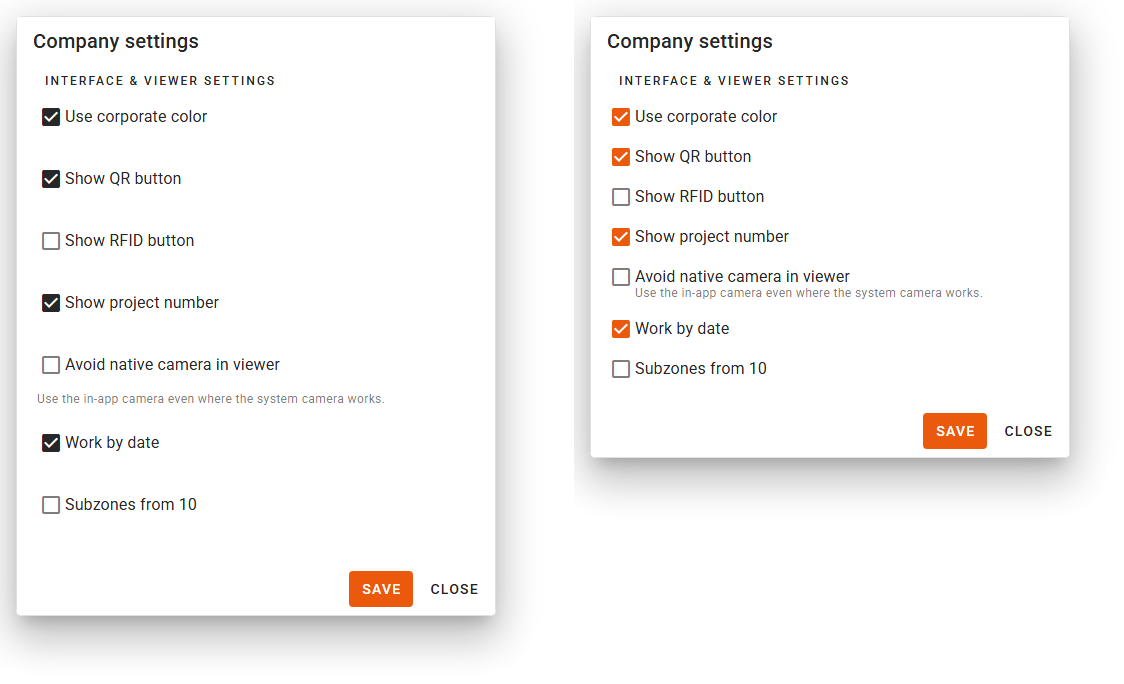
{property}names now tell you which names they take. Every one of them gets an Insert property button that lists what you can use and drops it in at the cursor: the viewer header, the viewer list hint and the custom constructibles column in Company → Viewer settings, and the part data fields and user attributes of the BTL, BTLx and BVX machine setups. The list is not only the built-in names — it also shows your own model properties, read from your recent panels, which is the half nobody could guess. The machine file fields also accept the names the panel fields use, so{super_project},{batch_name}and{phase_name}now work in both places. A field will no longer let you save a text whose braces do not close. And in the Automations trigger form, the design field box now offers your own model properties instead of asking you to remember them. See: Properties in Texts - 📸 Checklist pictures — a new company setting, Avoid native camera in viewer (Company → Viewer settings). Some companies manage their tablets with a policy that blocks the camera app, and when that happens the camera button opens the photo gallery instead, with nothing to explain why. Turn this on and the app takes the picture itself, without asking the device. It applies to checklist tasks and to notes alike. Leave it off unless you have that problem: the device's own camera is the better one where it works. See: Production Viewer
- 🔌 Webhooks — a new payload block, serialized_project, adds the project the event belongs to: your own project number, the client name, the super project and the start and delivery dates. Until now a payload named the project only by its produuz.it id, so matching an event to a job in your own system meant a second lookup. It arrives as
project__details, and it is left out when the event has no project. See: Integrations & Webhooks - 🐞 Fixed — Machine files: a user attribute written as
{super_project}put the words not found into every part of the BVX file instead of the super project name; unknown properties now come out empty, the same as in the BTL and BTLx files. Company settings: a mistyped text — an unclosed brace, or the{}the old help text suggested as an example — was accepted and then broke the viewer header, the viewer list and the constructibles table until somebody corrected it. Machine settings: twelve fields of the BTL and BVX setup forms were all labelled Split files by Profile Size, Use voids was filed under User Attribute 5, and Bench position opened empty instead of on its default. Viewer: the panel list was asking the server for the custom hint on every row even at the companies that do not use it. Webhooks: the delivery log painted successful calls red. Only a plain200counted as accepted, so an endpoint that answers201because it created a record,202because it queued the work or204because it has nothing to say filled the log with errors for calls that had arrived perfectly. Any2xxis a success now, both in the log and in the Last delivery column.
2026.09.20
- 📐 IFC Parsing Setup — a panel whose setup does not mark its top and bottom rails, or whose file carries no zones, could not be placed at all: its drawings came out in the coordinates of the IFC file, which for a roof element modelled on its slope means a flat projection at the wrong size, with every part in zone 0. produuz.it now works the panel out from its own geometry: the plane from the timbers, the length from which way is up, and the front face from what is on each side — battens go over the sheathing on the outside, a panel closed on one face has that face inside, and a sheet drilled with round holes for sockets and pipes is an inside layer. It draws as a panel again. Turn it on in company settings with Best effort panel orientation — it is off until you do, and it changes nothing for panels your setup already places. It is a best guess and the front face can come out on the wrong side, so marking the rails and the zones in the setup is what makes it certain. Machine files are untouched: they still refuse a panel they cannot place, because a guessed face would mean a mirrored panel on the machine. See: IFC Parsing Setup
- 🐞 Fixed — Part drawings: a long timber with a deep section — a rafter or a joist, anything from about 36 x 270 upwards — was drawn standing up instead of lying down, so it came out as a hairline down one side of the sheet with the rest of the page empty. Those parts are now drawn lying down, like every other one. The title on each drawing also showed a 32-character code instead of the short part reference used everywhere else, and the same long code reached the part tables of the cutting reports. Drawings are redrawn the next time the panel is analysed.
2026.09.17
- 🐞 Fixed — Login: on a computer or tablet set to dark mode, the login page drew its fields dark over the photo background, which left the boxes barely readable and the text hard to see. There is no theme switch before signing in, so the login page now always uses the light theme; your own choice of light or dark is untouched everywhere else. Checklist and notes: on a computer or a Windows tablet, the camera button opened the file browser instead of the camera, exactly like the button beside it. It now opens the camera on those devices too — and attaching a picture to a note uses the same two buttons as a checklist task, so the camera behaves the same way wherever you attach a photo.
2026.09.16
- 🔗 API — a new tutorial walks the whole flow end to end: send an IFC, generate its MOB v2 file and download it, with the exact payload for every call and what to wait for between them. It covers both ways of doing it — straight through the Mobfile Generator, which takes the IFC and hands back the machine file with no project involved, and the full project flow, where the IFC becomes a panel you can produce and report on. It is the question integrators ask most often, and the answer was spread over three separate pages until now. See: IFC to MOB2 file
- ⚙️ Production settings — the Part classes tab of the IFC parsing setup is now Custom part classes, and a class can do more than carry a name. Press Behaviours on it and say what parts of that class are left out of the panel measurements: the surface, the width, the height or the thickness, each on its own. The case it was built for is a placeholder layer — something modelled inside the panel that is not produced but takes up the space a real layer will. Ignore it in the surface, the width and the height, leave the thickness alone, and the panel keeps its real thickness while its surface stops counting a layer nobody built. Everything is off by default, so nothing changes until you turn something on, and each class row shows what it ignores without your having to open it. The Properties tab is now Part properties, which is what it always held. And in Hierarchy and project, the Names and Project sections are now one, Unit and project properties — they held the same kind of setting, and the old split put the phase and the batch outside a section called Names while the module id sat inside it. Nothing moved: the same six properties, in the same order, in one place. The IFC parsing tutorial has been rewritten around the seven tabs, in the order you actually set them up in. See: Custom part classes and Setting Up IFC Parsing
- 📐 IFC Parsing Setup — the separate BTL Parsing Setup is gone, along with its entry in the project settings: BTLx files have been read with the IFC parsing setup for a long time and the BTL one was no longer used by anything. And two things that used to be part categories are now custom part class behaviours: Ignored Part is now a class with Ignore this part completely, and Hidden Material a class with Hide in the 3D viewer. Your rules were moved across for you, so nothing changes in what you see. The company checkbox Hide hidden materials in 3D goes with them: each setup now decides for itself. A part can also belong to several classes at once and takes the behaviours of all of them. See: Custom part classes
- 🌳 Custom part branches — a branch now has a second switch, Counts in the panel measurements. A branch is recognised before a part falls back to timber or plate from its category, so a part your setup knows perfectly well — a window frame, a cladding profile — could end up with no category, and a part with no category was outside the panel width, height, thickness and surface, with nothing saying so. Turn the switch on for cladding and frames that are really part of the panel; leave it off for brackets and connectors that stick out past the frame. It is off by default, so nothing changes until you tick it. Which measurements the part is then left out of is still a custom part class job. Worth knowing either way: these measurements are not only a report figure — your rack loads are drawn from them, so the width decides how many panels fit in a rack row and the thickness how deep the stack builds. See: Custom part branches
- 🐞 Fixed — Panel measurements: nail lines, saw cuts, drills, milling and glue were measured as if they were part of the panel, so a saw mark hanging below the bottom rail made the panel read taller than it is, and marked areas reaching past an edge made it wider. They describe what a machine does, not what the panel is made of, and they no longer count towards any panel dimension or area. Each design picks the corrected numbers up on its next analysis. Notes: raising a note on a module never worked. The form took it, the save came back with a technical error and the app errored on top of it; nothing was ever created. Module notes are now saved on the module, they show up on it, and the link in the message sent with them opens the module instead of a page that does not exist.
2026.09.15
- 🧩 Parts list — a Name column, and you can search and sort by it. The name is now yours to decide: in the parsing setup, Part Name says which IFC property holds it, and left empty it keeps reading the name the IFC element carries, exactly as before. What the IFC file itself called the part is still kept and still visible, as its own optional column and in the part panel. See: IFC Parsing Setup
- ⚙️ Production settings — the Part Name property in the IFC parsing setup, so the name shown in the parts list, the reports and the machine file templates can come from the property your exporter actually writes. It does not change how parts are classified: the category and branch rules keep matching the raw IFC properties. The documentation now also spells out how the Zone property reads a layer written with a letter —
F1,F2on one face andB1,B2on the other — where theBis what makes the zone negative. The assembly filter is back, and it now has two lists: Split only these assemblies keeps what you name and leaves the rest of the file alone, and Never split these assemblies drops what you name even when the first list keeps it. Both lists apply to the new hierarchy splitter as well, which ignored the filter until now. Leave them empty and every assembly is split, as before. And every rule and every property name gains a Read from a specific property set box, for when the same property name exists in two property sets with different values: name the set to read, or tick it and leave it empty to read only the IFC element's own attributes. The editor's tabs are reordered to follow the order you set things up in, starting with Hierarchy and project, and two of them are renamed to say what they hold: Panel Part Categories and Steel Cage Part Categories. The whole guide has been rewritten around the editor, with every setting documented and reachable from its own (i) button. See: IFC Parsing Setup - 🔌 Webhooks — a webhook can now react to several events at once, so one endpoint no longer needs a row per event repeating the same URL, secret and headers. Your existing webhooks keep exactly the event they had. A new event, station start, fires when an operator starts a station, not only when the station is finished. Calls are now made in the background, so a slow endpoint of yours can no longer hold up the tablets on the shop floor — expect the call a few seconds after the event, and do not rely on the order of two events raised together. The webhooks table gains a Last delivery column: green when the last call was accepted, red when it was refused or got no answer, and clicking it shows the last 20 calls with their status, how long each took and the error. Until now a webhook could stop working and nothing anywhere said so. Records are kept for 30 days. The documentation now lists every event and every payload block, with an example of what your endpoint receives for each one. See: Integrations & Webhooks
- 📸 Checklist pictures — attaching a photo to a checklist task now takes one tap. The camera button on the task row is the camera: it opens your device's own camera app, you shoot, you confirm, and you are back on the checklist — which never leaves the screen any more. On a computer it is one Add photos button, and you can also drag files onto the task or paste a screenshot into it. The task ticks itself once the photo is stored, unless it is still waiting on a form or a QR code; you can always untick it. Photos now show as thumbnails on the task, they stay visible after you tick it, and tapping one opens it full size — until now you could not look at the photo you had just taken without unticking the task first. Photos taken before this get their thumbnail the first time you open the panel, so an old panel with many pictures fills in over a couple of visits. And the photo is kept exactly as the camera took it, at full resolution: it is the quality record of the panel, so nothing is shrunk. If an upload fails you are now told, and the task stays unticked. See: Production Viewer
- 🪪 Who is working — the checklist pictures now record who uploaded them. You see it on the panel, in the Production Proof card of the constructible detail page, and in the Quality Control Report, under each picture. It is kept apart from who ticked the task, because the person taking the photo is often not the one checking the box. Pictures uploaded before this say No author recorded rather than borrowing a name. See: Quality Control Report
- 🐞 Fixed — Constructibles: on a single panel's page, Proof options → Set ready and Merge checklist did nothing at all — the dialog closed as if the panel had been marked ready and nothing changed. Both now work from the panel's own page, and no longer report success when there is nothing to act on. Issues: an issue raised with parts attached printed Name: undefined for every one of them. Machine files: a steel part whose IFC name was empty could take the DSTV NC file down with it. Checklist: a failed picture upload said nothing at all — it looked exactly like a successful one until you found the checkbox dead — and it could delete other photos that happened to share a file name. Leaving the checklist with the camera open left the camera running until the app was reloaded. The camera panel was also wider than the panel it sat in on most screens.
2026.09.04
We keep our efforts on performance improvement:
- ⏳ Loading — the app downloads about 3 MB less on a fresh open, which is most of the wait on a workshop tablet: the icons were being fetched four times over, in four formats. They now ship with the app and work in Android with no connection.
- Checklists: starting a panel with earlier stations unfinished did part of the work twice. We batched requests to server when several stations where being set as ready at once.
- Webhooks: one pointing at a server that never answered could hold the app up for a minute and a half; calls now give up after ten seconds.
- Web service cleanup: We finished a job of code and dependencies cleanup that makes our backend significantly faster. This can be seen in the loading speed when switching projects.
User-facing changes:
- 📦 Part batches — the view is now in the project menu too, listing only that project's batches. Same filters, panel and actions as company-wide. See: Logistics
- 🧰 Kitted parts — the production list now shows which panels can be built. A panel with parts still to cut says how many are missing, and reads Kitted parts once they are all ready. Both Constructibles lists gain three columns: Status, Kit (a sortable fraction of the material cut) and Delivery status. In Company settings, Kitted parts now offers Off, Manual and Automatic (recommended). On Manual, the logistics table offers to mark a panel when its last part is cut, and every panel in the logistics menu shows its progress with a one-tap mark. Starting a panel with parts missing shows a warning with the count, and never blocks you. The dashboard gains a Ready to build chart per production line. See: Logistics
- 🚗 Constructibles list — a Rack load column in both lists, naming the rack a panel is planned onto and its position on it. For companies that plan racks.
- 🚚 Delivery — a screen of its own next to Logistics and Production, for a tablet at the rack. The left menu lists your rack loads with a bar showing where their panels are, filtered by All, To load and To deliver; All projects lists every rack the company owes, soonest first. Open a rack and every panel has three buttons — Not loaded, In rack, Delivered. Along the bottom: unload all, load all, all delivered, and Edit for managers. A rack load now carries a delivery date, which orders the list, decides what is late, and is printed on the sticker. With a rack open, scanning a panel's QR marks it in the rack. See: Delivery & Racks
- 🔒 Rack setups — a setup now says which rows are strapped to its frame: a flat bed straps nothing, a single-side rack its first row or none, an A-frame A0, B0, both or neither. The form's diagram shows it as you pick, and the padlock appears in Delivery, the drawings and the stickers. Existing setups keep their marks, except flat beds, which now mark nothing. See: Delivery & Racks
- 🚚 Logistics — the parts table now uses its width properly: columns fit their content, and a column that reads the same on every row is written once above the table instead, usually Material. The view is laid out like the panel viewer, with the table on one side and a toolbar column beside it holding the part batch, search, sorting, columns, Set all parts ready and the view's messages — a bottom bar on a phone. Start production on parts already being cut now opens that batch and resumes it if paused, instead of refusing. Select from report only appears when the project has a final report. See: Logistics
- 🐞 Fixed — Logistics: the Mark kitted button logged a warning on every render; a part batch could be picked but never cleared. Machine files: files launched in bulk through the API ignored your job settings. Machine settings: a setup could be given another company's machine; names were capped at 22 characters; generic plates machines were not counted against your licence, which is now only checked when you change the model. Delivery: opening a rack from its sticker loaded every drawing in the company first, and drew every panel at a placeholder size. Dates: date fields could be set but never cleared. Menu: accounts with view-only or no rights were shown the whole management menu, which then refused them at every entry. Production Counts: switching project briefly showed the previous project's numbers. Monthly report: the quota report was emailed every half hour for a whole day; reports are now sent one company at a time, never twice for the same month, and a task that keeps failing is reported instead of retried forever.
2026.09.03
- 🐞 Fixed — User accounts: a company with more than 100 people saw some accounts listed twice and others not at all — the list is fetched a page at a time and the pages had no fixed order.
2026.08.25
- ⏳ Loading — Updated project loading UI and behavior.
2026.08.24
- New: overhang on a rack. Panels sit centred on the rack, so a row wider than the rack sticks out at both ends. Each rack setup now says how far that may go, with a Max overhang per end, and each row is coloured for it: green while it fits, amber while it hangs over within the allowance, red past it. The drawing shows it — the frame is drawn at the rack's real length and dashed guides mark where it ends. Setups left at 0 behave exactly as before. See: Delivery & Racks
- Improved: the rack load editor is a normal dialog instead of a fullscreen page, and its columns are ordered the way the work is done: load details, panels to load, the rack. See: Delivery & Racks
- 🔢 Production Counts — when the quantities you saved name designs or batches that have been deleted since, the Generate dialog lists them and says they will be discarded. Pressing Generate drops them and creates the rest. Batch and phase names can now hold dots, so a batch can be called 1.2: the dot has to sit between characters, so a name cannot start or end with one. See: Quantities
- 👤 User accounts — one account is used by several people, so the records could only ever say which tablet did the work, never who. Every account now has a list of production employees: the people who may work under it. Adding one does not mean creating a login — leave the username empty and you get a person with a name, an alias and no password, who can be named on the work but cannot sign in. Every account also gets an alias, the short name the factory calls that person by, which starts as their current username and is the name shown everywhere from now on. The users table is now User accounts, with the alias first and a key marking who can log in. See: Company settings
- 🪪 Who is working — in the viewer, the account button and the checklist show which employees the work is being filed under, and Change employees in the account menu picks them. Several at once, because two people work at one station and a task is often done between them. Completed checklist items keep the aliases and the time, so a panel's history is readable on the shop floor. The same indicator is in the material declaration dialog, so you can fix it before closing a part batch. Accounts with a single employee never have to choose. See: Viewer
- 🔌 Webhooks — a new payload block, employees client ids, sends your own ids for the people an event belongs to, falling back to their alias when they have none — one entry per person either way. Employees sends the same people as full rows (alias, name, client id). The two rack load events can finally be picked from the form, and are now called rack load ready and rack load delivered. See: Integrations & Webhooks
- 🐞 Fixed — Production Counts: generating could fail every time with no explanation, leaving the project stuck, when the saved quantities pointed at a design or a batch that no longer existed. Renaming a phase emptied its whole column: the saved quantities name the phase they belong to, and only the phase itself was renamed, so every number of it was left behind under the old name. The numbers now move with the phase, together with the template applied to it. Typing a batch or phase name with a number in it sent the number to the quantities matrix instead of the name field, and the check icon beside the name did not save it, so the name could only be confirmed with Enter. Delivery: the rack frame was missing from the drawing when a rack was opened by scanning its sticker or from the rack button in the viewer, so there was no way to tell which row was strapped to it. Checklists: Merge checklist did nothing to the items a panel already had, so a task that had since been set to require a picture or a form kept the old setup until the panel was flushed; it now updates them without touching what the operator had already completed, and no longer re-rolls the tasks that are only checked on a fraction of a batch. Company settings: the employees picker in the Django admin listed the users of every company. Integrations: the production events endpoint returned the events of every company, not just yours. Dashboard: today's timeline showed no name against a completed station task. Chat: the send icon did nothing, so a message could only be sent with Enter.
2026.08.18
- Fixed: a bug that was crashing analysis and some files.
2026.08.17
- Updated: Delivery & Racks
- New: two webhook events, rack load loaded and rack load delivered, carrying the load, its rack setup and every panel with its position. See: Integrations & Webhooks
- Improved: the panel sorting dialog of a batch can now sort by rack loading. One button arranges the panels the way their racks get loaded, and every panel shows a chip with its rack and its position on it. See: Delivery & Racks
- Improved: The rack sticker was redesigned.
- Improved: QR codes in sticker PDFs are clickable.
- Fixed: Logistics stock declaration updated according to clients feedback.
2026.08.15
- 🧩 Parts list — the part detail panel gains two sections. Branch tells you why the part landed in that branch: its category, whether it is a built-in branch or one declared in the project's parsing setup, and for custom ones the material it behaves like, whether logistics is enabled and the rules that assign it. Part batch shows the batch status, production line, priority, scheduled date, progress and who started it, and warns when the batch belongs to another project. Filters react immediately instead of after a second, the size filters no longer reload the whole size catalogue on every change, and the part batch filter now works company-wide, without having to pick a project first — a part batch belongs to the company and may span projects, unlike a phase or a batch.
- 📦 Part batches — clicking a part batch name opens a panel on the right with the whole batch: status, production line, project, progress, times, its parts, and its work sessions with the material declared as returned. The actions (open in logistics, pause or resume, finish, reopen) moved there from the row, so pause and resume now work outside the viewer, and the production line can be corrected there — until now it was only ever set when the batch was started. A part batch has its own address and can be linked to. See: Logistics
- 🖥️ Viewer — with a project selected, one control in the left menu decides what the list shows. Closed, it names the phase and batch you are working on and how many of their constructibles are ready, a count that turns green once they all are. Tap it to pick a phase or a single batch, or use the arrows to step to the previous or next batch. The Production / Design buttons and the switch that hides finished constructibles now live inside it. See: Viewer
- 🧱 Sizes and Materials — "Stock products" is now called Sizes and Materials, which is what the view holds. The old address still works.
- 🔌 Webhooks — they are configured in Automations now, next to the other actions that run on their own, instead of in Company settings. One webhook can be assigned to several production lines, or to every line through a "Fire on every production line" switch that also covers the lines you create later. Leaving the list empty no longer means "every line" — the webhook simply does not fire, and the form tells you so. Your existing webhooks keep working exactly as before. See: Integrations & Webhooks
- 🐞 Fixed — Parts list: sorting by Material, Profile, Length, Weight, Revision or Part Batch failed, a removed sort stayed applied, the first load ignored the selected project, a name containing characters like & or # broke the search, the selected projects were never shown in the picker, assigning a part batch to many parts fired one request per part and could hang the dialog, the part detail could crash for parts with no design, and the Length, Weight and Start columns were always empty. Constructibles: starting a panel or module that cannot be started — most often because its batch has no production line — now says so on screen with the actual reason, instead of reporting "Panel started!" in green while nothing had happened, and reading another company's panels and modules by passing their project id is no longer possible. Viewer: companies that do not work by date no longer get a date selector that does nothing while the option that does work stays hidden, production workers working by date no longer get a switch with no effect, the options there are translated instead of always being in English, and the production date no longer jumps back to today every time you return to the viewer. Files: the Help option in the file operations menu led to a page that does not exist, and now opens the project build tutorial. See: Build a project
2026.08.13
🎉 A frontend refactor release. Several of the views you use every day were rebuilt, so they look and work differently. Below: which views changed, what is new in them, and the fixes that are not part of the rebuild.
🏗️ Views rebuilt
- 🧩 Parts list — company-wide and inside a project.
- 🚚 Logistics list. See: Logistics
- 🔢 Production Counts. See: Quantities
- 📄 Files, now split in two: Production files (by machine and line) and Management files (office documents), in a project and company-wide, replacing the Reports tab. See: Reports
- 🏭 Production Settings — one card per production line, with its stations, machines and checklists. Production lines and Production stations are a single view now: each line is a row with its stations inside, in the order the line runs them, rows can be collapsed, and a station used by more than one line appears in each of them, marked as shared. Lines are grouped by what they build — modules, assemblies or parts. See: Production Lines
- 🖥️ Viewer — two views instead of three, switched with a chevron button in the toolbar rather than the floating box of buttons that sat over the drawing. Extended (drawing plus right panel) is the default on big screens, standard gives the drawing all the width, and your choice is remembered. See: Viewer
- 🧭 Left menu, grouped in sections. Company: Settings, Files, Constructibles, with the Dashboard first and the Mobfile Generator in Files. Project: Designs, Constructibles, Files, Production, Settings. See: Mobfile Generator
- ⚙️ Projects Settings — phase templates moved here, as an expandable table. See: Quantities
🧩 Parts list
- New: a column picker with three presets (production, logistics, all), and it remembers your choice. Material and Profile are a single column that warns when the database and the IFC disagree.
- New: totals for everything the filter matches — parts, linear metres and weight, broken down by branch — not just the page you are looking at.
- New: export to CSV respecting the filters, and the whole filtered set can be selected at once to assign it to a part batch in one go.
- New: filters are kept in the address bar, so a filtered list can be shared, bookmarked and survives a refresh. Active filters are shown as chips you can remove one by one, with a button to clear them all.
- New: company-wide, the list shows which project each part belongs to, and lets you filter by phase, batch and part batch as soon as you pick a single project.
- New: parts that hang from no panel or module are shown, marked as orphans, instead of being invisible. They should not exist, so finding them is the point.
🚚 Logistics
- New: 📦 part batches are the unit of work in the logistics view. Pick the batch somebody prepared for you, or start production on what you have on screen and the batch is created for you. Pause it when you step away, finish it when the parts are done — the time worked and who did it are recorded. Until it is started the ready counters stay locked. See: Logistics
- New: when a batch is finished, a form asks for the material that goes back to stock — whole bars or sheets, remnants, scrap and where they are left. Bar lengths and sheet sizes that are not in your catalogue yet can be typed in and are saved for next time. See: Logistics
- New: a Part batches view in the company menu, with the status, progress, times and declared material of every batch, and buttons to open, finish or reopen them. See: Logistics
- New: sort by clicking any column, and the list opens with the longest parts on top, ready for the saw. Zone and reference sort naturally, so Z2 comes before Z10. A Sort menu offers longest first, reference A-Z, pending first and zone then reference, and lets you switch between grouping by zone and a flat list. Your choice is remembered. See: Logistics
- New: a search box, a "hide completed" switch, columns for material, pending parts and progress, per-zone and overall totals, and a column picker. See: Logistics
- Improved: "Set all parts ready" asks for confirmation, says how many rows and parts it will change, applies only to what the list is showing, and does it in a single operation instead of one per row. See: Logistics
🔢 Production Counts
- New: fill in the matrix from the keyboard. Arrow keys, Tab and Enter move between cells, typing a digit overwrites the value,
+and−step it,Ctrl+Dcopies the selected number down the column, and you can paste a column straight from Excel.Ctrl+ZandCtrl+Yundo and redo — a fill-down or a bulk change undoes in one step. A help button lists every shortcut. See: Quantities - New: it saves by itself a couple of seconds after you stop editing, and the toolbar shows whether your changes are saved. See: Quantities
- New: a status bar with the project target, what you have assigned, the total area and how many designs do not add up. "Balance all" spreads the difference for you and shows exactly which designs it will change before doing it. Each unbalanced row also has its own button to balance just that row. See: Quantities
- New: "Recover totals" rebuilds the project targets from the splitter counts, showing each design, where its number comes from and what would change before writing anything. See: Quantities
- Improved: ⚡ much faster. On large projects the matrix used to take up to half a minute to appear and freeze for about a second on every number you typed; both are now practically instant. See: Quantities
- Improved: the phase and batch matrices are chosen with two buttons plus a phase picker, and the choice is kept in the address bar, so reloading or going back no longer drops you back to the phase matrix, and you can bookmark or share a phase. See: Quantities
- Improved: the bulk operations are gathered in one "Bulk" menu, which separates the actions that change your plan from the ones that change the project targets. Clearing the targets keeps the splitter counts, asks for confirmation, and can be undone with "Recover totals". See: Quantities
- Improved: the Generate dialog shows the impact as two figures — units to create and units to delete, with the number of batches each affects — and lists the detail grouped by phase. When phase and batch quantities do not add up, it lists exactly which designs and phases are off and by how much. See: Quantities
- Improved: generating constructibles is much faster on large batches, and it is all-or-nothing: if it fails, no half-generated units are left behind. See: Quantities
- Improved: Reset asks for confirmation, because it deletes the quantities saved on the project. Hovering the target figure shows which IFC file each part of it came from. See: Quantities
📄 Files and documents
- New: file generation templates — save a set of files you always create together and generate them in one action. Managed in the new File settings view, in the Files section of the menu, and you can also create one on the spot from the Run template dialog. See: Reports
- New: File defaults. In File settings you can set the options each type of document opens with — cover page, grouping, table style, paper size and the rest. Every new file of that type starts from your values instead of the system ones, including the ones created from a generation template. Files already created keep the settings they were saved with, and a Reset button puts a type back to the system defaults. Machine files keep their defaults on the machine setup, as before. See: Reports
- New: the Custom BoM can be created now. It had a form and settings but was missing from the document type list.
- New: the project files list shows which design each file belongs to, with a link to open it. Details and specs show how many designs use them, and project IFCs how many designs they produced. Files naming a design that does not exist are highlighted.
- Improved: the file type list only offers formats your machines can produce.
🤖 Automations and automatic drawings
- New: drawings can be generated automatically. Save a drawing setup — which views, one drawing per zone, whether the framework is included — and either run it by hand on the designs you pick or let an action trigger run it every time a design finishes its analysis. Setups live in Automations, next to the machine file ones. See: Production Lines
- New: the drawings card of a design shows whether generation is running or failed, warns when a newer IFC arrived after the drawings were made, marks the outdated ones, and has a button to generate them again. Whoever launched a run gets a message if it fails.
- Improved: action triggers honour the "Only if" condition, so a trigger can be limited to some designs instead of running for all of them. Triggers that generate MOB files also work now: they were saved and fired but never produced a file.
- Improved: "MOB file actions" are now "Machine file setups", one of the two kinds of setup an automation can run, and each generated machine file records the settings it was built with.
- Improved: the trigger and machine file setup forms explain what they do. A trigger reads as three steps — when this happens, only if, then do this — with the events and actions written out as sentences instead of internal names. See: Production Lines
🏭 Production settings
- New: machine setups have their own view, Machine settings. See: Production Lines
- New: stations are reordered by dragging them, and the new order is saved as soon as you drop the card. Each line keeps its own order, also for stations shared by several lines. See: Production Lines
- New: a station can be added to a line from the line itself, choosing among the ones that are not in it yet, including those with no line. Stations belonging to no line are listed at the end of the view. See: Production Lines
- New: deleting a station asks whether to remove it only from that line or to delete it from all of them. See: Production Lines
- Improved: a machine's parsed configuration file is shown as readable JSON instead of a long list of blocked fields, and it records when the file was read. See: Production Lines
- Improved: machine setups can be duplicated from the card, like production lines and stations, instead of having to open the setup first. See: Production Lines
🎨 Around the app
- New: the project selector can show the project number above the project name. Turn it on in Company Settings > Interface settings; it also adds a search box to the selector and shows the number in the views that mix projects. See: Company Settings
- New: the viewer's extended view shows the panel checklist at the top of the right panel, with the drawing underneath, so you can tick tasks off without opening the checklist dialog. See: Viewer
- Improved: the corporate color is used as soon as you register it, and the switch to turn it off sits next to the color picker instead of being hidden in the company settings. Scrollbars follow the corporate color too, also in Firefox. See: Management
- Improved: 🌍 Spanish, Dutch and Polish translations completed. The dashboard, production settings and the new file views no longer fall back to English.
🔌 Integrations
- New: the material sizes endpoint can return quantities. A purchasing or ERP integration can ask for the material of a project, a part batch or a set of panels and get how many parts of each cut length or plate size are needed, with the totals, instead of downloading every part to add them up. Replaced and deleted parts are not counted. See: API v2
- New: those material endpoints also accept a project, so material can be asked for by project instead of listing its panels. See: API v2
- New: two webhook events,
part_batch_startandpart_batch_ready, carrying the batch, its session (times, pauses, parts marked ready, material returned) and the sizes it covers. See: Integrations
🐞 Fixed
- Quantities: unsaved Production Counts quantities were silently reverted a few seconds after any change in production, Generate deleted your saved quantities before it knew whether it had worked (and said nothing when it failed), cloning a batch never copied its quantities and left the new batch empty, the project target could be counted several times for designs with more than one revision or drop to zero when a design had no target, project targets were never filled in after splitting an IFC, clearing the targets also destroyed the splitter counts they are built from, splitting a second IFC into a project erased the phase and batch split of the first one, and loading quantities from the project splitter could write them into another phase's batch.
- Documents: reports of different types for the same project overwrote each other when unzipping a downloaded bundle, several document options were generated with a different value than the form showed (no cover page, no part drawings, grouped by selection instead of by batch, wrong table style), changing the document type kept the settings of the previous type, changing the file type cleared the selected machine and left the file with no options to fill in, and switching type quickly could show the options of the previous type.
- Automations and drawings: an AUTO MOB v2 file with no setup selected failed with a generic error, generating drawings launched one analysis per drawing, a drawing's number changed meaning when a zone disappeared from a design (so a new drawing overwrote an unrelated one), drawings that no longer belonged to any zone were left behind looking current, the MOB file action picked in an action trigger was never saved, and the trigger form offered design properties that could never match.
- Part batches: deleting a part batch deleted its parts instead of just ungrouping them, part batch times were not recorded anywhere, and a project id could be used to read another company's production proofs.
- Elsewhere: in the checklist the last stations were cut off with no way to scroll to them when a production line had many stations, two people saving different company settings at the same time discarded each other's changes, saving the corporate colour reported success even when it had failed, another company's panels and modules could be read by passing their project id, password recovery did nothing at all — the request never left the browser, so no token was ever sent and the screen gave no error, on the login screen every sign-in button spun at once when you used any of them, so you could not tell which method was running, and in the document material picker the lengths were sorted as text instead of by size, so 700 came after 4700.
2026.07.23
- New: projects can have an engineering contact (name, phone, email), managed in company settings and shown to production staff in the issue panel. See: Company Settings
- New: webhooks can include custom payload fields, added to the request body alongside the standard data. See: Integrations & Webhooks
- Improved: the app works much better on phones: overlay side menu, full screen dialogs, adapted forms and menus. Desktop and tablet unchanged.
- Improved: the Android app no longer needs photo library access; photos go through the system picker.
- Improved: the upload button in the files view now shows a loading indicator while the project's files are being fetched.
- Improved: project file upload only accepts the file types of the selected category. Wrong-type files are skipped with a warning.
- Improved: the project files list loads faster, especially right after uploading a large batch of files.
- Fixed: uploads over 100 MB failing before starting, hidden lines in part drawings looking solid where edges overlap, the side view of timber parts showing the wrong end, and the upload button staying disabled when the file list failed to load.
2026.07.06
- New: an IFC Parser license type. Companies can assign it to users, who then sign in to ifc.prefabmatrix.com with their produuz.it account.
- New: sign in with your Google or Microsoft account, or link one from your account settings.
- New: a Dashboard for managers with a weekly chart of panels marked as ready, one line per production line, over 12 weeks. See: Dashboard
- Improved: with "Select by Part Batches", the materials and plate sizes selectors only list materials of the chosen batches.
- Improved: BTL/BTLx parsing and generation is more robust, with clearer messages when a file fails.
- Improved: MOB2 multiple updates.
- Improved: the Android app is no longer locked to landscape — the screen now rotates with the device.
- Removed: the beta Panel Spec Parser tool has been removed from the Tools menu in favor of ifc.prefabmatrix.com.
- Fixed: the loading screen getting stuck on start, the Accessories BoM report coming out without accessory tables, unfiltered materials and plate sizes lists in the report dialog, and wrong timestamps in the Mobfile Generator files list.
2026.06.22
- New: a "Tools" section in the manager menu, with the Mobfile Generator and a new Panel Spec Parser. See: Mobfile Generator
- New: company setting "Launch analysis automatically". When disabled, analysis only runs when started manually. Enabled by default.
- New: phase templates — a reusable set of batches with name prefixes, applied when creating a phase. See: Quantities / BoM Matrix
- New: in the matrix, add the panels for the current module counts in one click — only phase totals or also batches, without doubling on re-run. See: Quantities / BoM Matrix
- New: the matrix can auto-allocate each design's count into the batch whose prefix matches the design name. See: Quantities / BoM Matrix
- Improved: numeric Parsing Setup values that indicate a "back" reference (containing "B"/"back") are now read as negative.
- Improved: drawings of generic (proxy) elements use a consistent orientation. Sloped and short proxy parts are recognized and rotated correctly.
- Improved: plate front drawings with non-rectangular contours are reliably oriented with a 90° corner at the bottom-left.
- Fixed: TOP/FRONT arrows on wood side views pointing at the wrong faces, slow response when many users connect at once, client info overlapping the divider on Dymo QR labels, wrong module numbers when loading splitter counts into the matrix, and wrong drawing counts in the designs table.
2026.05.20
- New: wood parts with cutouts open in an interactive 3D view from the logistics view. See: Logistics
2026.05.19
- Improved: multiple fixes and updates for part drawings.
- Improved: the Mobfile Generator preselects the default IFC Parsing Setup and the first line with a machine.
- Improved: the 3D viewer shows a loading indicator with parsing percentage and progress across models.
- Improved: the logistics view is much faster when picking panels and branches — branch and size lists come from data already on screen.
- Fixed: unclear errors when deleting a report mid-generation, zone drawings failing to load as PDFs, drawing counts including auto-generated drawings, a crash when opening the files panel right after a background delete, the Mobfile Generator ignoring default job options and its download links expiring, a crash when submitting an issue from the 3D viewer, and workers unable to complete checklists on panels whose production line had changed.
2026.05.12
- New: the design drawer now shows whether a design has auto-generated drawings, with a button to clean them. The same clean action is also available in bulk from the designs table under "Launch action".
- Improved: cleaning auto-generated drawings refreshes the design's drawing count so the table stays in sync.
- Fixed: an error that could prevent deleting assemblies, batches or designs when older duplicate part records were lingering in the database.
2026.05.11
- New drawing engine for part drawings and panel auto generated drawings.
- Multipanel groups: Auto DWGs, checklist and other small updates. See: Multipanel Groups
2026.05.09
- Improved: Multipanel updates. See: Multipanel Groups
- Improved: QR Sticker labels now print a short panel ID next to the QR code, so workers can identify a panel by eye without scanning. See: QR Stickers
- Improved: part drawings show hidden details (drillings, cutouts, corner cuts) as dashed lines, are now vector graphics, and each part gets a combined multi-view sheet.
2026.04.28
- Improved: Multipanel updates. See: Multipanel Groups
- Improved: Table actions, PL editor. See: Production Lines
- Improved: in the 3D viewer, when a selected part exists in the database but has no design record, the right panel now shows a clear notice so you know why drawings and metadata are unavailable.
- Improved: the Force Analysis dialog now offers an option to also regenerate part designs information and drawings, useful when you need to rebuild drawings even if the design hasn't changed.
- Improved: saving an IFC Parsing Setup already used by projects offers a "Save without launching analysis" option.
- Fixed: report form crashes on missing production line references, report files stuck in "running", the upload button blocked for up to 45 seconds, switching to a station shared by several lines landing on the wrong one, stale part drawings in the 3D viewer, missing side and top drawings for angled end cuts, wrong coordinate frame in automatic assembly drawings, and BoMs including a whole Multipanel Group when only some panels were selected.
2026.04.17
- New: Multipanel Groups — lock a group to report it as one panel: correct full-width rail lengths in BoMs and one MOB2 file per group. See: Multipanel Groups
- Improved: the report form marks multipanel assemblies with a group chip, and "Force multipanel selection" picks the whole group at once. See: Multipanel Groups
- Fixed: the batch name showing as "None" in BoM report headers instead of the actual batch, browser autofill dropdowns appearing on form fields throughout the app.
2026.04.14
- Fixed: the Mobfile Generator no longer shows job options for non-MOB2 machine formats, a rare database deadlock that could occur when multiple workers processed assembly parts simultaneously.
2026.04.13
- Improved: production lines can now have multiple client IDs, allowing a single line to be matched from different external systems. See: Production Lines
- Fixed: race conditions failing design analysis, the API schema endpoint failing to load, part drawings failing for complex wood geometry, and a crash on the files page with an empty search field.
2026.04.09
- Improved: Spanish, Dutch, and Polish translations updated to cover all missing keys.
- Fixed: an error that prevented Mobfile Generator jobs from starting when files were uploaded, missing section drawings for plates in the plates BOM report.
2026.04.03
- Improved section drawings for wood parts: corrected orientation and added TOP/FRONT face indicators for easier interpretation.
- Improved database performance for large projects with many parts.
- Fixed: report crashes when a report was deleted mid-job, errors opening checklist packages from several devices, login errors after an expired session, PDF/IFC files failing to load after 10 hours, an error when uploading with no files selected, and parts not highlighting in the 3D viewer.
2026.03.25
- Fixed visibility of parts linked to older PartDesign revisions in the viewer, logistics view, and material sizes list.
- Improved analysis reliability: individual part failures no longer block the full analysis, and the minireport now flags IFC vs. registered data discrepancies.
- Improved size sorting in logistics view (by material, shape, then dimensions) and removed empty sizes from the list.
- New: production users with logistics tipos can now access the logistics view directly from the production interface, filtered to their line's configured branches.
- New: part drawings can now be opened in fullscreen from the logistics view, with zoom and pan support.
- Improved PDF page navigation buttons in the viewer.
- Fixed issues in BTLx and DXF generation for certain projects.
- Fixed a crash when a design was deleted while its analysis was still queued.
- Fixed unnecessary re-analysis when adding PDF drawings to a design.
2026.03.24
- New: production lines now support a "Client ID" field, allowing ERP systems to match orders to lines by an external identifier instead of relying on exact name matching.
- Fixed an issue where production users could not load list hints in the viewer.
2026.03.19
- Documentation: full docs site update — guides for Viewer, Reports, Machine Files, Planning, Logistics, Issues, Stock, Quantities, Forecast, Integrations and Account. All placeholder pages completed.
- Fixed an issue where part drawing generation could crash for certain wood parts with unusual geometry.
2026.03.18
- Improved rendering speed of large production lists (100+ items). Scrolling is now much smoother.
- Fixed an issue where the priority indicator (e.g. "3/15") in production lists could show an incorrect maximum when mixing panels from different dates.
- Panel and module statuses now refresh automatically during a session, so you always see the latest production status without reloading.
- PDF report headers now show a cleaner 2-row layout with Date, Status, Batch, and Project.
- Fixed an issue where reports could show an incorrect total openings area when a wall contained more than one window or door.
- Several fixes for production excel.
- Fixed an issue where reports could be incorrectly flagged as having an outdated IFC when design files (not IFCs) were updated on designs that were initially created without an IFC.
- Fixed an issue where webhooks were not triggered when marking panels as ready using the "Set all stations as ready" bulk action.
- Fixed an issue where part drawing generation could fail for certain wood parts.
- Fixed an issue where arc/segment detection in hole geometry could fail.
- Fixed an issue where wall orientation could fail with certain 3D model geometries.
- Fixed a warning that could appear during wood angle calculations when parts have coinciding vertices.
- Fixed an issue where generating 2D views for certain wood parts could produce a calculation warning when start and end points overlap.
- Internal code improvements for better maintainability and performance of the 3D model processing engine.
2026.03.10
- Improved the analysis report sent after processing a design: now includes openings data and more reliable dimension checks.
- Deleting designs with linked files is now faster (single bulk operation instead of one per file).
2023.03.07
- The production Excel was fully updated, including more design data and openings information.
2023.03.02
- We migrated all our backend services from AWS to Google Cloud Computing.
2026.02.19
- ✅ What changed: the app was made more reliable, faster, and safer — plus a few user-facing improvements.
- 🔧 Reliability & maintenance: background jobs and automated maintenance were improved so the system recovers faster and produces fewer errors.
- ⚡ Performance: 3D views and file processing are faster — pages and reports should load noticeably quicker.
- ☁️ Storage & backups: files and images are now stored and backed up more safely in Google Cloud (test, soon production also).
- 🗂️ Reports & drawings: exported rack/tracing drawings and reports are clearer and more dependable.
- 🌐 User experience: small UI polish, updated translations, and easier planning workflows.
- 🐞 Bug fixes: many small bugs were fixed across the app.
Impact for you: fewer errors, faster pages, safer file handling — no action required.
2025.12.04
- Updated android.
- Improved viewer performance.
- Improved Production Planning view.
2025.11.01
- BVX Files: Split by size fix for bvx and csv.
- BTL Files: Clean btl respliter.
- Production Planning: several updates
- Production Checklist: updates
- 3D Viewer & Logistics: Logistics viewers skeleton loaders.
- Reports & Excel:
- Qr content to qc report
- Bypass flag in company excels report
- Pdfjs cdn
- Technical Drawings: auto dwgs beta
- API & Backend: Updates in scheduled_prod_date behavior.
- Frontend & UI:
- Selectmonth component
- Workload progress component
- Show again weeks on v-date-picker (now ok with 3.10 vuetify)
- Vuetify update to 3.10
- Bug Fixes:
- Client order id chip in prod planning
- Bug in upload operations form
- Split by size fix for bvx and csv
- Drop to unscheduled when empty
2025.10.01
- MOB2 Machine:
- Glue frame + mob1 zones fix
- Advanced gluing settings to mob2_flow
- Nailing_line_generator
- Pass zone_data to get_nailing_lines in AutoAnalyzer
- Context-aware nailing line generation
- MOB1 Machine:
- Glue frame + mob1 zones fix.
- MOBI_ONE_V1 handling in file and report generation
- Production Checklist:
- Station setting bug in pl creation
- Updates in station status disable handling
- Expanded form in checklist (optional)
- Is_last flag in stations tasks form
- Issue on adding checklist items in form station
- Issues in station form for new_station
- Stations status with disableds
- Stations disabling and sorting
- IFC Parsing:
- Native thatopen dispose in ifc reloading
- Skip stdlib dnames in splitter
- Option to skip stdlib dnames in splitter
- Reports & Excel:
- Updates in qc report
- Form render in qc report
- Generic wood CSV report generator
- Support for generating woods CSV reports
- Generic Wood CSV to report types
- New formatted version for qc report
- Technical Drawings: Debug SVG generation and wood context classification.
- Bug Fixes:
- Is_last flag in stations tasks form
- Issue on adding checklist items in form station
- Debug SVG generation and wood context classification
- MOBI_ONE_V1 handling in file and report generation
- Revert patch for thatopen snapping bug
- Issue in wifi fail protection for checklist
- Issue in update_actuals_status
2025.09.01
- MOB2 Machine:
- MOB2 Flow
- Command_builder_battens
- Nailing line generation for plate operations
- Production Planning: Don't fail for old calendar setups.
- Production Checklist:
- Fullscreen checklist rearrangement
- Set of migrations for many to many pl-station
- Auto start station reliability
- Station selector for users
- Migration for docs package in checklist items
- Subset from checklist item
- Updates for docs package in checklist items
- ButtonStation
- Reports & Excel: Typo in PDFView.vue, Canvas ref in PDFView.
- API & Backend:
- Stations viewsets and company relation migrations
- Post single rcp checklist item endpoint action
- Events endpoint filters
- Package viewset with station fk
- File packages endpoint
- Frontend & UI:
- Apply flip_x_shift to layer x-shift in CommandBuilder
- Command_builder_saw_lines
- Command_builder_battens
- Plserializer with station field as list of ordered uuids
- Command_builder
- Command_builder_milling_lines
- Bug in vuetify treeview
- Command_builder_glue_lines
- Database:
- Set of migrations for many to many pl-station
- Stations viewsets and company relation migrations
- Swagger schema base url
- Migration for docs package in checklist items
- ProductionStation.is_last migration
- Bug Fixes:
- Typo in PDFView.vue
- Bug in scrapping
- Bug in authserializer
- Fixed checklist
- Pinia bug in ButtonRFIDRegister
- Bug in station ready event dispatch
- Bug in vuetify treeview
- Swagger schema base url
2025.08.01
- MOB2 Machine:
- Refactor mob2_flow_job to generate and upload MOB2 files
- Method to generate MOB2 rows by station
- Auto mob2 report
- Split out generate_auto_mob2_from_report
- Mob2_flow_job mock
- Auto_mob2 report type
- Tests for mob2_flow_job new flow
- Mob2_flow machine settings configuration
- Production Checklist: StationTasksForm, Method to generate MOB2 rows by station.
- 3D Viewer & Logistics:
- Psets parsing in viewer_composables
- More refactors at viewer_composables
- AI backend doc guidelines and expand logistics/company docs
- Change refs to consts in viewer_composables
- Viewer hidden material hider
- IFC Parsing: Downgrade web-ifc.
- Reports & Excel:
- Auto mob2 report
- Split out generate_auto_mob2_from_report
- Auto_mob2 report type
- Bulk reports update endpoint
- Bulk reports endpoint
- API & Backend:
- Updates and endpoints for triggers
- Bulk reports update endpoint
- Bulk launch action button endpoint
- Bulk reports endpoint
- Frontend & UI:
- AI backend doc guidelines and expand logistics/company docs
- Backend documentation guidelines and prompts
- Docs: elaborate frontend view docs
- Database:
- Alter models in factories
- Machine_mob_file to LinkedFilePackage model
- MatchCriteria, MachineMobFile, and MobFilesFlowConfig models
- Bug Fixes:
- Naming bug in ButtonUploadFilePackaged.vue
- Versioning in LinkedFilePackage.new_file()
- Psets parsing in viewer_composables
- Conflict dependencies
- Fixed UploadFilePackageField and ButtonIssueAdd
- Edges renderer
- Fixed machinefileuploader.vue
- ActionTrigger.trigger_by_event()
2025.07.01
- MOB2 Machine: MOB2 Add filter to remove consecutive beams in Flooring.
- 3D Viewer & Logistics: 3d container scss.
- API & Backend: Api JWT text, Rack model and endpoint.
- Frontend & UI: Use uuids in rack form references.
- Database:
- Rack model migration and bug fixes
- Rack model and endpoint
- Rack model + migration
- Bug Fixes:
- Assembly loading in rack form
- 3d container scss
- Several filters and methods in delivery_composables
- All dnd racks gliches
- Rack model migration and bug fixes
- Rack model + migration
- Scroll overflow in delivery list of panels
- Default rack widths
2025.06.01
- MOB2 Machine:
- Mob2 triangular nailing fix
- Nailing
- Edgesfromframents test
- BTL Files:
- Btlx_parser_json
- Btlx_layer
- Btlx_part
- Production Checklist: Checklist unsaved explicit warnings, Things in checklist button.
- 3D Viewer & Logistics: Viewer set_camera fix, Default orientation for modules viewer.
- IFC Parsing: Btlx_parser_json, Ignore case for ifcps checking.
- Reports & Excel: Magic char grouping in pdf text scrapper.
- Frontend & UI: Move delivery components to its own folder, Command_builder_plates_nails.
- Database: Dimensions in racktrace model + migration.
- Bug Fixes:
- Force floats on default rotation matrix to avoid numeric issue
- Things in checklist button
- Viewer set_camera fix
- Default orientation for modules viewer
- Mob2 triangular nailing fix
- Issue in useAssembliesRack composable call
- New part batch setter
- Refix default rotation matrices
2025.05.01
- MOB2 Machine:
- Batten
- Command_builder_battens
- MOB2 single line mill/saw checked in degrees
- MOB battens fix
- MOB2 nailing optimization fix
- Production Checklist: Auto start station on production start.
- 3D Viewer & Logistics: Updates in multi-ifc module viewer.
- IFC Parsing:
- Parser
- Auto timber_panel tipo for splitter
- Ifc_ps_definitions
- Test updates in splitter
- Ifcps to project creation
- Updates in splitter
- Updates in multi-ifc module viewer
- Keep indexer with first ifc loaded
- Reports & Excel:
- Save report without generating
- Bug in company excels
- Minireport check on orientation
- Several updates for by_parts_batch reports
- Fixes in reports forms
- Bug in DialogReportForm
- Technical Drawings:
- Issue with some dwg orientation for roof plates
- Back to plate dwgs
- Dwg test update
- API & Backend: Acept ordering query param in parts viewset, Bug in SizeViewSet get_queryset.
- Frontend & UI:
- Command_builder_saw_lines
- Command_builder_battens
- Command_builder
- Command_builder_plates_nails
- Command_builder_milling_holes
- Database: AI model.
- Bug Fixes:
- Typo and margins fix in left menu
- Bug in DialogContextualSend.vue
- MOB files fix ellipse generation
- Bug in company excels
- Apparence of ready switch
- Minireport check on orientation
- Fixed f5 bad refresh in part list
- Fixed part batch backend queryset filter
2025.04.01
- MOB2 Machine:
- MOB2 isolation
- MOB2 isolation upgrade
- MOB2 battens add setting of distance to borders
- Create isolation_command_builder_explanation.md
- MOB2 Isolation WIP
- Command_builder_isolation
- MOB2 Isolation select heads directions
- BVX Files: BVX angular cut fix, BVX drill throughout.
- BTL Files:
- Btlx_model
- Create btlx_example
- Create btlx_adapter
- Btlx_parser_oop
- Create README_BTLX.md
- Create btlx_ifcopenshell
- BTLX parser
- Create btlx_model
- Production Planning: Bug in calendar.
- Production Checklist: Don't clean production line on report type change.
- 3D Viewer & Logistics:
- Hotfix for viewer bug
- Viewer_store.getExtraIFCs
- Several updates in multiIFC viewer for modules
- Multi ifc assembly viewer
- IFC Parsing:
- Partlist ref and ifcname
- Basics for by prop project ifc splitting
- Viewer_store.getExtraIFCs
- Split ifc.py in two files
- Multi_ifc selector
- Btlx_parser_oop
- Zone switch for multiifc mode
- Extra ifcs allocation in generate_designs
- Reports & Excel:
- Don't clean production line on report type change
- Reliability in run_minireport
- Form report part batch selector
- More form types to part batches reports
- Huge bug in DialogReportForm
- For worktime excel
- Hook machine files to part batch reports
- API & Backend:
- Updates in parts endpoint
- New class api connector cancellable
- Allow archived=True in packages viewset
- Distinct queryset in PartBatchViewSet
- PartViewSet.get_queryset
- Updates in size viewset
- PartViewSet
- New filters in partviewset
- Frontend & UI:
- PartBatchViewSet queryset distinct by UUID
- Component
- Command_builder
- Create isolation_command_builder_explanation.md
- Command_builder_isolation
- Create component
- Database:
- PartBatch model and endpoint
- Create btlx_model
- Btlx_model
- Constructibles.0017 migration
- Bug Fixes:
- Typo in SelectSizes.vue
- Zone switch for multiifc mode
- Constructibles.0017 migration
- Matrix ones fix naming rules
- Part_batches url def
- Stdlib settings save
- Small issue in BttonSetPartBatch
- BVX angular cut fix
2025.03.01
- MOB2 Machine:
- Mob2 x rotation fix
- MOB2 combine holes changes
- MOB2 rotate x
- MOB2 mirror across x axis
- MOB2 nail adjustments
- Isolation fix
- MOB2 combine holes
- Mob2 add cw/c sense to individual lines
- BVX Files: BVX holes fall back.
- Production Checklist: Post retry for events and checklist save.
- IFC Parsing:
- Proper duplicate discard in IFCs and optional resplit
- New holes parser
- Parse_holes
- Holes parser
- Reports & Excel: Don't open report form tree with too much items, Quota reports with dyno usage.
- API & Backend: Base produuzit viewset to allow good parts filters.
- Frontend & UI: Command_builder, Command_builder_milling_holes.
- Database: Models, Missing migration for events.
- Performance: Check the ignore_me flag before has_representation becaues of performance reasons.
- Bug Fixes:
- Mob2 x rotation fix
- Base produuzit viewset to allow good parts filters
- Analysis sorting in table designs
- For keep_revisions bad analysis trigger
- Var name in ConstructiblesFilterBar
- XCS bugfix
- Fixed import
- Isolation fix
2025.02.01
- MOB2 Machine: Command_builder_isolation, Command_builder_frame_nails.
- MOB1 Machine: Mill directions to mob1.
- BVX Files:
- BVX custom user properties
- Bvx explicit reading wbs, client order id
- Bvx read meta values
- Bvx close part section
- BTL Files: BTL user attributes reading.
- 3D Viewer & Logistics:
- Viewer orientation and controls up dir
- Don't fetch empty headers in viewer
- Viewer list mode guards
- IFC Parsing:
- Updates in IFCPS form
- Ifc_ps_definitions
- Translations and help texts for ifcps
- Dont break on missing part props parsing from ifc
- Ifcps assembly filter
- Splitter update for assembly prefix filtering
- API & Backend: Super_project to heijmans custom endpoint, Put as patch in ProduuzitViewSet.
- Frontend & UI:
- Command_builder_isolation
- Get designs by uuid in post request
- Command_builder_frame_nails
- Bug Fixes:
- This should fix #545
- Bug in machine quota check
- Serializer in designs
- Correctly fix last commit 😵‍💫
- Produuz-it/woodwall#538
- Viewer orientation and controls up dir
- Holes parsing
- Auto closing dialog issue
2025.01.01
- MOB2 Machine:
- MOB2 Export isolation as csv
- MOB2 round holes r=38
- MOB2 add isolation order
- BTL Files: Create btlx_parser, Create btl_parse.
- 3D Viewer & Logistics:
- Logistics sizes
- Icons to logisticsSizesBar
- Issue in LogisticsBranchesBar.vue
- IFC Parsing: Create btlx_parser, Create btl_parse.
- Reports & Excel:
- Added metrics to minireport
- Use test case flag in pdf docments
- Minireport to meta
- Technical Drawings: Plot_svg.
- API & Backend: Swagger and openapi links, Racks model and endpoint.
- Database: Racks model and endpoint.
- Bug Fixes:
- Issue in LogisticsBranchesBar.vue
- Naming bug in project transfering
- Get_test_db_url URL
- Fixed url parameter
2024.12.01
- MOB2 Machine:
- MOB2 times and plots
- Mob2 change glue lines z
- MOB2 new Z calculation system
- Mob2 z
- Production Checklist:
- Trash from checklist
- More trash removed from checklist
- Merge checklist feature
- 3D Viewer & Logistics:
- Workaround to solve bug on viewer first load
- Added click mode buttons to viewer
- Added clic modes to 3D viewer
- Clean viewer composables
- IFC Parsing: Splitter disabling based on company.m_splitter, Typo company.m_splitter.
- Reports & Excel: Analysis minireport.
- API & Backend:
- Validate password on change_password endpoint
- Viewset updates for #454
- Password validation endpoint
- Frontend & UI: Command_builder_glue_lines, Command_builder.
- Bug Fixes:
- ButtonLoadCountsFromProject
- Things for produuz-it/woodwall#526
- Typo company.m_splitter
- Bug where the grouping mode was missing
- Workaround to solve bug on viewer first load
- Pr resolution in res handler for some edgy cases
- Styles in ButtonOperations
- Delete debugging comments
2024.11.01
- MOB2 Machine:
- MOB2 Travelsalesmal problem added to routing
- MOB2 layer orientation direct select
- MOB2 Isolation z
- MOB2 Optimizer for single nailing
- MOB2 layers z fix
- Command_builder_isolation
- MOB2 heijmans custom mob file names
- BVX Files: BTL and BVX heijmans custom file name, Heijmans hardcoded params for btl/bvx.
- BTL Files:
- BTL and BVX heijmans custom file name
- BTL fix
- Heijmans hardcoded params for btl/bvx
- Production Checklist:
- Small performance issue in ChecklistDataCard
- Ass_prefixes to ProductionStation model
- Horizontally scrollable station picker
- Assembly prefixes to station setup for modules
2024.10.22
- V3 Released! 🎉 This is a full frontend framework update. Together with this refactor, multiple issues were addressed and some features were upgraded like the logistics interface, production lines setup, 3d viewer, checklist capabilities.
2024.06.22 to 2024.10.20
- MOB2: Shift handle diagonal woods, isolation updates, milling and nailing enhancements.
- CORE: Improved multipolygon generation, alignment problems in coords.py (geom core), universal hash for parts, and better operation lines parsing.
- GENERAL: Fixed part_sync, HM_SAP issues, improved worktime_excel date parsing, and switched IP banning to Redis.
- BVX: Angular cutouts, bypass fixes, and improved I Beams handling.
2024.06.19
- Better performance and monitoring on frontend.
- BVX updates.
- MOB2 updates in nailer, fix tool picking bug, fix glueing bug.
2024.06.04
- BVX updates.
- Project clone&transfer (beta).
2024.05.31
- New Frame Nailer machine added.
- BVX improved.
- New feature for parts kitting and auto kitting (all ready for prod).
- Fixed total square meters in quantities matrix.
2024.05.27
- Removed horizontal touch scroll behavior in left menu.
- Fixed issue on project load for production users.
- MOB2: Drilling fix, improve ellipse check, improved reliability on empty values, improved reliablity in mixed operations with frame drilling and battens.
- MTF: Fixed optimizer.
2024.05.23
- Fixed splitter.
- Reports "final" status.
- MOB2: drilling and nailer updates, battens fixes, svg fixes.
- MOB1: nailers updates.
- Improved production line database performance.
- BVX: multiple updates and performance fixes.
- Added location parameter in company info (used for timezones).
- Updates worktime excel reports (also added timezone awareness).
- Added new filters to API designs endpoints.
- Fixed several UI performance issues.
- Fixed some issues in Logistics Viewer.
2024.04.24
- Add connection status indicator to Account menu.
- Improve project loading failure behavior.
- Fix production workers issue on designs mode.
- MOB2: multiple updates for battens nailing, including svg operations picture.
- MOB2: improved reliability in isolation machines.
- MOB2: fixed triangular plot.
- ARDIS: add zone to csv, improve part bounds,
- Upgraded to a max of 30 servers on peak demand.
- Updated excel for timezone handling.
- Updated time metrics calculation from checklist data.
- BVX: Added material field
- IFC Parsing Setup: Added batten category.
- Improved geometry error auto correction.
2024.04.04
- Added delayed constructibles to the "today" list in viewer.
- BVX and BTL: name change.
- MTF: change newline char to avoid full bricked machine.
- MOB2: Fix nonail zone for vertical twin nailing.
- MOB2: Isolation machine, setup, svgs, reverse nozzle assignmente, and more updates.
- Updates in checklist: Start station action, lock for prod users, prev station ready button.
2024.03.24
- MOB2: Change color for sawing lines.
- MOB2: Fix sawing lines generation.
- MOB2: Lockout areas for nail lines.
- MOB1: Milling comand fix.
- MTF: Fixed bugs, added tolerance to clamps position.
- Fix part geom grouping in BoMs.
- Fixed a problem in detail detector when corrupted PDFs.
- Updates in checklist: Pause button.
- Fixed viewer performance issue.
- Fixed summertime issue in viewer date selector.
- Fixed security issue in API.
- Fixed resources issue in newly created projects through API.
- Improved chat performance.
2024.03.08
- Fixed and issue with duplicated materials when multiple analysis running at the same time.
- Fixed several issues in Worktime Excel (Per worker-panel).
2024.03.07
- Fix a problem appearing with multiple empty values in clients IFCs+IFCPSs.
- MTF SVG generator.
- CI: New automated testing system for reliability improvement.
2024.03.03
- Fixed issues in MOB2.
- MOB2 SVG fix for frame nailing.
- Merge duplicated IFC Property Sets when class hierarchy is correct.
- Update oredering in batch assemblies sorting dialog.
- Update default sorting in constructibles generator.
- ARDIS sort by production order.
- MTF files.
2024.02.20
- Several fixes in logistics viewer.
- Sorted sizes in stock tables.
- Correctly move to bottom ready panels in the viewer panels list.
- BTL fixed mirroring issue.
- Improved plate orientation detection.
- Several database performance improvements.
2024.02.13
- Fix ARDIS correct file generation.
- Fix BTL fix lap layer position.
- Added warning at IFC splitter for unsuported
IfcBuildingElementProxyparts. - Fixed bug in bulk_create endpoint.
- Updated report PDF engine: improves performance for large tables.
- Fix: Machine setups now correctly save multiple defaults when there are multiple file formats allowed.
- Improved reliability in plate size selector in reports.
- Updated logistics viewer (beta2: added ready parts buttons).
2024.02.07
- MOB2: fix frame nailing for bottom zero, duplicate_mill_to_saw.
- BTL and BVX: improved performance, rounding angles setting, filter parts by Reference prefix.
- Updated logistics viewer (beta version).
- Updates for stdlibs.
- Updates for bulk_create endpoints.
- Fixed issues in drawings.
- Improved reliability in automatic ifc analysis.
2024.01.26
- BTL and BVX updates.
- Updated logistics viewer.
- Production Line checklist auto by branches found in assembly. See: Production Lines
- Checklist random inclusion criteria fixed.
- Checklist button updated, checklist flush updated.
- Fixed password recovery system.
- Updated NiceLabel payload to their API V2. See: NiceLabel Tutorial
2024.01.17
- Fixed performance issues in viewer BoM.
- Fixed logistics viewer issues.
- Improved BVX operations.
- Updated API attending clients suggestions.
- Several database schema performance updates.
- Updated per-designs BoM with tables according to the "alike" IFCPS custom branch definition.
2024.01.10 (nightly)
- Several fixes in Production Counts view.
- Section Codes updated.
2024.01.10
- Logistics view alfa version.
- BVX improvements.
- Company-wide reports issues fixed.
- client_meta accepted in bulk_create endpoints for constructibles.
- Updates in IFC4 parsing.
- Improved performance in analysis and reports.
2024.01.01
- V2 Released! 🎉