 Produuz.it Docs
Appearance
Properties in texts
Several text fields in Produuz.it are templates: you type free text, and wherever you want a value from the model you write a property name between curly braces.
Project: {project_name} - Phase: {phase_name}Project: {project_name} - Phase: {phase_name}becomes
Project: Zonnehof - Phase: Fase 2Project: Zonnehof - Phase: Fase 2Every field that works this way has an Insert property button ({ }) on its right. It lists everything you can use in that field, including your own model properties, and inserts it where the cursor is. That button is the authoritative list — this page is the same list, written down.
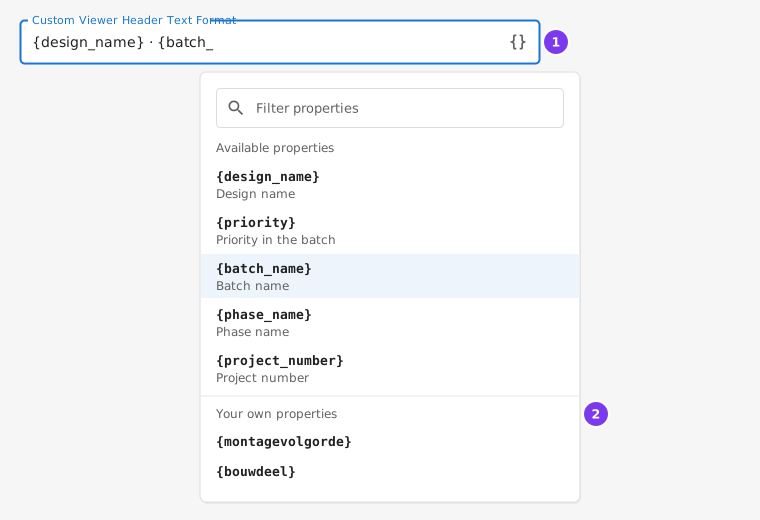
- The Insert property button at the end of the field.
- Your own model properties, read from your panels.
Where you can use them
| Where | Field | Resolved per |
|---|---|---|
| Company → Viewer settings | Custom Viewer Header | Panel |
| Company → Viewer settings | Custom List Hint (the second line in the viewer list) | Panel |
| Company → Viewer settings | Custom Constructibles Table Column | Panel |
| Machine setup → BTL / BTLx / BVX | Part data fields (Designation, Assembly number, Group, Package, Material, Timber grade, Quality grade, Subgroup / Storey) | Part |
| Machine setup → BTL / BTLx / BVX | User attribute values (up to 5) | Part |
The two groups use two different lists, because they are resolved against two different things. A viewer header describes a panel; a BTL Designation describes one piece of timber inside that panel. Read the right table below.
Panel properties
Used by the viewer header, the list hint and the custom constructibles column.
| Property | Value |
|---|---|
{design_name} | Design name of the panel |
{priority} | Priority inside the batch |
{batch_name} | Batch name |
{phase_name} | Phase name |
{scheduled_prod_date} | Scheduled production date |
{client_order_id} | Client order id |
{ifc_unit_id} | Unit ID of the panel's IFC element |
{ifc_guid} | GlobalId of the panel's IFC element |
{project_name} | Project name |
{project_number} | Project number |
{super_project} | Super project |
{client_name} | Client name |
Plus your own properties — see below.
Part properties
Used by the machine file fields (BTL, BTLx and BVX). These are resolved per part, so a single file covering a whole batch still carries the right panel name on every piece.
| Property | Value |
|---|---|
{part_pos} | Part reference / position |
{name} | Part name |
{material} | Material |
{description} | Part description |
{erp_mat} | ERP material code |
{comment} | Comment |
{finish} | Finish |
{width} / {height} / {length} | Dimensions |
{unit} | Unit |
{profile_size} | Profile size |
{shaped_section_name} | Shaped section name |
{zone} | Zone |
{assembly_name} | Panel name |
{design_name} | Panel name — the same value as {assembly_name} |
{batch} | Batch name |
{phase} | Phase name |
{project_name} | Project name |
{project_number} | Project number |
{super_project_name} | Super project |
{client_order_id} | Client order id |
Plus your own properties — see below.
The panel names also work here
{super_project}, {batch_name} and {phase_name} — the names the panel list above uses — are accepted in machine file fields too, and give the same value as {super_project_name}, {batch} and {phase}. You do not have to remember which list you are in.
Your own properties
Both lists also accept any property of your own models. These are the keys stored on a panel as metadata or client metadata: whatever your IFC parsing setup extracts, or whatever your ERP writes through the API. They are different at every company — {montagevolgorde} is a real property at one company and a typo at every other.
Two ways to see yours:
- The Insert property button lists them under Your own properties. It is read from your own panels, so if the section is empty it means none of your panels carry properties of their own — not that the list failed to load.
- On any panel: Constructibles → open the panel → Client meta.
Rules
- A property that does not exist is not an error. In the viewer settings it renders as
---; in machine files it renders empty. Nothing fails, so a typo is silent — which is exactly why the Insert property button exists. - Free text is kept as it is.
Order {client_order_id} - {design_name}givesOrder ORD-88 - HD-529. - Every property must be named.
{}and{0}are not accepted, and the field will say so before you can save. - Every brace must be closed.
{design_nameis rejected the same way. - To print a literal brace, double it:
{{gives{. - Numbers can be padded:
{priority:03d}gives007. This only works on numeric properties. - Your own properties cannot override the ones in the tables above. If one of your model properties is called
design_name,{design_name}still means the design name.