 Produuz.it Docs
Appearance
Per-Design BoM
The Per-Design Bill of Materials lists the parts per unique design. If multiple assemblies share the same design, the design is listed once, with the number of assemblies next to its name (for example D-11 (x4)).
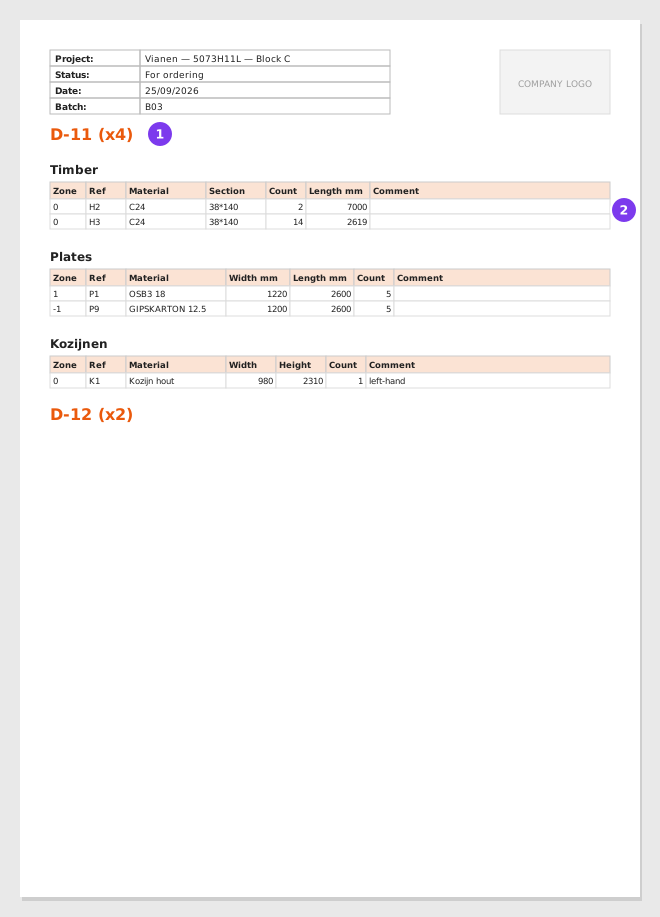
- The design and how many of the selected assemblies share it.
- One table per branch: timber, plates, and the branches you selected.
Output
- Format: PDF, or a ZIP with one PDF per phase, batch or panel, depending on the grouping. Designs are deduplicated inside each file.
- Content: One section per design, starting on a new page: its wood table, its plates table, and a table for each selected branch.
Options
| Option | Description |
|---|---|
| Group parts from the report in the same folder | How the content is split into files: By Phase, By Batch (default), By Panel or By Selected Panels (one single PDF). |
| Table style | compact_tables (default) gives one compact table per material type; extended_tables gives the full Wood BoM and Plates BoM tables, with drawings. |
| Branches | The custom branches to add as tables. Branches you do not select are left out. |
| Combine | When the output is a ZIP, also add Combined.pdf with all the PDFs merged. |
| Cover Page | Include a title page with project information. On by default. |
| Designs Summary | Add a summary table of all included designs. |
| Show Profile Side Drawings | Include the wood part drawings (extended tables). On by default. |
| Group parts that differ only in length | On by default. Parts with the same details and a different length share one table and one drawing, with the length shown as LENGTH. See below. |
| Show Plates Drawings | Include plate drawings (extended tables). On by default. |
| Attach to Viewer as DOC | Link each generated PDF to its assemblies in the Viewer. Only when the output is a ZIP. |
| Contact person / Delivery address | Printed on the cover page. Leave empty to use the company's. |
Parts that differ only in length
With Show profile side drawings on, each wood part with a detail (a drilling, a notch, an angled end cut) gets a table and a drawing of its own. When several parts have exactly the same details and differ only in their length — the studs of a sloped wall, all with the same angled top cut — they now share one table and one drawing, with a row per part.
- The drawing shows the length as LENGTH, with no number. The real length of each part is in its row.
- The part of the length that changes is drawn short, between two break marks.
- Details before it are measured from the left end, below the drawing. Details after it are measured from the right end, above the drawing, each end with its own 0.
- Only the length may differ: a different width, height, section, material, finish or comment keeps the parts apart. Details must match within 1 mm.
- A part turned end for end or turned over counts as the same part. A mirrored part does not.
- A group has one changing length or none. If some parts change before a detail and others after it, they form separate groups.
Tables go by the part's shape, whichever way round it was modelled, not by its reference. A reference is expected to be one shape, and when it is not, the row says so in red: this reference has more than one shape (its rows are in separate tables) or same shape as another reference (separate rows of one table). In projects created before 26 September 2026, a part whose reference is automatic still counts as another shape when it is modelled turned round, so its automatic reference does not change.
Turn it off with Group parts that differ only in length to get one table per part again. The drawing of each part, in the viewer and in logistics, is not affected: it keeps all its numbers.
With extended_tables, custom branches set as wood alike get the same timber tables as the woods: straight parts in one table, parts with details with their drawing, grouped by length where they can be. With compact_tables they keep their compact table.
When to Use
This report type is ideal when you want a complete BoM per design type rather than per physical assembly. Useful for purchasing and material planning where quantities are calculated per design variant.