 Produuz.it Docs
Appearance
Machine Files
A machine file tells a machine what to cut, nail, mill or weld, part by part. produuz.it writes it from the IFC model of your panels, read by your IFC Parsing Setup, and from how you set up each machine.
What decides the file
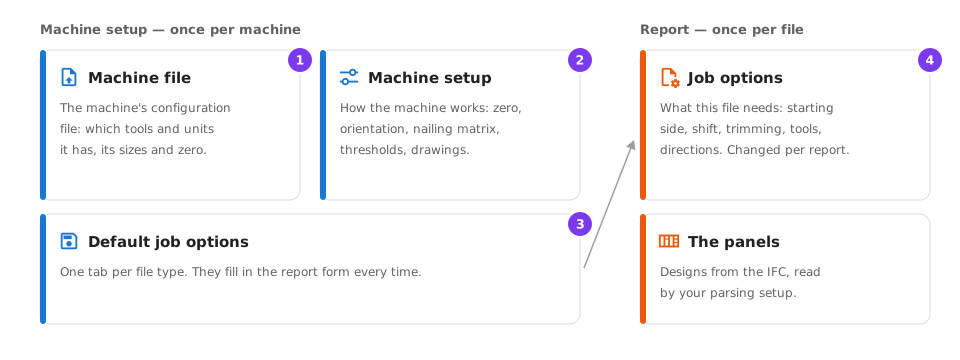
- Machine file — the machine's own configuration file, uploaded once in the machine setup. It says which tools and units the machine has. H&M machines need it.
- Machine setup — how this machine works: its zero, its orientation, its nailing matrix, its limits, which drawings to make. Set in Production Settings → Machine Settings.
- Default job options — one tab per file type in the machine setup. They fill in the report form, so you set your usual choices once.
- Job options — the choices for one file, in the report form. They start from the defaults and can be changed for that file only.
A machine setup is used by a station of a production line (panel machines: Mobi One, Frame Station, Robobrick, Isolation) or by a line or on its own (saws, cutters, profilers). See Machine Settings.
Where machine files are made
| Where | For | See |
|---|---|---|
| Production files → New file | Any machine file, for the panels you select. The normal way. | Reports |
| Run template | Several files at once, from a generation template. | Generation Templates |
| Action triggers and Launch action | MOB v2 files made on their own when a design finishes its analysis, or by hand from the designs table. | Automations |
| Mobfile Generator | MOB files from model files that are not in a project. | Mobfile Generator |
When something cannot be built
A machine file is always made, even when part of it cannot be built. What was left out is listed in ERRORS.md, at the top of the downloaded zip:
- a part that could not be built, or one of its operations, such as a lap;
- the operations of a zone that has no plate or batten to put them on;
- a whole panel, when its model file is missing or its orientation cannot be found from its rails and plates;
- a value that was assumed: in a MOB file, a blocker height of 70 mm when no station of the line has a machine on the frame zone or on one side of the panel.
Each line says which file and which part it belongs to. A file that comes with ERRORS.md shows a warning icon next to its status in the reports list and in the Mobfile Generator, and you get one message for the whole report. MOB v2 files made by an action trigger keep ERRORS.md next to the file. Check what is listed before the file goes to the machine.
A file is not made at all only when something it needs for every panel is missing, such as the production line of a MOB file or the machine of a BTL file. The report then fails with a message that says what to pick.
Machines and their files
| Machine model | Files |
|---|---|
| H&M Mobi One V1 Station | MOB v1 |
| H&M Mobi One V2 Station | MOB v2, Panel BTLx |
| H&M Frame Station V1 / V2 | MOB v1 / MOB v2 |
| H&M Robi-One Brick Slip Robot | MOB v2 |
| H&M Isolation Machine | MOB v2 |
| H&M Truss Master | BTL, BTLx, Generic Wood CSV |
| HUNDEGGER SPEED-Cut, TURBO-Cut | BTL, BVX, BTLx, Generic Wood CSV |
| Generic Woods machine | Generic Wood CSV, BTLx |
| SCM-Gabbiani s95 38 | Ardis |
| Generic Plates machine | Ardis, XCS, DXF, CIX |
| Voortman profiler | DSTV .nc |
| Valk Welding machine | WISCON |
| H&M Roofs framing | MTF |
| H&M Frame nailer | Frame Nailer CSV |
| STS Steel Frame machine | STS Steel Frame file |
| H&M Mobi One V2 Production Line | No file: it is the machine of a line. |
Some machine types are licensed: Machine Settings shows how many setups you have out of your maximum.
H&M panel lines
An H&M line has several machine stations, and one MOB file holds the work of all of them for one panel. Start with How a file is made: it explains how zones decide which station writes which layer, and why the station that builds the frame decides for the whole line. Then set up each machine: