 Produuz.it Docs
Appearance
Production Excel
The Production Excel generates a spreadsheet with one row per panel of the project, with its dimensions, areas, weight and openings. It is listed in Production files.
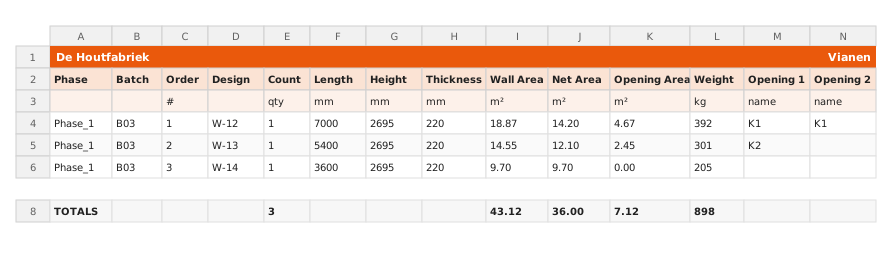
Output
- Format: Excel (.xlsx)
- Content: One sheet. The first row holds the company name and the project name. Then one row per assembly with these columns:
| Column | Unit |
|---|---|
| Phase, Batch, Order, Design | |
| Count | always 1 |
| Length, Height, Thickness | mm |
| Wall Area, Net Area, Opening Area | m² |
| Weight | kg |
| Opening 1 … Opening 4 | name of each opening |
A TOTALS row at the bottom adds up the count, the three areas and the weight. The header rows stay frozen while you scroll.
Scope
Generate it inside a project: it always includes every assembly of the project, so there is no panel selection. Modules are not included.
In the company-wide Production files it includes your company's assemblies whose scheduled production date falls between From and To. The dates start on the current week, Monday to Friday.
Options
There are no document settings. Only the Document comment and Document status of the report form apply.
When to Use
Use this report for production planning meetings, or when you need the panel sizes and areas of a project in a spreadsheet.