 Produuz.it Docs
Appearance
Quality Control Report
The Quality Control Report generates a PDF summarizing the quality control records of your assemblies.
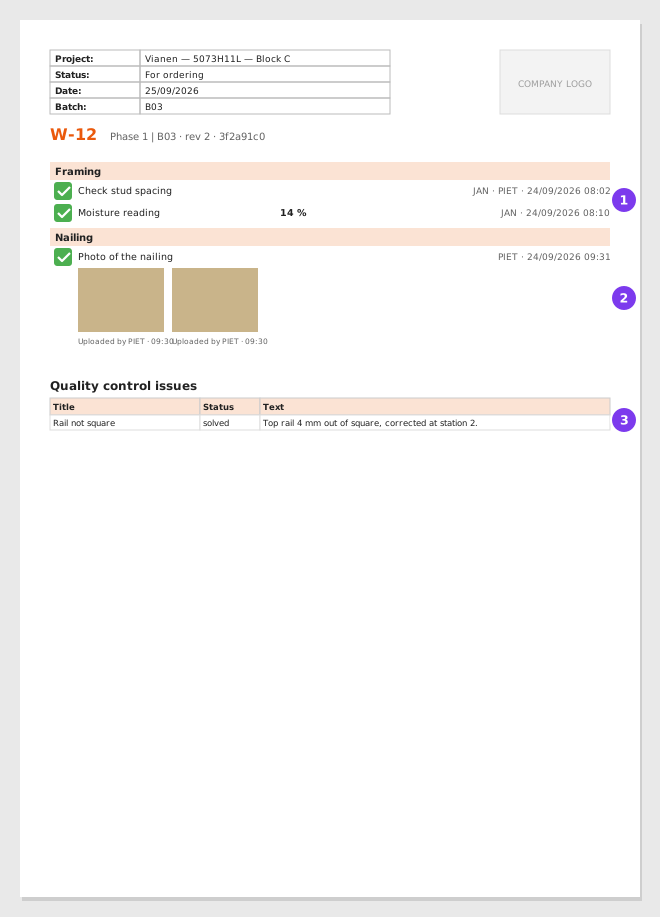
- The checklist of each station, with who ticked each task and when, and the form values.
- The pictures, each with who uploaded it.
- The quality control issues of the assembly.
Output
- Format: PDF
- Content: One section per assembly, with its production checklist (every task, per station, with its pictures and form values) followed by the quality control issues logged for it. An assembly with no checklist says so, and an assembly with no quality control issues says no issue registered.
Scope
This report is available both at project level and company level. In both cases you select the assemblies to include.
- Project level — Select the assemblies from the project tree.
- Company level — If your company works by date, pick a production line and a date range to narrow the list, then select the assemblies.
Options
| Option | Description |
|---|---|
| Table style | How the checklist is printed: classic tables (the default), compact tables, or one table per station. |
| Contact person | Printed on the document. Leave it empty to use the company default. |
| Delivery address | Printed on the document. Leave it empty to use the company default. |
| Production line | Narrows the assemblies you can select (company-level reports). |
| Date range | Narrows the assemblies you can select (company-level reports). |
Who did what
Every checklist item in the report says who ticked it, and every picture says who uploaded it and when. The two are separate on purpose: the person who takes the photo is often not the one who ticks the box.
The name is the alias of the employees who were working under the account at that moment. When nobody was named — an older record, or an account with no employees selected — the account name is shown instead. A picture uploaded before this was recorded shows no name in the report, rather than borrowing the name of whoever ticked the task.
The same information is on the panel itself, in the Production Proof card of the constructible detail page, where such a picture says No author recorded.
See: Who is working for how employees are selected on the shop floor.
When to Use
Use this report for quality audits, compliance reviews, and tracking quality trends across your production.