 Produuz.it Docs
Appearance
API v2
The produuz.it REST API lets you automate design uploads, constructible management, report generation, and more from external systems.
Interactive Documentation
The full API is documented through an interactive Swagger interface:
- Swagger UI: back.produuz.it/api/v2/swagger/
- OpenAPI schema: back.produuz.it/api/v2/openapi/, for importing into API clients.
Both links go through the produuz.it login page first. The schema only lists the endpoints your account can use, so sign in to see all of them.
The schema describes every endpoint with its query parameters, the body it expects and the answer it gives. To try a request from the Swagger page with an API account, press Authorize and paste its access token.
The Select a definition list at the top of the Swagger page switches between the produuz.it API (core) and the API of each module: planning, sales, purchasing, people, suppliers and design. Each one has its own schema at /api/v2/openapi/<module>/, for example /api/v2/openapi/planning/, and its own version. The module APIs are new and start at version 0.x: they can still change until they reach 1.0. The produuz.it API only adds things, so what you use keeps working.
The MCP connector (/api/v2/mcp) is not in this schema: an MCP client reads the list of tools from the connector itself. See Claude connector (MCP).
Query parameters
All lists read their filters the same way:
trueandfalseare booleans:?archived=true.null,allandundefinedmean "no filter", the same as leaving the parameter out.- A parameter ending in
__intakes a comma-separated list:?status__in=waiting,working. - Dates are written
2026-10-01, and times in ISO 8601:2026-10-01T08:00:00Z.
Authentication
The API uses JWT (JSON Web Token) authentication.
- Obtain a token pair —
POST /api/v2/my_user/token/withusernameandpassword. If the account has two-factor authentication (2FA) enabled, also send the current code asotp. The response holds anaccessand arefreshtoken. - Include the access token — add
Authorization: Bearer <access>to every request. - Refresh the access token —
POST /api/v2/my_user/token/refresh/with{"refresh": "<refresh>"}returns a newaccesstoken.
An access token is valid for 1 hour. A refresh token from the login endpoint is valid for 10 hours.
json
{ "username": "jan", "password": "********", "otp": "123456" }{ "username": "jan", "password": "********", "otp": "123456" }A missing code answers 400 with {"otp": "OTP needed for this user"}, a wrong one with {"otp_invalid": "OTP not valid"}.
API accounts
For machine-to-machine integrations, use an API account instead of a person's account. API accounts have no password and do not log in: a company admin generates their tokens in the app.
- In Company settings, open the API Accounts card and press New. Give it an Account label (up to 10 characters) and a Role. The number of API accounts is limited by your licence, and the counter is shown on the card (
1/3 API Accounts). - On the account row, press the key button. In Get Tokens for API Account, set Days to expiry (7 by default, at most 370) and press Load.
- Copy the Refresh Token and the Access Token. Store the refresh token safely and use it with
/api/v2/my_user/token/refresh/to get a new access token every hour.
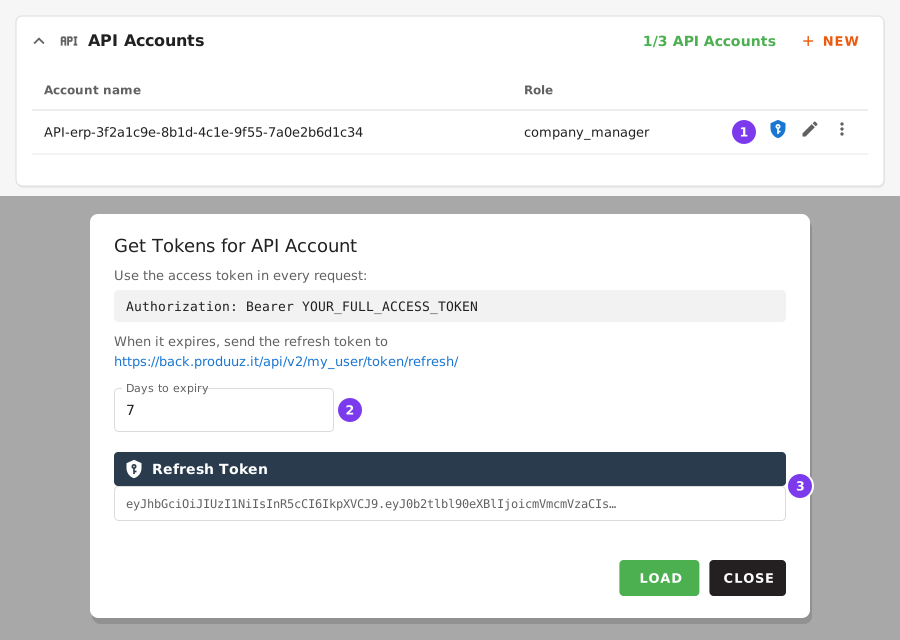
- The key button on the account row opens Get Tokens for API Account.
- How many days the refresh token stays valid.
- After Load, the refresh token and, below it, the access token. Click one to copy it.
Only company admins can generate tokens. The role of the API account decides what it can do, exactly like a user: an integration that creates or changes data needs the Company Manager or Company Admin role.
Pagination
List endpoints are paginated: the response is an object with count, next, previous and results, 100 rows per page by default and 200 at most: a larger limit is reduced to 200. Use the limit and offset query parameters to page through them, or follow next until it is null.
Reading production events as they happen
To keep a system up to date with the production events, read /api/v2/records/events/ with after instead of offset. Each page costs the same, however far you are, and the list has no count.
- The first time, ask from a date:
/api/v2/records/events/?after=×tamp__gte=2026-10-01. An emptyafterstarts from the oldest event that matches the other filters. - Each answer is
{"next": "<event uuid>", "results": [...]}, oldest first, up tolimitevents (200 by default, 1000 at most). Storenext. - Next time, ask with it:
/api/v2/records/events/?after=<next>. An emptyresultsmeans there is nothing new;nextthen repeats the uuid you sent, so keep asking with it.
The other filters (event, project, assembly, module, employee, timestamp__gte, timestamp__lte) work the same in both modes. A uuid that is not an event of your company answers 400. Without after, the list pages with limit and offset as before.
Main Endpoint Groups
| Group | Base path | Description |
|---|---|---|
| Constructibles | /api/v2/constructibles/ | Designs, actuals (assemblies/modules), batches, parts, part batches |
| Company | /api/v2/company/ | Projects, standard libraries, contacts, users, IFC parsing setups, API accounts |
| My company | /api/v2/my_company/ | Your company and its settings |
| Reports | /api/v2/reports/ | Report creation and status tracking |
| Tools | /api/v2/tools/ | Tool jobs, such as the Mobfile Generator |
| Factories | /api/v2/factories/ | Production lines, stations, machines, triggers, action setups |
| Cloud Storage | /api/v2/cloudstorage/ | File uploads and package management |
| Logistics | /api/v2/logistics/ | Materials, products, sizes, racks and rack loads |
| Records | /api/v2/records/ | Issues, production events, production proofs |
| Dashboard | /api/v2/dashboard/ | Dashboard indicators |
| Integrations | /api/v2/integrations/ | Webhooks |
| User | /api/v2/my_user/ | Profile, authentication, settings |
Common Workflows
For step-by-step API tutorials, see Connecting to the API:
- Upload and create designs
- Fetch and filter designs
- Generate constructibles
- Generate reports and machine files
- IFC to MOB2 file, end to end
Material Quantities for Purchasing
To order material you don't need to download every part. Ask the sizes endpoint for the material in scope and let it count for you:
POST /api/v2/logistics/sizes/profiles/names_and_actual_dims/
POST /api/v2/logistics/sizes/plates/names_and_actual_dims/
POST /api/v2/logistics/sizes/profiles/names_and_actual_dims/
POST /api/v2/logistics/sizes/plates/names_and_actual_dims/The scope goes in the body as uuid lists, which are OR-ed together. Any of projects, assemblies, part_batches and modules works. Add with_counts to get the quantities:
json
{ "projects": ["<project uuid>"], "with_counts": true }{ "projects": ["<project uuid>"], "with_counts": true }Each entry is one material size with its cut dimensions. For profiles the dimension is the cut length in mm; for plates it is length*width:
json
[{
  "size": "VUREN_C24 38*120",
  "actual_dims": ["5630", "5380"],
  "dims": [
    {"dim": "5630", "count": 2, "total_length": 11260.0},
    {"dim": "5380", "count": 4, "total_length": 21520.0}
  ],
  "count": 148,
  "total_length": 115766.0
}]
[{
"size": "VUREN_C24 38*120",
"actual_dims": ["5630", "5380"],
"dims": [
{"dim": "5630", "count": 2, "total_length": 11260.0},
{"dim": "5380", "count": 4, "total_length": 21520.0}
],
"count": 148,
"total_length": 115766.0
}]countis the number of parts to cut. Deprecated parts — replaced or deleted work — are not counted, so the quantities are orderable as they come.- Totals come as
total_lengthin mm for profiles andtotal_areain mm2 for plates. - Without
with_countsyou get onlysizeandactual_dims, which is the cheaper call for filling in a material selector. with_countsneeds a scope: counting a whole company catalogue is rejected with a400.- Scope by
projects,assembliesorpart_batches. A part inside a panel that sits inside a module is only linked to the panel, so scoping bymodulesalone can miss parts.
Rate Limits
The REST API has no general rate limit. Only the Claude connector (MCP) endpoints are limited: 600 requests per hour on /api/v2/mcp and 120 per hour on /api/v2/mcp/docs. Over the limit, they answer 429 Too Many Requests; wait before retrying.